
Web Reading Optimization Tools: 2026 Buying Guide
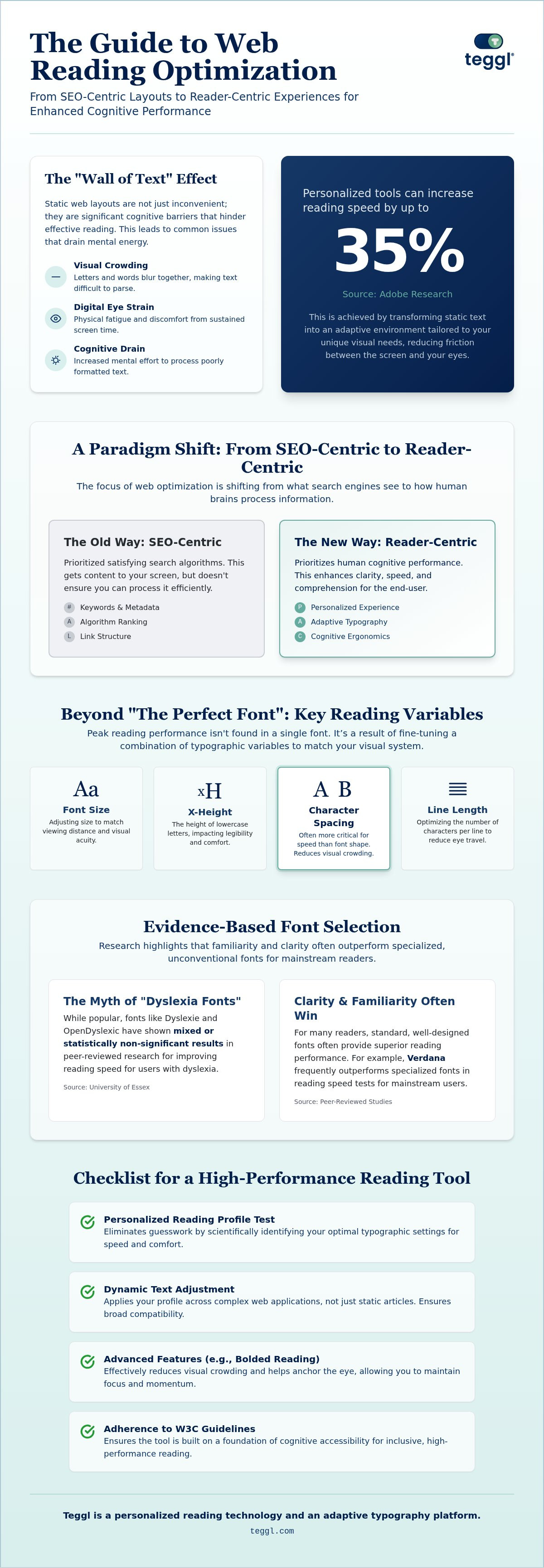
Adobe Research suggests that users can read up to 35% faster simply by using a web content reading optimization tool tailored to their unique visual needs. You've likely experienced the frustration of digital eye strain or the mental fog that sets in when facing a "wall of text" on a modern website. Visual crowding and poor typography aren't just minor inconveniences; they're significant barriers that cause line-skipping and drain your cognitive energy throughout the day.
It's time to reclaim your focus. This 2026 guide promises to bridge the gap between digital content and human cognition by highlighting the latest evidence-based technologies. We'll explore how personalized reading environments can improve your information retention and sensory comfort. You'll learn how to transform static layouts into adaptive platforms that boost your words-per-minute while significantly reducing physical fatigue.
Table of Contents
Beyond SEO: The Shift Toward Reader-Centric Web Content Reading Optimization Tools
Digital optimization has long focused on the creator's side, perfecting keywords and metadata to satisfy search algorithms. However, a significant shift is occurring toward reader-side optimization. While SEO gets content to your screen, it doesn't ensure your brain can process it efficiently. A web content reading optimization tool is a technology that personalizes visual text variables to enhance human cognitive performance. Standard browser 'Reader Modes' often fall short for high-volume consumption because they offer static, one-size-fits-all solutions that ignore individual differences in visual processing. True clarity requires adaptive typography. This technology adjusts specific variables to remove friction between the screen and your eyes, transforming a passive reading experience into an active, high-performance state.
The Productivity Gap: Why Static Content Fails the Modern Brain
Static layouts frequently trigger visual crowding, a phenomenon where letters and words blur together and cause the eye to skip lines. This increases cognitive load and leads to physical eye strain, making it difficult to sustain focus on long-form articles. Unlike traditional Speed Reading Techniques that require manual practice and intense mental effort, modern tools automate the optimization process. By implementing a bolded reading modus, you can navigate information density with ease. This approach reduces the "wall of text" effect. It allows your brain to anchor on key characters and maintain momentum without the fatigue associated with standard web fonts. It's about creating a seamless bridge between digital text and your unique cognitive architecture.
The 2026 Buyer’s Guide: Evaluating Tools Based on Cognitive Ergonomics
Selecting a web content reading optimization tool requires moving beyond subjective preference toward cognitive ergonomics. Adobe research confirms there's no single font that works best for every individual. Instead, peak performance is a result of fine-tuning variables like font size, x-height, and line length. This level of personalization ensures the digital environment adapts to your specific visual needs rather than forcing the eye to conform to a rigid layout.
While specialized "dyslexia fonts" are popular, peer-reviewed research from the University of Essex indicates mixed or statistically non-significant results for Dyslexie and OpenDyslexic. For many mainstream readers, Verdana frequently provides superior reading speeds compared to these specialized alternatives. This suggests that clarity and familiarity often outweigh the benefits of unconventional letterforms in high-performance environments.
Essential Features of a Modern Reading Optimization Tool
Prioritize dynamic text adjustment over static overlays when selecting a web content reading optimization tool to ensure compatibility with complex web applications. Your chosen tool should adhere to W3C guidelines on cognitive accessibility for inclusive performance. Essential features include a Reading Profile Test to determine your unique settings and a tekstbegrip verbeteren tool for better retention. You can test your reading profile to start optimizing your digital experience today.
Personalising Your Digital Environment: How to Implement Adaptive Reading Technology
Transitioning to an adaptive reading experience begins with understanding your unique visual profile. Unlike static browser extensions that simply strip away styling, a modern web content reading optimization tool leverages the principles of cognitive ergonomics to align digital text with your brain's processing speed. Start by taking a Reading Profile Test to eliminate the guesswork. This assessment identifies whether your visual system performs better with high x-height fonts like Montserrat, which provides comfort for many older readers, or utilitarian sans-serifs like Verdana for maximum speed. Once you've identified these settings, activate Bolded Reading to afleidingen verminderen tijdens online lezen. Teggl provides a seamless browser-level integration that removes the need for manual copy-pasting, ensuring your personalized environment follows you across every website you visit.
Measuring Success: Tracking Your Reading WPM and Comprehension
Before deploying a new tool, establish a baseline by measuring your current words-per-minute (WPM) on standard web text. This data point is your starting line. According to Adobe Research, readers can realistically expect a 35% speed increase once they implement personally optimal typographic settings. However, speed shouldn't come at the cost of understanding. Aim for a 90% comprehension rate as your primary target. If your retention drops below this threshold, try adjusting your character spacing or font weight. You'll soon find the "sweet spot" where efficiency and clarity coexist. Tracking these metrics regularly ensures your digital environment remains a powerful tool for productivity rather than a source of cognitive fatigue.
Master Your Digital Reading Experience
The transition from static text to an adaptive typography platform marks a significant evolution in how we consume information. You've seen that a high-quality web content reading optimization tool doesn't just change a font; it aligns every typographic variable with your specific cognitive needs. By prioritizing cognitive ergonomics over generic layouts, you can overcome visual crowding and reclaim your focus. Peer-reviewed readability research indicates that these personalized adjustments lead to measurable gains in both speed and comfort. It's about removing the friction between your eyes and the screen to achieve a state of effortless flow.
Ready to transform your digital environment? Discover your optimal reading settings with the Teggl Reading Profile Test. This seamless browser extension provides instant optimization based on your unique visual profile. Take control of your reading performance and enjoy a clearer, more efficient digital life.
Frequently Asked Questions
Is there a single best font for digital reading?
No single font is universally superior for every reader. Adobe Research proves that reading performance is a highly individual result of multiple variables like font size, x-height, and spacing. While some readers find comfort in fonts like Garamond or Montserrat, others achieve peak speed with Verdana. Personalized settings are the only way to maximize efficiency for your specific visual profile.
Do dyslexia-specific fonts like OpenDyslexic actually work?
Empirical evidence shows no measurable benefit for dyslexia-specific fonts over standard typefaces. Studies from the University of Essex and other independent researchers found that fonts like OpenDyslexic or Dyslexie don't improve reading rate or accuracy. In fact, many readers perform better with familiar, high-legibility fonts like Verdana or Arial because these options effectively reduce visual stress for a broader audience.
How much can a reading optimization tool increase my speed?
A high-quality web content reading optimization tool can increase your reading speed by up to 35%. This benchmark, documented by Adobe's Readability Consortium, is achieved when text is tailored to your unique visual needs. Most users reach this speed boost while maintaining a 90% comprehension rate. This effectively bridges the gap between dense digital content and your brain's natural processing power.
Can these tools help with ADHD-related focus issues?
While these tools don't cure ADHD, they significantly mitigate the sensory overload caused by dense digital layouts. Features like Bolded Reading Mode help anchor your attention by reducing visual crowding and breaking up "walls of text." This creates a more manageable digital environment that supports sustained focus and reduces the mental fatigue often associated with high-volume reading across different websites.
What is the difference between Bionic Reading and Bolded Reading?
Bolded Reading is a specialized focus mode designed to guide the eye through dense text by weighting specific characters. Unlike static methods, this adaptive typography approach reduces visual crowding and improves concentration. It's a core feature of a web content reading optimization tool, allowing you to maintain momentum and process complex information without the friction found in standard, non-optimized web layouts.
Does typographic layout affect reading efficiency even without time pressure?
Yes, typographic layout impacts efficiency regardless of time pressure. Research from the University of Leeds demonstrates that optimized layouts with clear line lengths and proper inter-line spacing increase answer-per-second efficiency. Even when you're reading at a relaxed pace, a well-structured environment reduces the cognitive effort required to find and process information. This leads to better overall performance and significantly less eye strain.



Comments