
The Science of Reading: How to Personalize Your Reading Mode (Leesmodus Personaliseren) in 2026
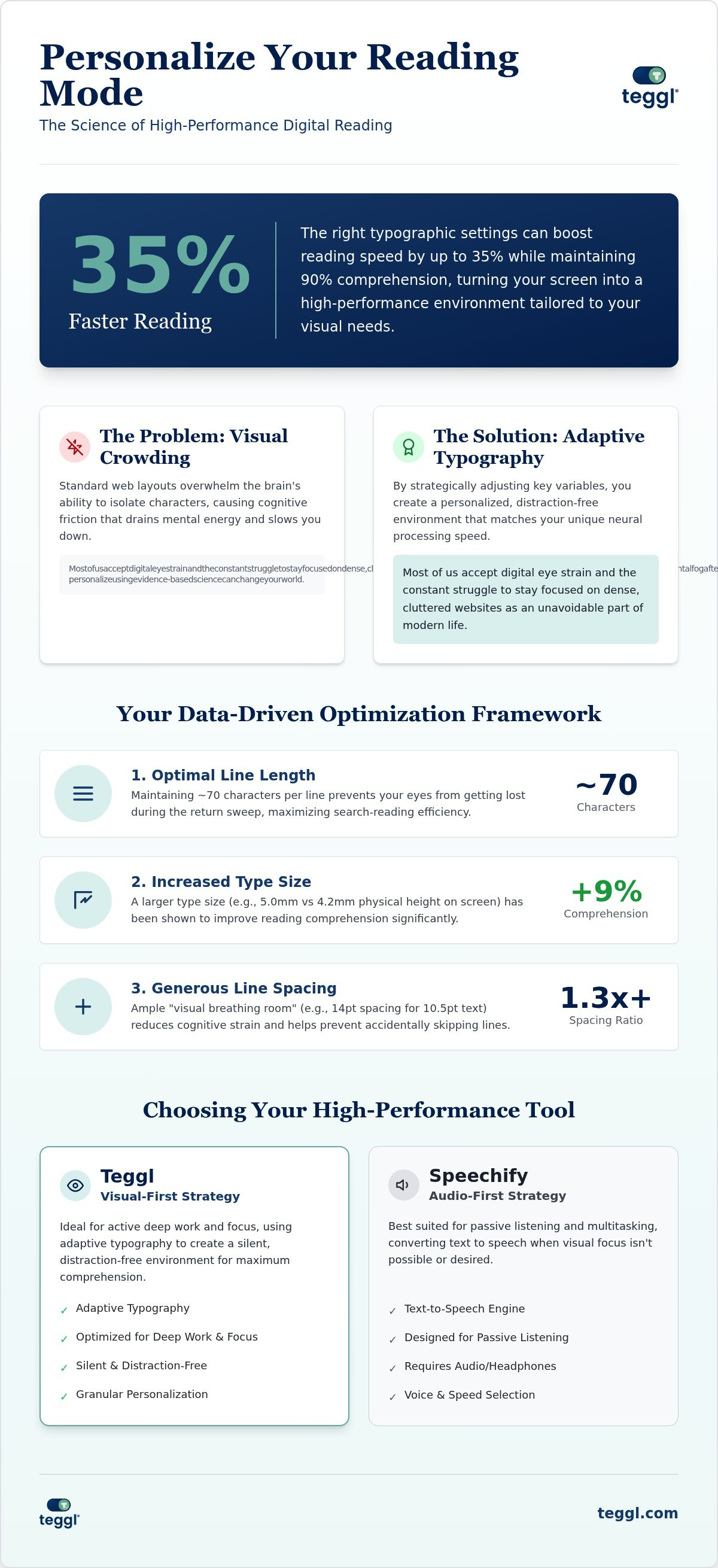
Did you know that the right typographic settings can increase your reading speed by up to 35% without sacrificing a single detail of comprehension? Most of us accept digital eye strain and the constant struggle to stay focused on dense, cluttered websites as an unavoidable part of modern life. You've likely felt that familiar mental fog after an hour of scrolling through complex reports; however, learning how to leesmodus personaliseren using evidence-based science can change everything. It's time to stop fighting against your screen and start working with your biology.
You can turn your browser into a high-performance environment tailored to your specific visual needs and cognitive strengths. This guide explores the latest 2026 research on cognitive load, x-height, and adaptive typography. You'll discover the practical steps to build a digital flow state that protects your energy, reduces mental fatigue, and sharpens your focus during work or study.
Table of Contents
Beyond "Clean View": The Cognitive Science of Personalizing Your Reading Mode
To leesmodus personaliseren is to move beyond simple aesthetic changes. It represents the strategic adjustment of typographic variables to match your unique neural processing. Standard web layouts often trigger "Visual Crowding," a phenomenon where the brain’s ability to isolate individual characters is overwhelmed by surrounding text. This cognitive friction drains your mental energy. Adobe research highlights the impact of this alignment; personalized typography allows readers to read 35% faster while maintaining 90% comprehension. It's not just about comfort; it's about reclaiming lost productivity.
We must move past the "One Size Fits All" myth. Many believe specific fonts like Dyslexie or OpenDyslexic are universally superior, but research shows conflicting results. Reading performance is actually a result of multiple variables, including font size, contrast, and screen quality. These factors are central to Readability principles. Effective personalization acknowledges that your eyes have specific requirements that differ from everyone else's.
Why Standard Browser Reading Modes Often Fall Short
Most built-in tools focus on simplification by removing ads. While this helps, it stops short of true optimization. A generic "Dark Mode" or "Sepia" filter doesn't address underlying legibility issues like inadequate x-height or excessive line length. You need more than a "clean view" to achieve a flow state. Adaptive Typography fills this gap by adjusting the text structure based on individual performance data. When you leesmodus personaliseren, you aren't just hiding distractions; you're engineering a seamless reading environment.
Choosing Your Optimal Settings: A Data-Driven Framework for Leesmodus Personaliseren
Shifting from standard views to a high-performance flow state requires a systematic approach. To leesmodus personaliseren effectively, you must first identify your ideal x-height. Essex research reveals that a larger type size (5.0mm vs 4.2mm) can trigger a 9% comprehension boost. Next, optimize your line length. Findings from Leeds University suggest that maintaining approximately 70 characters per line maximizes search-reading efficiency; this prevents your eyes from getting lost during the return sweep to the next line.
Visual breathing room is equally vital. Aim for 14pt inter-line spacing when using 10.5pt text to reduce cognitive strain and prevent line-skipping. When choosing a typeface, prioritize performance over aesthetics. For instance, Verdana often outperforms specialized fonts like Sassoon Primary in digital environments. This data-driven strategy aligns with recent research on personalized text formats, which confirms that tailored layouts improve speed without compromising accuracy. It's about finding the specific combination that works for your biology.
The Reading Profile Test: Finding Your Personal Baseline
Generic settings can't account for individual neural diversity. Teggl’s Reading Profile Test uses eye-movement logic to determine exactly which variables unlock your focus. Since findings differ between individuals, static "dyslexia fonts" are often less effective than a dynamic, personalized profile. You can discover more in our guide on dyslexia reading tools regarding these individual differences. It's time to find your baseline. We invite you to take the Reading Profile Test to discover your own optimal reading settings today.
Teggl vs. Speechify: Finding the Best Alternative for Your Reading Flow
Choosing between tools often comes down to your primary sensory preference. While Speechify leads the "Audio First" market, Teggl prioritizes a "Visual First" strategy. Listening to text is useful for multitasking; however, many professionals find that visual reading is superior for deep comprehension and complex retention. Bolded Reading, a sophisticated visual reading technique, anchors your focus by emphasizing the initial parts of words. This allows you to maintain a high-performance flow state without the external distraction of sound or the need for constant headphones.
The following table illustrates the primary differences in approach between these two productivity leaders:
The Teggl Browser Extension serves as a quiet reading sanctuary on cluttered websites. It's an evidence-based innovation designed for peak productivity, not just an accessibility workaround. When you leesmodus personaliseren, you're doing more than changing a font. You're transforming the screen into a tool that respects your visual ergonomics and removes the cognitive barriers that standard web design creates.
Integrating Personalized Reading into Your 2026 Workflow
Efficiency in 2026 requires a modular approach to information. You can use Teggl to reduce online reading distractions by filtering out digital noise and reformatting text on the fly. This level of control over how you leesmodus personaliseren allows you to toggle between intensive study and rapid information gathering. Switch between "Deep Reading" profiles with high contrast and "Skimming" modes that utilize Bolded Reading for rapid scanning. Discover your optimal settings and try the Teggl Browser Extension to experience a truly friction-free reading environment.
Master Your Digital Reading Environment
The transition from cognitive fatigue to a high-performance flow state begins with a single realization: your digital experience should adapt to you, not the other way around. By choosing to leesmodus personaliseren, you're applying decades of research from institutions like Adobe and Essex University to your daily workflow. You've learned that adjusting x-height can boost comprehension by 9% and that personalized profiles can increase reading speed by up to 35%. These aren't just minor tweaks; they're essential upgrades for anyone navigating a text-heavy world.
It's time to replace the struggle of visual crowding with the clarity of adaptive typography. Whether you're scanning reports or diving into deep study, the right settings protect your mental energy and sharpen your focus. Take the next step toward a friction-free experience and discover your optimal reading settings with Teggl. Your most productive reading sessions are just a few clicks away.
Frequently Asked Questions
Does personalizing my reading mode really improve speed?
Personalizing your reading mode can significantly increase speed by aligning digital text with your unique neural processing. Adobe research indicates that using optimal fonts can boost reading speed by 35% without sacrificing comprehension. When you leesmodus personaliseren, you remove the cognitive friction caused by poor layout. This allows your brain to process information faster and more efficiently than standard web views.
Is there a specific font that is best for everyone?
No single font is universally superior for every reader. While common choices like Verdana or Arial are popular for digital screens, individual performance depends on variables like x-height and character spacing. Scientific integrity requires acknowledging that what works for one person may not work for another. This diversity is why adaptive typography is more effective than relying on a "one size fits all" typeface.
How does Teggl differ from the standard reading mode in Chrome or Edge?
Standard browser modes typically focus on removing ads and sidebars to reduce visual distraction. Teggl goes further by offering an adaptive typography platform that modifies the text structure itself. It uses features like Bolded Reading and specific spacing adjustments based on your Reading Profile Test results. This ensures your leesmodus personaliseren efforts are driven by performance data rather than generic templates.
Can I use personalized reading settings for ADHD or Dyslexia?
Personalized reading settings are highly effective accessibility tools for individuals with ADHD or dyslexia. By adjusting line length and inter-line spacing, you can reduce visual crowding and maintain focus. However, these tools are adaptive typography platforms designed to improve performance; they don't cure medical conditions. Findings differ between individuals, so finding your specific baseline is key to achieving consistent focus.
What is the difference between Bolded Reading and Bionic Reading?
Bolded Reading is a sophisticated variant of the bionic reading concept that emphasizes the initial parts of words to guide the eye. This creates artificial fixation points, helping you maintain a high-performance flow state during long sessions. While both methods use bolding to anchor the reader, Teggl integrates this into a broader suite of personalized settings to ensure a seamless and comfortable experience.
Does larger font size always help with reading comprehension?
Larger font sizes don't always guarantee better comprehension. While Essex research shows that increasing x-height can lead to a 9% comprehension gain, excessively large text can actually slow you down by reducing the amount of information visible at once. The goal is to find the "sweet spot" where text is clear enough to reduce strain but compact enough to maintain reading momentum.



Comments