
The Science of Personalized Typography: Why One Font Does Not Fit All
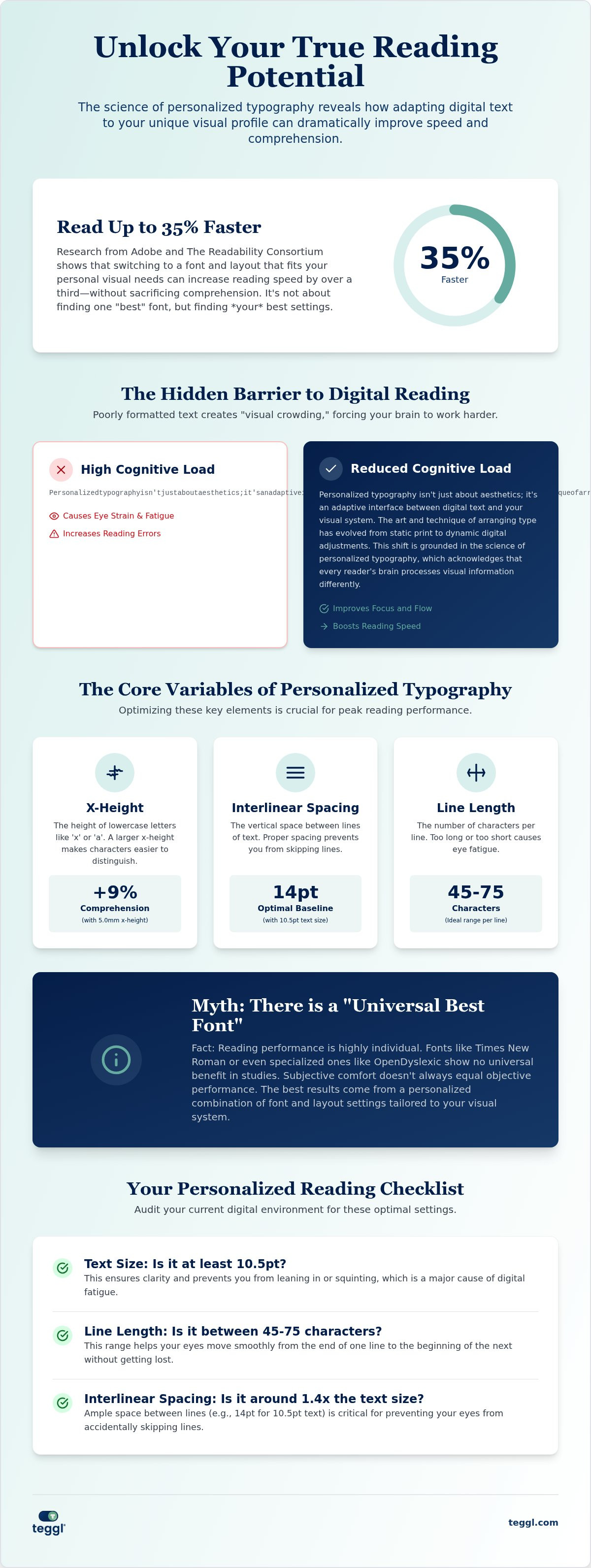
Research from Adobe and The Readability Consortium reveals that you could read up to 35% faster simply by switching to a font that fits your unique visual profile. Most of us have spent hours squinting at dense digital text, fighting visual crowding and the inevitable eye strain that follows. You've likely felt the frustration of specialized fonts that fail to deliver real-world results. This happens because the science of personalized typography proves there's no such thing as a universal best font.
We're going to explore the peer-reviewed research behind adaptive typography and how personalizing your digital environment can increase reading speed without losing comprehension. While individual findings may differ, you'll understand the cognitive mechanics of reading and find a practical framework for tailoring your own digital space. It's time to move beyond static design and embrace a reading experience built specifically for your eyes.
Table of Contents
The Cognitive Mechanics of Digital Readability
Personalized typography isn't just about aesthetics; it's an adaptive interface between digital text and your visual system. The art and technique of arranging type has evolved from static print to dynamic digital adjustments. This shift is grounded in the science of personalized typography, which acknowledges that every reader's brain processes visual information differently. Your eyes don't just see; they decode symbols into meaning through a complex cognitive loop.
One major hurdle in this process is "visual crowding." This occurs when letters or words are spaced too closely, making it difficult for the eye to distinguish individual characters. It spikes cognitive load and forces the brain to work harder just to recognize words before it can even begin to comprehend them. Adobe Research highlights the impact of solving this: individuals read up to 35% faster with their personally optimal font. You can explore how specific reading comprehension tools in 2026, like Bolded Reading, address these mechanics by helping the eye navigate dense text more efficiently.
Dispelling the 'Universal Best Font' Myth
We often assume "standard" fonts like Arial or Times New Roman are safe defaults for everyone. Research suggests otherwise. These fonts aren't universally optimal. For instance, a 2017 study in the Annals of Dyslexia found that OpenDyslexic provided no measurable benefit in speed or accuracy compared to standard fonts. While a reader might prefer how a specific font looks, subjective comfort doesn't always equal objective performance. The science of personalized typography focuses on data-driven results over stylistic trends. It recognizes that what works for your colleague might actually slow you down.
Key Variables in Personalized Typographic Design
To optimize your reading experience, we must look beyond the font name and examine specific typographic variables. The University of Essex found that a 5.0mm x-height improves comprehension by 9%. This vertical measurement of lowercase letters directly influences how easily your brain identifies character shapes and processes information. Similarly, The Readability Consortium emphasizes that character width and weight play pivotal roles in accessibility. For instance, older readers often find the structural clarity of Montserrat more effective than the delicate, traditional strokes of Garamond due to age-related vision shifts. These adjustments aren't just preferences; they're essential calibrations for your visual system.
Layout is just as vital as the font itself. Research from the University of Leeds suggests a baseline of 10.5pt text size paired with 14pt interlinear space for optimal flow. Interlinear spacing is the vertical distance between the baselines of text, and it's critical for reducing line-skipping during long sessions. If these settings feel off, you can calibrate your digital environment with Teggl's tools to align with your personal biology. Understanding the science of personalized typography allows you to build a reading space that supports your brain instead of draining it.
The Science of Adaptive Bolding and Focal Points
Bolded Reading creates artificial fixation points that guide your eye through a sentence with precision. This technique reduces saccadic regressions, which are the frustrating moments when your eye jumps backward to re-read a word you've already passed. By applying the science of personalized typography, tools like the Bolded Reading modus stabilize your visual path and create momentum. This helps you maintain deep focus on the meaning of the text rather than just the mechanics of the letters themselves.
Implementing Personalized Reading Technology in 2026
Transitioning from theory to practice requires more than just picking a new font. The Reading Profile Test serves as a diagnostic tool to identify your Optimal Reading Settings by measuring how your eyes react to specific typographic changes. While findings differ between individuals, this data-driven approach is the core of the science of personalized typography. It ensures your digital layout matches your neurological needs. Beyond the text itself, environmental factors like screen quality and contrast ratios play a supporting role. High-resolution displays allow for sharper character edges, while proper contrast reduces the glare that often leads to digital fatigue.
Audit your current reading environment with this quick checklist:
Text Size: Is it at least 10.5pt to ensure clarity without leaning forward?
Line Length: Are your lines roughly 45 to 75 characters long to prevent eye fatigue?
Interlinear Spacing: Do you have roughly 14pt of space between lines to stop your eyes from skipping?
Combining these adjustments with strategies on how to reduce online reading distractions creates a focused, high-performance workspace.
Calibrating Your Digital Environment with Teggl
Most websites use rigid CSS. These styles ignore your personal requirements. The Teggl Browser Extension solves this by overriding default styles with your unique profile. You can compare your performance using adaptive bolding versus standard text to see the immediate impact on your focus. By applying the science of personalized typography, Teggl functions as a comprehensive accessibility solution. It transforms the web into a flexible environment that respects your visual profile. This moves you beyond the limitations of one-size-fits-all design.
Master Your Digital Reading Experience
The shift toward adaptive reading technology is more than a trend; it's a fundamental change in how we interact with information. By understanding the science of personalized typography, you move past the limitations of static layouts that cause eye strain and slow you down. Research from The Readability Consortium proves that personalizing your digital text can lead to a 35% increase in reading speed without sacrificing comprehension. This evidence-based approach to accessibility acknowledges that your visual profile is unique. It's time to stop fighting against rigid web standards and start using tools that adapt to your brain's specific needs. You have the power to transform every screen into a high-performance environment that supports your focus and well-being. Discover your optimal reading settings with the Teggl Reading Profile Test and experience the clarity of a truly personalized digital world.
Frequently Asked Questions
Can a personalized font really improve my reading speed by 35%?
Research from Adobe and The Readability Consortium confirms that readers can achieve up to a 35% increase in speed when using their personally optimal font. This gain occurs when you compare your best-performing font against your worst. Because visual processing is unique, there isn't a single font that works for everyone. Personalization ensures you aren't stuck with a layout that slows your brain down.
Is there a single best font for people with dyslexia or ADHD?
No, a 2026 meta-analysis of 15 studies found that fonts like OpenDyslexic don't consistently improve speed or accuracy. Performance is a result of multiple variables, such as font size and spacing, rather than a specific font shape. The science of personalized typography suggests that individual calibration is more effective than relying on a single universal font for neurodivergent readers.
Does font size affect reading comprehension as much as speed?
It does. While speed is a common metric, comprehension is the ultimate goal of reading. Studies from the University of Essex show that specific variables like a 5.0mm x-height can boost comprehension by 9%. The right proportions reduce the cognitive effort required to decode letters. This leaves more mental energy available for processing the actual meaning and context of the text.
What is the difference between legibility and readability in typography?
Legibility describes how easily you can distinguish one letter from another, such as an "i" from an "l." Readability refers to how easily you can process entire sentences and paragraphs. A font can be legible but still have poor readability if the line spacing is too tight. Personalized settings optimize both to create a frictionless experience that supports long-term focus.
How do I find my own optimal reading settings?
The most effective method is taking a Reading Profile Test. This test evaluates your reading speed and comfort across different typographic configurations to find your specific optimal settings. It moves beyond subjective preference to provide data-driven results. This approach is a core part of the science of personalized typography, allowing you to build a digital environment tailored to your own biological needs.
Why do standard web fonts often cause digital eye strain?
Standard fonts are designed as a compromise for the average user, which often results in visual crowding. When text isn't calibrated to your eyes, your ocular muscles must work harder to maintain focus. This constant micro-adjustment leads to headaches and fatigue. Using adaptive bolding or adjusting interlinear spacing can remove these obstacles, creating a much more soothing and efficient reading experience.



Comments