
The Science of a Customizable Web Reading Experience: A 2026 Guide to Digital Readability
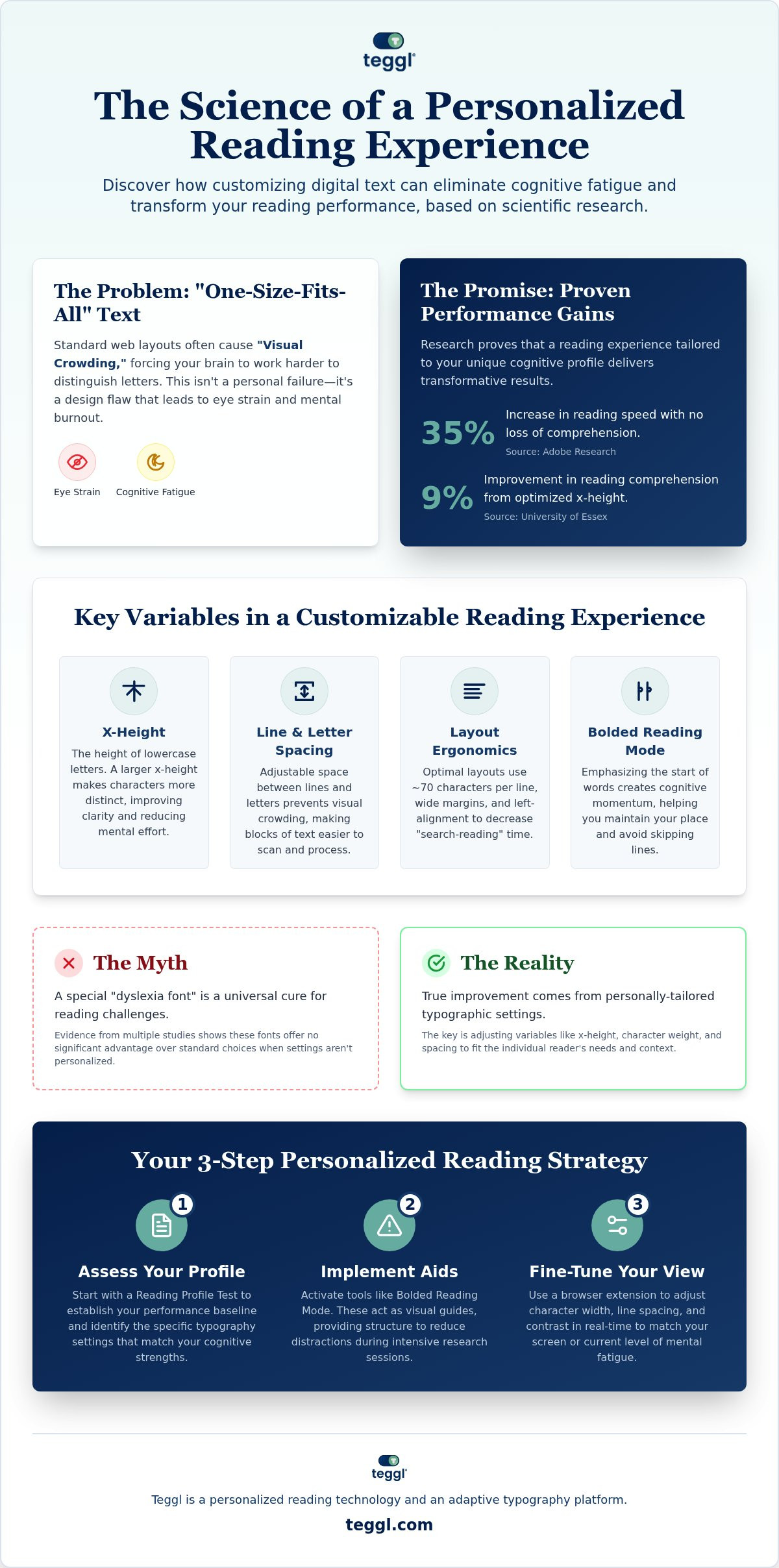
Did you know that personalizing your font choice can increase your reading speed by up to 35% without losing a single detail of comprehension? Research from Adobe and The Readability Consortium proves that a customizable web reading experience is the key to overcoming the "one-size-fits-all" text that slows us down. If you've ever felt the sting of eye strain or the frustration of re-reading the same line three times, you aren't alone. It's a common struggle in our text-heavy world, but it isn't a personal failure. It's a design flaw that you can now correct.
This guide shows you how to leverage personalized typography to eliminate visual crowding and reduce mental fatigue. We'll break down the scientific variables that impact focus, such as x-height and contrast, and provide a clear path to optimizing your digital research. You'll discover how to transform your screen into a high-performance tool tailored specifically to your cognitive needs.
Table of Contents
The Cognitive Science of Web Readability: Why Personalization Matters
A customizable web reading experience is the dynamic adjustment of text variables to match your unique cognitive profile. While the concept of readability once relied on static formulas, we now know that text must be as flexible as the person reading it. Science shows that when you align typography with your brain's processing style, the results are transformative.
Standard web fonts often cause "Visual Crowding," a phenomenon where characters appear too close together for the brain to distinguish them quickly. This effect is especially taxing for neurodivergent individuals, including those with ADHD. It forces the brain to work harder just to decode symbols, leading to cognitive burnout long before you've finished your research. Technology should solve this friction, not create it.
The data supports a personalized approach. Adobe Research found that individualized font optimization can lead to a 35% increase in reading speed with no loss in comprehension. This isn't about finding a single "best" font for everyone. Instead, it's about building a Reading Profile. Your optimal settings are a moving target influenced by your age, your screen quality, and even your current level of fatigue.
The Myth of the Universal Dyslexia Font
Many believe specialized fonts are a universal cure for reading challenges, but the evidence is mixed. Studies from the University of Leeds and other independent researchers show that fonts like OpenDyslexic don't provide a statistically significant advantage over standard choices like Arial or Verdana. Success isn't found in a proprietary typeface. Instead, it's found in the specific adjustment of x-height, character weight, and letter spacing tailored to the individual reader.
Key Variables in a Customizable Web Reading Experience
To build a truly customizable web reading experience, you must look beyond font choice alone. Research from the University of Essex indicates that a larger x-height, the height of lowercase letters, can improve comprehension by 9%. This vertical expansion makes letters more distinct, reducing the mental effort required to process each word. It's a small adjustment that yields measurable cognitive relief.
Visual anchors also play a vital role in maintaining focus. While Bionic Reading uses artificial fixation points, Bolded Reading Mode creates cognitive momentum by emphasizing the start of words. This prevents line-skipping and helps you maintain your place during long-form digital research. You can explore these differences in our guide to bionic and bolded reading. Additionally, a psychophysiological study on web accessibility highlights how high-contrast settings and dark mode significantly reduce digital eye strain by managing light sensitivity.
Layout Ergonomics: Line Length and Spacing
Layout structure is just as critical as typography. Findings from the University of Leeds suggest that the most legible layouts maintain approximately 70 characters per line. For 10.5pt text, interlinear spacing should be set to 14pt to prevent visual crowding. Left-aligned text and wide margins also decrease "search-reading" time, allowing you to scan information more efficiently without getting lost on the page.
When evaluating a reading tool, ensure it offers these customization features:
Adjustable line height and letter spacing.
Dynamic margin controls for better focus.
Variable x-height settings for character clarity.
Contrast and color temperature filters to reduce strain.
If you're ready to see how these variables impact your own productivity, you can test your reading performance with our specialized tools.
How to Build Your Personalized Reading Strategy with Teggl
Achieving a customizable web reading experience isn't about trial and error; it's about data-driven precision. Your journey begins with the Reading Profile Test to establish your baseline performance. This assessment identifies the specific typography settings that align with your unique cognitive strengths. Once you've identified your optimal settings, implement Bolded Reading Mode. This tool acts as a visual guide, providing the structure needed for reducing online reading distractions during intensive research sessions.
The final step is fine-tuning your environment through the Teggl Browser Extension. This allows you to adjust character width, line spacing, and contrast in real-time to match your screen quality or your current level of mental fatigue. This transition into a customizable web reading experience ensures that technology serves you, rather than forcing you to adapt to rigid layouts. By utilizing these tools, you move away from being a static reader and become an adaptive one, using personalized technology to command the text.
Bolded Reading Modus: Beyond Simple Font Changes
Teggl’s Bolded Reading mode is more than a stylistic choice; it utilizes a specific mechanism to facilitate rapid information processing by creating artificial fixation points. These anchors guide your eyes through dense sentences with less effort, allowing your brain to focus on comprehension rather than the mechanical task of decoding symbols. This is an essential tool for maintaining momentum during complex digital tasks. For implementation tips and a breakdown of the technology, consult the Bolded Reading Modus: The 2026 Buyer’s Guide. Empower yourself to master digital text by discovering your unique reading profile today.
Master Your Digital Environment Today
Digital reading doesn't have to be a source of exhaustion. By moving away from static layouts and embracing a customizable web reading experience, you reclaim control over your focus and speed. The evidence from leading universities is clear: when you optimize variables like x-height and visual anchors, you unlock peak cognitive performance. This isn't just about typography; it's about creating a frictionless environment where information flows naturally.
High-performance professionals use these research-backed methods to stay ahead of digital overload without the burnout. You've seen the science; now it's time to apply it to your daily workflow. Ready to optimize your focus? Take the Teggl Reading Profile Test and discover your optimal settings. Empower your brain with the clarity and momentum it deserves.
Frequently Asked Questions
Is there one specific font that is best for everyone?
No single font is universally superior for every reader. Research from Adobe and The Readability Consortium confirms that reading performance is highly individual. While some people excel with Garamond, others read up to 35% faster using Montserrat. Personalization is the only way to maximize your specific speed and comprehension levels without compromising accuracy or comfort.
Can a customizable web reading experience really help with ADHD or dyslexia?
A customizable web reading experience reduces the cognitive load associated with visual crowding. For neurodivergent individuals, adjusting variables like letter spacing and x-height can significantly decrease mental fatigue. University of Essex studies show that larger fonts can improve comprehension by 9%. While these tools don't cure conditions, they provide a frictionless environment that supports better focus during long digital tasks.
How does Bolded Reading differ from Bionic Reading?
Bolded Reading Mode focuses on creating cognitive momentum through specific visual anchors. Unlike Bionic Reading, which uses artificial fixation points, Bolded Reading emphasizes the start of words to guide the eye smoothly across the page. This mechanism is specifically designed to prevent line-skipping and help readers maintain their place during complex research or high-pressure academic work.
Do I need to be a tech expert to customize my browser's reading experience?
You don't need any technical background to optimize your digital text. The Teggl Browser Extension handles the complex typography adjustments automatically. By starting with a Reading Profile Test, you receive a tailored setup that integrates directly into your daily browsing. It's an intuitive solution designed to remove technical obstacles so you can focus entirely on the information you're reading.



Comments