
The Best Bionic Reading Alternative in 2026: Why Personalization Beats Fixed Algorithms
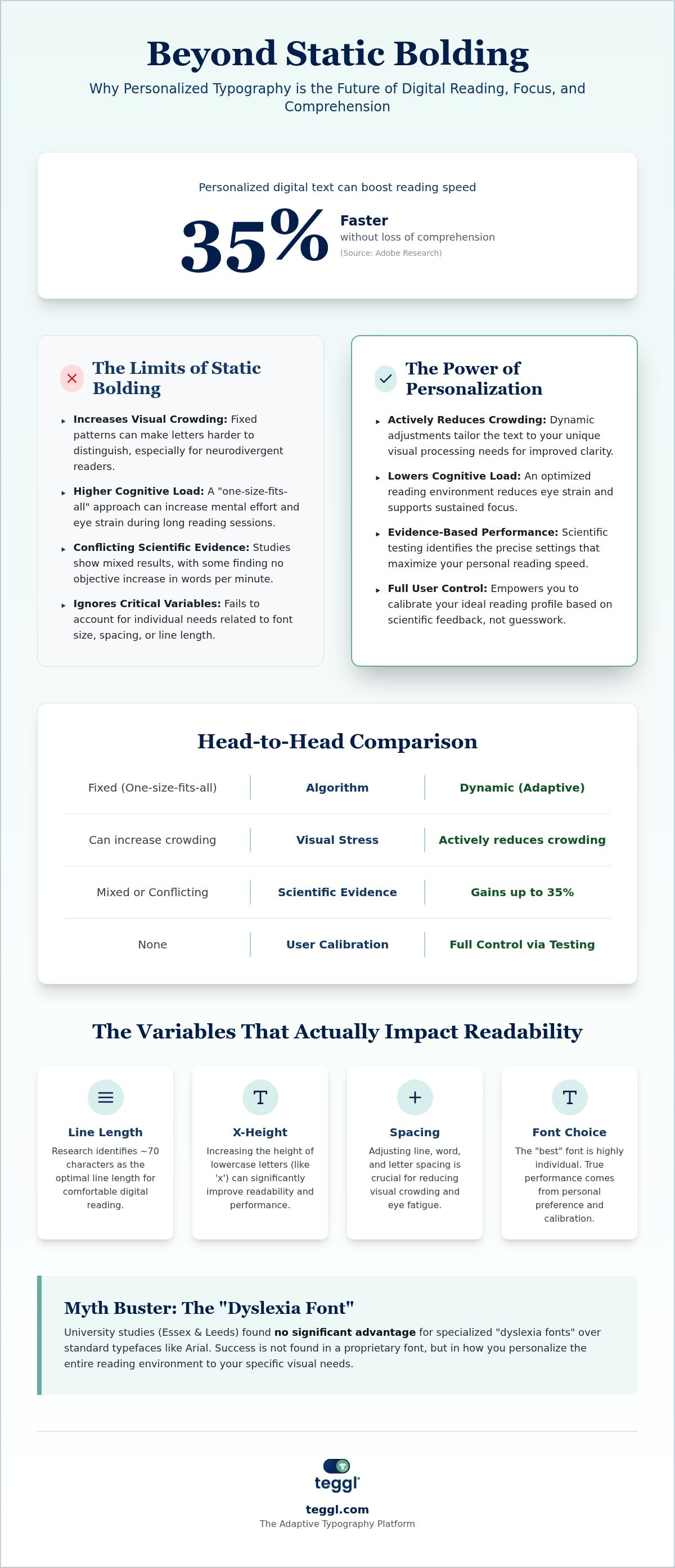
Did you know that personalizing your digital text can boost your reading speed by up to 35%? While fixed-point highlighting once felt like a breakthrough, 2026 research confirms that a one-size-fits-all algorithm isn't the final answer for digital focus. You've likely felt the fatigue of visual crowding or hit a sudden paywall when trying to process dense research. If you're looking for a bionic reading alternative that actually understands your unique visual profile, you're in the right place.
In this guide, we'll explain why predefined text enhancements are becoming obsolete. Discover how evidence-based personalization reduces cognitive load and provides the digital clarity you've been searching for. It's time to move beyond rigid settings and embrace a tool that evolves with your environment. We'll explore how adaptive typography provides a sophisticated path forward for high-performance reading and lasting visual comfort.
Key Takeaways
Static algorithms often create visual crowding because they don't account for individual differences in information processing. Switch to a dynamic interface that adjusts to your unique visual requirements.
Identify your ideal settings with the Reading Profile Test to ensure your technology supports your performance. This evidence-based approach replaces guesswork with a scientific understanding of your reading habits.
Choose a bionic reading alternative that allows for manual calibration and flexible bolding patterns. Personalized digital text helps you maintain focus without the frustration of premium paywalls or rigid layouts.
Lower your cognitive load and reduce eye strain by optimizing variables like line spacing and x-height. Transform your browser into a high-performance workspace that protects your visual health.
Table of Contents
Why Readers Are Seeking a Bionic Reading Alternative in 2026
Digital reading is undergoing a major transformation. While early bolding methods gained significant popularity, the scientific community remains divided on their actual efficacy. Recent research from 2023 and 2024 has shown conflicting results; some participants report improved comprehension, while others experience longer reading times and lower scores compared to traditional text. A 2022 study of over 2,000 readers even found no objective increase in words per minute, despite users feeling faster. This lack of scientific consensus is exactly why many are looking for a bionic reading alternative that offers more than just a static visual overlay.
A primary driver for this shift is "visual crowding." This happens when letters are too close together, making it difficult for the brain to isolate individual characters. For neurodivergent readers, static bolding can sometimes exacerbate this issue by creating high-contrast noise that disrupts the natural tracking of the eye. Instead of providing clarity, fixed algorithms can increase cognitive load and trigger eye strain during long research sessions. Effective technology should address these sensory comfort needs by allowing for dynamic adjustments rather than imposing a single style.
The Problem with Fixed Algorithms and Static Bolding
Traditional speed reading techniques often fail because they rely on rigid, one-size-fits-all patterns. Bolding the first few letters of every word doesn't account for varying word lengths or linguistic complexity. It ignores critical variables like x-height, spacing, and screen quality, which all impact how we process information. Because reading performance is highly individual, a truly effective bionic reading alternative must be adaptive. It should provide a framework for personalization that respects your unique visual profile and environmental factors, ensuring that your tools work for you rather than against you.
Beyond Bolding: How to Evaluate Evidence-Based Reading Tools
Finding a reliable bionic reading alternative requires looking past marketing claims. While generalized digital tool use can sometimes hinder comprehension, research on digital tool practices shows that specific, project-based reading often yields positive results. Use the following comparison to distinguish between outdated methods and modern, adaptive solutions.
We should also address the proprietary "dyslexia font" myth. Studies from the University of Essex and Leeds found no significant advantage for these fonts over standard typefaces. Success isn't found in a specific font name, but in how you adjust the environment to your visual needs. Findings differ between individuals, so focus on tools that offer flexibility rather than rigid, proprietary designs.
The Variables That Actually Impact Digital Readability
Performance is a result of multiple variables working in harmony. Leeds research identifies 70 characters as the optimal line length for digital text, while increasing x-height to 5.0 mm can raise a child's measured reading age by 4 months. Adobe studies confirm that personalizing these settings can improve reading speed by 35% without losing comprehension. Because the "best" font varies by individual, some may prefer the geometric clarity of Montserrat while others find Garamond more soothing. You don't need a proprietary font; you need a bionic reading alternative that lets you discover your optimal reading settings through direct calibration.
Teggl: Transitioning from Static Bolding to Personalized Reading Profiles
Teggl represents a fundamental shift in how we approach digital text. While many search for a bionic reading alternative in the form of a simple app, Teggl functions as a sophisticated adaptive typography platform. The core of this system is the Reading Profile Test, a scientific method designed to identify your specific performance baseline. Unlike static algorithms that apply the same bolding pattern to every user, Teggl empowers you to discover which variables actually drive your focus and comprehension. It's about finding the precise configuration that matches your cognitive style.
The Bolded Reading modus within Teggl is built on the principle of personal calibration. It acknowledges that reading performance is influenced by a complex interplay of font size, contrast, and spacing. By adhering to W3C standards and principles of cognitive ergonomics, the Teggl browser extension ensures that your digital environment remains accessible and comfortable. It transforms the screen into a workspace that respects your visual health while maximizing efficiency. You don't have to settle for a rigid interface that ignores your environmental factors.
How to Optimize Your Digital Reading Environment with Teggl
Creating a high-performance reading environment is a logical, sequential process. Follow these phases to integrate Teggl into your daily workflow:
Step 1: Take the Reading Profile Test. Establish a precise baseline for your speed and comprehension to understand your current cognitive load across different text densities.
Step 2: Calibrate x-height and character spacing. Use your test results to adjust these variables, effectively reducing visual crowding and sensory overload during long sessions.
Step 3: Activate Bolded Reading Mode. Deploy high-intensity bolding during deep research to maintain focus and prevent the common habit of skipping lines.
Embrace Personalized Reading Performance
The shift toward adaptive typography marks a significant milestone in digital focus. We've seen that static bolding often fails to account for individual visual crowding; however, evidence-based personalization offers a clear path forward. By focusing on variables like x-height and character spacing, you can align your digital environment with your brain's natural processing speed. Research from Adobe demonstrates that these personal optimizations can improve reading speed by up to 35% without sacrificing comprehension. If you're ready to move beyond rigid algorithms, it's time to choose a bionic reading alternative that prioritizes your unique needs. This commitment to cognitive accessibility and W3C compliance ensures a seamless experience for every reader. Take the Teggl Reading Profile Test to find your optimal reading settings and transform how you interact with text today. You deserve a digital workspace that supports your peak performance and well-being.
Frequently Asked Questions
Is there a free bionic reading alternative?
Several free tools are available for readers seeking a bionic reading alternative without a premium subscription. The FastRead app, marketed as "Free Forever" in 2026, offers a suite of professional tools without requiring registration. Other options include the SwiftRead extension, which maintains a freemium model, and open-source browser extensions like Jiffy Reader. While these tools provide basic bolding, they often lack the sophisticated calibration required to adjust for your specific visual profile and environmental factors. Choosing a tool that allows for manual adjustment is essential for long-term comfort and cognitive performance.
Why doesn’t Bionic Reading work for everyone?
Bionic Reading relies on a static algorithm that bolds a fixed percentage of every word, which doesn't account for individual differences in information processing. Scientific research in this field remains conflicted; while some users feel they read faster, objective studies often show no measurable increase in words per minute. For many, the high-contrast bolding creates visual noise that actually increases cognitive load. Because reading performance is a result of multiple variables like screen quality and contrast, a "one-size-fits-none" approach can lead to eye strain rather than the intended focus.
Do specialized dyslexia fonts actually improve reading speed?
Despite the popularity of proprietary fonts, peer-reviewed research from multiple universities shows no significant advantage for these designs over standard typefaces. Digital readability is more effectively improved by adhering to W3C standards and accessibility guidelines, such as the WCAG 2.1 Level AA standards that became a legal requirement for many U.S. entities in April 2026. Instead of a specific font, focus on adjustable variables like x-height and character spacing. Findings differ between individuals, so the most effective accessibility solution is one that allows you to personalize the entire reading experience.
How does Teggl’s Bolded Reading differ from other extensions?
Teggl distinguishes itself as a personalized reading technology rather than a static bolding tool. While most extensions apply a universal style, Teggl utilizes a Reading Profile Test to determine your unique baseline for speed and comprehension. This data-driven approach allows you to calibrate typography settings-such as character spacing and bolding intensity-to match your cognitive needs. By functioning as an adaptive typography platform, Teggl ensures that your digital environment respects your visual ergonomics and physical well-being, providing a sophisticated alternative to rigid, non-adjustable algorithms.
Can personalized typography help with ADHD symptoms like line skipping?
Personalized typography is an effective tool for managing visual tracking challenges often associated with ADHD. By optimizing character spacing and line length, you can create a stable visual environment that reduces the likelihood of skipping lines or losing your place. High-intensity bolding acts as a visual anchor, helping the brain maintain focus on the current word during dense research sessions. This adaptive approach helps lower the sensory overload that often leads to fatigue. It's important to remember that while these tools improve performance, they're designed for optimization and are not a clinical cure.



Comments