
The 2026 Guide to Speed Reading Browser Add-ons: Science, Personalization, and Performance
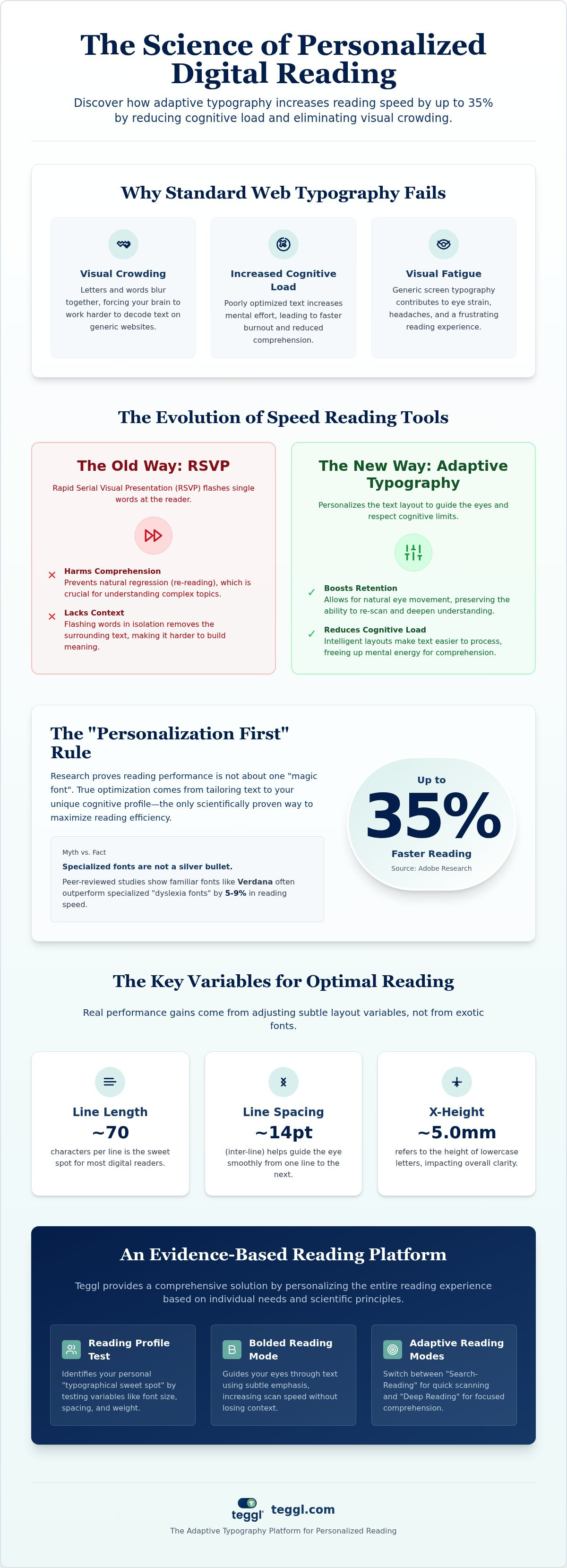
Research from Adobe shows that you can read up to 35% faster simply by using personally optimal fonts. It's a staggering figure that highlights how much current digital habits hold us back. You've likely felt the sting of visual fatigue or found yourself skipping lines while using a generic speed reading browser add-on. It's frustrating when your brain wants to move faster than standard web typography allows.
This guide reveals how evidence-based browser extensions can increase your reading speed by up to 35% through personalized adaptive typography and cognitive optimization. We'll explore the mechanics of readability, break down the latest 2026 accessibility standards, and show you how to eliminate visual crowding for good. By the end, you'll know exactly how to build a personalized reading environment that matches your cognitive profile.
Table of Contents
The Evolution of Speed Reading Browser Add-ons in 2026
In 2026, a speed reading browser add-on is no longer just a productivity hack; it's a vital tool for cognitive accessibility. Most websites use standard rendering that wasn't designed for the high-volume digital overload we face today. This generic approach often leads to "visual crowding," where letters and words blur together, forcing the brain to work harder to decode text. Many people turn to traditional speed reading techniques to cope, but eye-training apps often miss the mark by ignoring how our biology interacts with digital screens. Modern solutions must prioritize physical well-being alongside performance.
To better understand this concept, watch this helpful video:
RSVP vs. Adaptive Typography: Finding the Retention Balance
Rapid Serial Visual Presentation (RSVP) flashes single words to increase pace, but it often fails because it prevents natural regression, which is essential for deep comprehension. In contrast, adaptive typography platforms like Teggl focus on guiding the eye through the layout without removing context. Choosing an effective speed reading browser add-on means looking for tools that respect your cognitive load. By using Bolded Reading Mode, you can maintain a high pace while actually absorbing the material. If you're curious about the technical differences, our Reading Comprehension Tools guide provides a detailed breakdown of how these methods influence retention. This shift from "flashing words" to "intelligent layouts" marks the true evolution of modern readability tools.
Evaluating Tools: A 2026 Research-Based Framework
Research from Adobe and the Readability Consortium has completely changed how we evaluate a speed reading browser add-on. Their findings prove that readers can increase their pace by up to 35% just by switching to a font that matches their unique cognitive profile. This "Personalization First" rule replaces the outdated belief that one specific font works for every user. Scientists have noted a clear trade-off between speed and accuracy when readers try to force themselves to move faster without first optimizing their visual environment.
While many tools still market generic "dyslexia fonts," peer-reviewed data from Leeds and Essex universities show that specialized designs often offer no significant speed advantage over Arial or Verdana. Real optimization relies on subtle layout variables that reduce the brain's workload. For most digital readers, the ideal environment involves a line length of 70 characters, inter-line spacing of 14pt, and an x-height of roughly 5.0mm. Teggl avoids the "one-size-fits-all" trap by using a Reading Profile Test to identify these specific metrics for each individual.
The Science of Readability: Why Personalization Trumps Generic Solutions
The Essex study provided a breakthrough when it showed Verdana outperforming Sassoon Primary by 5-9% in reading speed. It suggests that when choosing a speed reading browser add-on, familiarity and specific typographical weights are more effective than generic accessibility fonts. Addressing "Visual Stress" is another key factor; simply adjusting font sizes can raise a measured reading age by up to 4 months. You can explore how these variables are integrated into modern tools in our Bolded Reading Modus Buyer’s Guide. If you want to stop guessing and start performing, discover your optimal reading settings with our adaptive platform.
Optimizing Your Digital Reading Workflow with Teggl
Integrating a speed reading browser add-on into your daily routine requires more than just a quick installation. To maximize efficiency, start by pinning the Teggl extension to your browser toolbar for instant access across all tabs. Once active, you can toggle between specific modes based on your current task. For instance, use "Search-Reading" with Bolded Reading Mode to scan technical documentation for keywords quickly. When you need to absorb complex information, switch to a more spacious "Deep Reading" setting. Reducing digital noise is also critical for maintaining momentum. You can find practical strategies for this in our 2026 guide on reducing distractions, which perfectly complements your new typographical setup.
Discovering Your Optimal Settings via the Reading Profile Test
The Reading Profile Test is the core of our adaptive approach. It uses a series of short, evidence-based exercises to match your real-time performance data with specific font variables. Instead of guessing if a font works, the test analyzes how your eyes react to changes in character width, weight, and line spacing. You'll receive a detailed breakdown of your typographical sweet spot, including recommendations for x-height and contrast. From there, you can adjust the reading-ruler effect to further minimize line-skipping and visual crowding. We invite you to compare your performance across different settings to see the results for yourself. Discovering your optimal configuration isn't just about speed; it's a sophisticated productivity strategy that ensures your digital environment finally works for you rather than against you.
Master the Future of Digital Readability
The shift toward adaptive typography marks a new era in digital efficiency. We've established that generic fonts often fail to deliver the results promised by traditional tools. Instead, evidence points to personalization as the ultimate performance driver. By aligning your screen's layout with your unique cognitive profile, you can overcome visual fatigue and regain control over your information flow. Professionals globally now use a sophisticated speed reading browser add-on to combat digital overload and maintain mental clarity.
Adobe Research indicates that finding your personally optimal font can increase reading speed by up to 35%. It's time to stop struggling with standard web rendering. Start reading on your own terms. Discover your optimal reading settings with the Teggl Reading Profile Test and experience a more focused digital life. You have the power to transform every article into a high-performance experience.
Frequently Asked Questions
Does a speed reading browser add-on actually work for deep comprehension?
Yes, but effectiveness depends on the methodology used. While Rapid Serial Visual Presentation can hinder deep understanding, a speed reading browser add-on that uses adaptive typography preserves context. By optimizing line length and spacing based on Leeds University research, you can maintain high comprehension levels while increasing your pace. It's about reducing the brain's effort to decode text rather than just flashing words faster.
Are special "dyslexia fonts" like OpenDyslexic or Dyslexie effective?
Empirical studies from the University of Essex and other independent researchers suggest these fonts don't provide a measurable speed advantage. In large-scale experiments, most participants actually performed better with standard fonts like Arial or Verdana. Instead of relying on a single "dyslexia-friendly" typeface, modern experts recommend personalizing multiple variables like x-height and character weight to find what works for your specific visual needs.
How much faster can I expect to read with a personalized browser extension?
You can achieve significant gains by moving away from generic web rendering. Scientific data from the Readability Consortium indicates that matching a reader to their optimal font profile can lead to measurable increases in words per minute. Using a personalized speed reading browser add-on allows you to bypass the "one-size-fits-all" trap. These results are most consistent when you adjust settings like character width and reading-ruler effects through a formal profile test.
Can a speed reading add-on help with ADHD and digital focus?
These tools are highly effective for managing digital overload and improving concentration. By utilizing Bolded Reading Mode, you can reduce visual crowding, which is a common distraction for those with ADHD. Research shows that specific layout adjustments, such as using 14pt interlinear spacing and 70-character line lengths, help anchor the eye. This creates a more stable environment that minimizes line-skipping and helps maintain a steady cognitive flow.



Comments