
The 2026 Guide to Reading News Faster: How Browser Extensions Optimize Digital Consumption
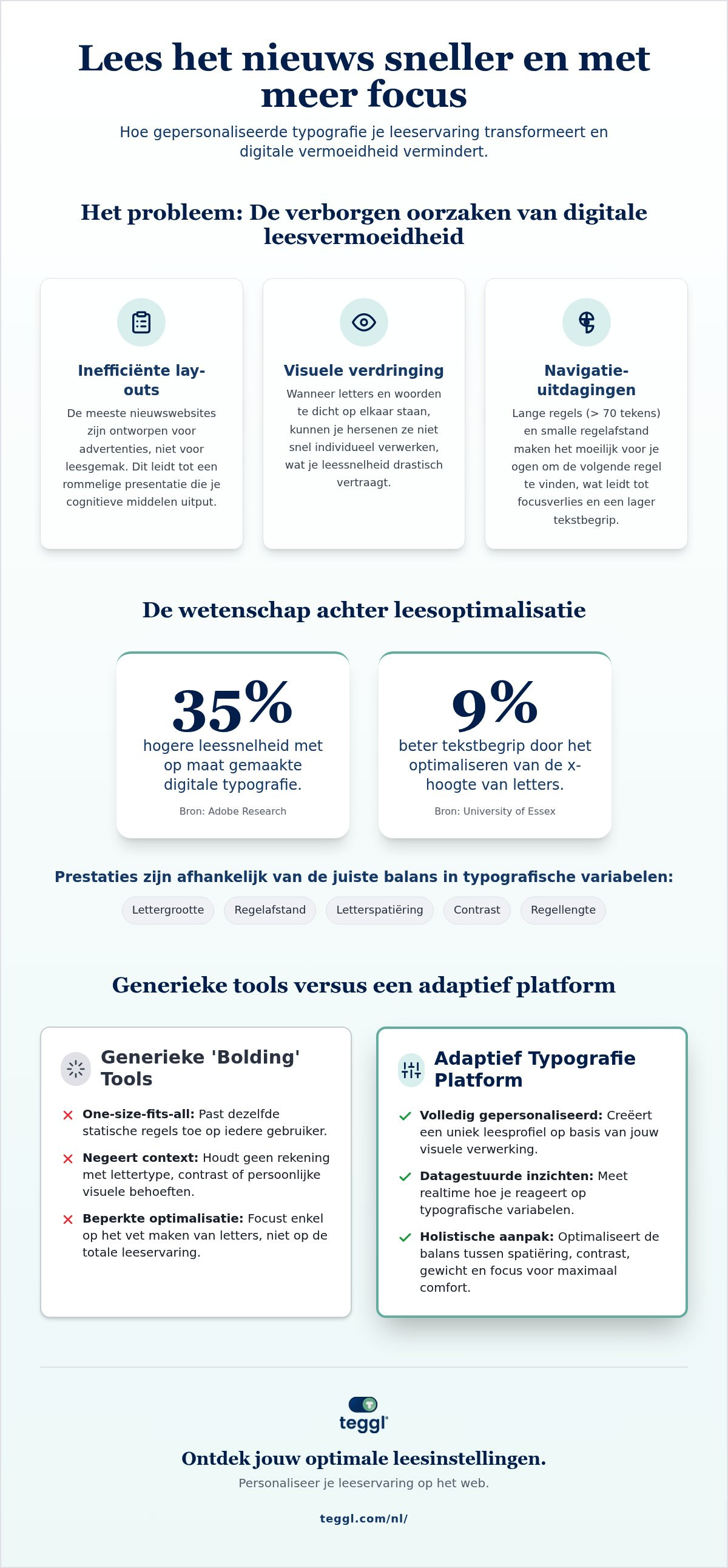
Did you know that Adobe research shows the right digital typography can increase your reading speed by up to 35%? Most of us struggle to keep up with the relentless 2026 news cycle, often feeling drained by cluttered layouts and endless scrolling. If you've been searching for a sneller nieuws lezen extensie, you're likely familiar with the frustration of losing focus halfway through a long-form article. It's a common modern struggle, but it isn't a personal failing. Instead, it's a design mismatch between the static text on your screen and the unique way your brain processes information.
We understand that staying informed shouldn't feel like a chore or lead to visual exhaustion. This guide promises to show you how to finish your daily news briefings in half the time while actually retaining more information. We'll explore the science behind personalized reading technology, specifically how tools like Bolded Reading Mode and individual reading profiles can transform your digital consumption. By the end of this article, you'll have a clear path to reducing visual stress and mastering your newsfeed with precision and ease.
Table of Contents
The Cognitive Science of Digital News Consumption and Visual Crowding
Reading news online is fundamentally different from reading a physical book. Most digital platforms are designed for aesthetic appeal or ad placement rather than cognitive ease. This results in "Visual Crowding," a physiological phenomenon where letters and words are packed too tightly for the brain to process them individually with speed. When you use a sneller nieuws lezen extensie, you're essentially fighting this bottleneck by creating more breathing room for your eyes.
The science of speed reading suggests that our eyes don't move smoothly across a page; they jump in small bursts called saccades. Standard news layouts, filled with tiny fonts and cluttered sidebars, force your brain to expend extra energy just to locate the next line of text. This mental friction leads to digital fatigue and a significant drop in focus. It's not that you're a slow reader; it's that your environment is working against you.
Why Standard News Layouts Slow You Down
According to the University of Leeds, line length is a critical factor in reading efficiency. Traditional news sites often use line lengths exceeding 70 characters. This makes it harder for the eye to return to the correct starting point on the next line, a process known as "Search-Reading." If inter-line spacing is too narrow, your retention drops because your brain is too busy navigating the layout to actually digest the content. Modern news consumption requires a layout that supports quick scanning without sacrificing the mental map of the text.
The Role of Typographical Variables
Adjusting specific variables makes a massive difference in how you process information. University of Essex research found that optimizing the x-height, which is the height of lowercase letters, can improve comprehension by up to 9%. Additionally, Adobe Research has identified "Optimal Font Personalization" as a key to peak performance. Their studies show that matching digital typography to an individual's cognitive profile can increase reading speed by as much as 35%. This proves that a one-size-fits-all approach fails readers. True efficiency comes from an adaptive typography platform that tailors the environment to your unique visual needs.
Evaluating News Reading Extensions: Personalization vs. Generic Bolded Reading
Many digital tools claim to offer a "bionic" or "bolded" experience, but they often apply the same static logic to every reader. This one-size-fits-all approach ignores the diversity of human vision and cognitive processing. Research by the Nielsen Norman Group on how users read online shows that we scan in complex, non-linear patterns. We often skip entire blocks of text if the layout feels overwhelming. While a generic sneller nieuws lezen extensie might bold the first few letters of every word, it won't account for your unique requirements regarding contrast or letter spacing.
We believe technology should be flexible enough to meet individual needs. This is why we distinguish between basic text modifiers and a comprehensive adaptive typography platform. A sophisticated tool must integrate into your existing browser workflow without breaking site functionality or distorting the original journalism you're trying to consume.
The Reading Profile Test: Finding Your Individual Baseline
Teggl moves beyond basic modifications by treating reading as a personalized performance task. Our Reading Profile Test measures how you respond to different typographical variables in real-time. Instead of guessing which settings work, you get data-driven insights. Adobe research indicates that matching a reader to their optimal font and layout can boost speed by up to 35%. It's not about finding a "magic" typeface. In fact, scientific studies consistently show that specific "dyslexia fonts" like OpenDyslexic offer no universal benefit over well-designed standard fonts. Performance is instead tied to the interplay of font size, weight, and spacing.
Beyond the Bold: Spacing, Contrast, and Focus
True optimization requires managing character width and line weight to prevent visual crowding. You can accelerate text scanning in 2026 by using a tool that balances high-energy productivity with sensory comfort. Teggl adjusts the environment to suit both quick news briefs and long-form investigative pieces. If you want to discover your own optimal settings, you can start your Reading Profile Test to see how personalized typography transforms your focus.
Optimizing Your Daily News Routine with the Teggl Browser Extension
Installing the extension is the first step toward reclaiming your time and mental energy. Once added to your browser, begin by calibrating your settings through the Reading Profile Test. This initial setup ensures the typography adapts to your specific visual needs rather than forcing you to adapt to a static screen. The extension functions as a sophisticated sneller nieuws lezen extensie, seamlessly integrating into your favorite digital publications and news aggregators without disrupting the site's original design.
Effective news consumption requires different strategies for different formats. When you're scanning morning headlines or short news briefs, use a higher intensity in Bolded Reading Mode to anchor your focus on key information. For long-form investigative journalism, adjust the settings to a more subtle weight. This flexibility helps you maintain a high reading speed without the cognitive burnout that usually follows an hour of screen time. By personalizing the text, you reduce the visual stress that often leads to headaches or digital fatigue during extended reading sessions.
Customizing Your News Experience
Environmental factors like lighting and time of day significantly impact how your brain processes text. You can create and save distinct profiles within the extension to meet these changing needs. Set up a "Morning Capture" profile with increased line spacing for rapid scanning while you're on your first cup of coffee. Switch to an "Evening Deep Dive" profile with reduced contrast and warmer tones to protect your eyes before sleep. Utilizing Teggl as a comprehensive bolded reading modus allows you to maintain peak performance regardless of your surroundings.
Measuring Your Performance Gains
Progress is most motivating when it's visible. The extension includes tools to track your reading speed improvements over time, allowing you to see your words-per-minute (WPM) grow as you become more accustomed to your personalized settings. Don't just aim for raw speed; prioritize comprehension. If you notice you're skipping details, try slightly increasing the x-height or adjusting the character width in your profile. This iterative approach turns a standard sneller nieuws lezen extensie into a powerful ally for long-term cognitive optimization.
Master Your Digital Information Flow
Staying informed in 2026 shouldn't come at the cost of your mental energy or physical comfort. We've explored how visual crowding and cluttered layouts create unnecessary friction in your daily routine. By shifting from static designs to an adaptive typography platform, you can bypass these obstacles and reclaim your focus. Peer-reviewed research from Adobe and leading universities confirms that personalized settings significantly outperform generic fonts, allowing you to process complex information with greater ease and speed.
Integrating a sneller nieuws lezen extensie into your browser is more than a productivity hack; it's a commitment to your cognitive well-being. Whether you're scanning morning briefs or diving into investigative journalism, your reading environment should work for you, not against you. You have the power to transform every news site into a clear, high-performance workspace tailored to your unique visual profile.
Ready to see the difference for yourself? Take the Reading Profile Test and discover your optimal news reading settings with Teggl. It's time to experience a seamless, frictionless way to stay informed and energized throughout your day.
Frequently Asked Questions
Can a browser extension really help me read news 35% faster?
Yes, Adobe research indicates that matching digital typography to an individual's cognitive profile can increase reading speed by up to 35%. This isn't a one-size-fits-all result but a benefit of personalized optimization. By using a sneller nieuws lezen extensie to adjust variables like x-height and character spacing, you reduce the mental energy required to process text. It's about aligning the screen with your brain's natural processing rhythm.
Is Bolded Reading Mode effective for people with ADHD or Dyslexia?
Bolded Reading Mode can improve focus and reduce visual crowding, which many users with ADHD or dyslexia find helpful for maintaining their place in a text. However, reading performance is highly individual. Scientific research shows mixed results for specific typefaces, but adjusting line length and weight often provides clarity. Teggl doesn't claim to cure these conditions. Instead, it offers an adaptive platform to help you find settings that work for your needs.
Will the Teggl extension work on all news websites?
The Teggl browser extension is designed to integrate seamlessly with most major news publications and digital aggregators. It works by modifying the page's visual layer to apply your Reading Profile without breaking the site's underlying functionality. Whether you're reading investigative reports on a legacy news site or scanning quick briefs on a modern blog, the extension maintains a consistent, optimized experience across your entire digital newsfeed.
Do I need to change my font to see an improvement in reading speed?
You don't necessarily need to change the typeface itself to see significant gains in efficiency. While font selection is a factor, variables like font size, x-height, and inter-line spacing often have a more substantial impact on readability. Using a sneller nieuws lezen extensie allows you to calibrate these specific typographical elements. This approach focuses on optimizing the layout and visual ergonomics of the text rather than just swapping one font for another.



Comments