
Teggl Browser Extension: The 2026 Guide to Personalized Digital Reading
Adobe research indicates that optimizing typographic variables with the Teggl Browser Extension can increase your reading speed by up to 35% while significantly reducing visual fatigue. It's frustrating to spend your workday squinting at dense paragraphs or re-reading the same line three times because of visual crowding. You shouldn't have to fight your screen just to absorb information; your digital environment should adapt to your unique needs.
This guide reveals how science-backed adaptive typography transforms your browsing experience into one of clarity and comfort. You'll discover how to eliminate digital eye strain and lower your cognitive load during intense research sessions. We will explore the specific variables that impact your focus, from line spacing to x-height, and show you how to build a personalized Reading Profile that works for your brain.
Table of Contents
Beyond Standard Fonts: Why Web Reading Exhausts the Brain
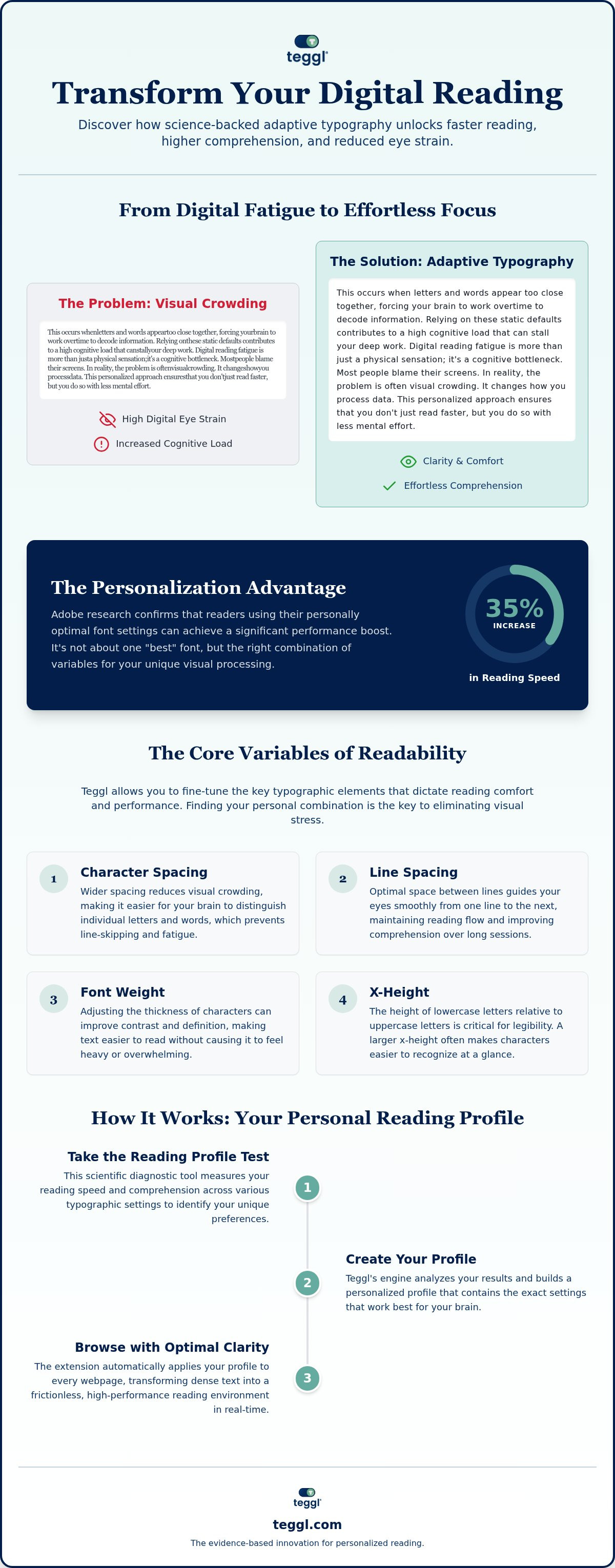
Digital reading fatigue is more than just a physical sensation; it's a cognitive bottleneck. Most people blame their screens. In reality, the problem is often visual crowding. This occurs when letters and words appear too close together, forcing your brain to work overtime to decode information. While standard fonts like Arial or Times New Roman are ubiquitous, they aren't optimized for every individual. Relying on these static defaults contributes to a high cognitive load that can stall your deep work. In 2026, the solution is adaptive typography. The Teggl Browser Extension leads this shift, moving away from rigid design toward a flexible system that adjusts to your personal visual needs.
The Science of Visual Crowding and Cognitive Performance
Typographic layout impacts your brain's efficiency far more than most people realize. It changes how you process data. Research from the University of Leeds confirms that variables like line length and spacing significantly alter reading speed, even when there's no time pressure involved. Similarly, a study by the University of Essex found that Verdana can outperform Sassoon Primary by 5-9% in search speed tasks. These performance gaps occur because different brains process visual information differently. Approximately 5% of mainstream readers experience visual stress, a condition where text appears to move or blur. By following the Web Content Accessibility Guidelines, the Teggl Browser Extension addresses these issues by allowing users to eliminate visual crowding. This personalized approach ensures that you don't just read faster, but you do so with less mental effort. Reading performance is a complex result of font size, x-height, and contrast; adaptive technology is the only way to master all of them simultaneously.
Optimizing Your Digital Environment: Key Variables for Performance
Improving digital reading isn't about finding a "magic font." It's about adjusting specific variables like font weight, x-height, and character spacing to suit your unique visual profile. These elements dictate how easily your eyes glide across a screen. While federal website standards provide a baseline for readability, they don't account for individual differences. The Teggl Browser Extension allows you to fine-tune these settings, turning a generic webpage into a high-performance environment. By manipulating character spacing, you can effectively eliminate the visual crowding that leads to line-skipping and fatigue.
Some users look for "dyslexia-specific" fonts like OpenDyslexic. It's vital to acknowledge that research in this area is mixed; some studies show benefits while others find no significant difference compared to standard sans-serif fonts. Rather than relying on a single font style, the Teggl Browser Extension focuses on adaptive typography. This includes Bolded Reading Mode, a tactical tool that highlights specific character clusters to guide your eye movement and anchor your focus during long-form reading. This approach recognizes that readability is a result of multiple variables, such as contrast and screen quality, rather than a "cure" for specific conditions.
Personalization: The 35% Advantage
Research from Adobe reveals that readers can achieve a 35% increase in speed when using their "personally optimal" font settings. For example, older readers often find that high x-height fonts like Montserrat or the classic proportions of Garamond reduce the effort required to distinguish characters. You can explore deeper tool comparisons in our Bolded Reading Modus: The 2026 Buyer’s Guide. If you're ready to stop guessing, you can test your reading performance today to see which variables unlock your peak efficiency.
Implementing Personalized Reading with the Teggl Browser Extension
Getting started with the Teggl Browser Extension in 2026 is a streamlined process designed to respect your existing workflow. Once installed, the extension works in the background to inject personalized typographic settings into every webpage you visit. Unlike older tools that often broke site layouts or caused flickering, Teggl uses a sophisticated rendering engine that adapts text in real-time while maintaining full site functionality. This ensures that your reading recall and comprehension remain high, whether you're scanning a technical manual or a news article. It's about creating a seamless bridge between your screen and your cognitive processing. Beyond typography, you should also consider environmental factors; our guide on How to Reduce Online Reading Distractions provides additional strategies for deep work.
Finding Your Optimal Settings with the Reading Profile Test
The core of the Teggl experience is the Reading Profile Test. This isn't a generic quiz; it's a scientific diagnostic tool that measures your specific visual preferences. By testing your reading speed and comprehension across various font weights, x-heights, and character spacings, the test builds a unique data set tailored to your brain. It identifies the exact point where visual crowding stops and clarity begins. We invite you to compare their own reading performance and discover your personal settings. This data-driven approach removes the guesswork from digital reading, allowing you to focus on the content rather than the struggle of processing it. Fine-tuning your profile creates a frictionless experience that feels natural and sustainable for long-term productivity, especially during text-heavy research phases.
Master Your Digital Reading Environment
Digital reading in 2026 demands more than just default settings. We've explored how visual crowding drives fatigue and how specific variables like x-height and character spacing dictate your cognitive performance. By using the Teggl Browser Extension, you move beyond one-size-fits-all fonts and embrace a personalized typography platform built on scientific research. Adobe research from the Readability Consortium highlights a potential 35% speed increase when settings are optimized for your brain's unique processing patterns.
It's time to stop fighting your screen and start reading with clarity and ease. You can transform your digital environment from a source of strain into a high-performance tool for deep work. Discover your optimal reading settings with the Teggl Reading Profile Test and reclaim your focus today. You deserve a browsing experience that feels natural, comfortable, and empowering.
Frequently Asked Questions
Can a personalized font really improve my reading speed?
Yes, research from the Adobe Readability Consortium indicates that users can achieve up to a 35% increase in reading speed when text is optimized for their specific visual profile. Reading performance isn't about a single "best" font but rather the combination of variables like spacing and x-height. The Teggl Browser Extension applies these findings to your daily browsing experience.
Does the Teggl Browser Extension work on all websites?
The extension is designed to work across the vast majority of text-heavy websites without disrupting their core functionality. It uses an adaptive typography engine that preserves the layout while modifying the text layer for better readability. Whether you're reading a technical wiki or a long-form news article, the Teggl Browser Extension ensures your personalized settings stay active across different domains.
Is the Teggl Reading Profile Test based on scientific research?
Yes, the test is a diagnostic tool rooted in peer-reviewed studies from institutions like the University of Essex and the University of Leeds. It measures how different typographic weights and character spacings impact your individual cognitive load. Instead of using generic defaults, it identifies the specific settings that minimize visual stress and maximize your information processing efficiency.
Will using a bolded reading mode help with ADHD or Dyslexia?
While Bolded Reading Mode isn't a cure for ADHD or dyslexia, it serves as a powerful focus tool to guide eye movement. Research into dyslexia-specific fonts shows mixed results, but reducing visual crowding and highlighting character clusters can help anchor attention. This method aims to lower the mental effort required to track lines and maintain focus during deep work.



Comments