
Reducing Visual Text Overload: A Scientific Guide
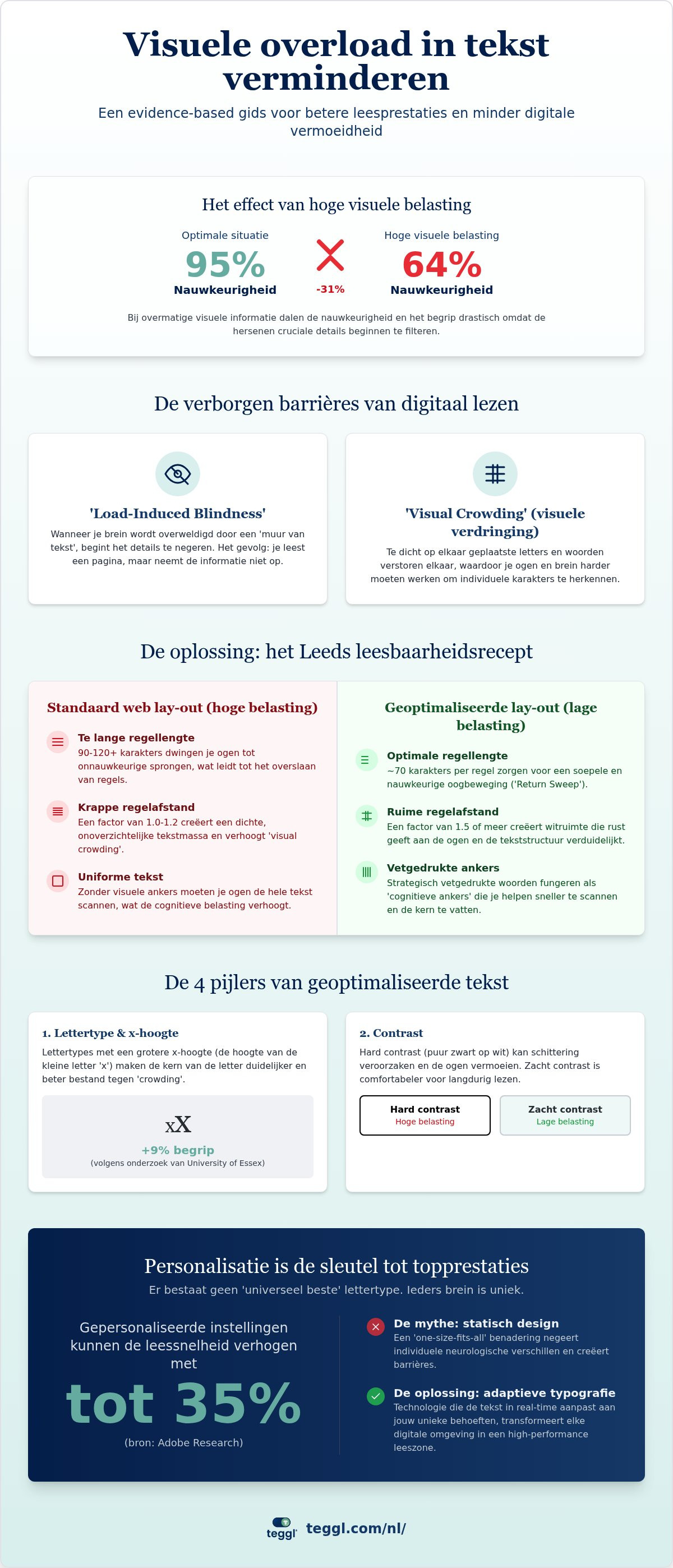
What if the mental exhaustion you feel after a morning of emails isn't a lack of stamina, but a structural failure of the text on your screen? You've probably experienced that moment where words start to blur and your focus shatters after just a few minutes of reading. It's a physiological response to digital clutter that affects both your speed and your comprehension. Since research indicates that high-load visual situations can drop accuracy in information processing from 95% to just 64%, learning how to visuele overload tekst verminderen is essential for anyone who wants to maintain peak performance.
You'll learn evidence-based methods to minimize visual fatigue and optimize your digital reading performance through personalized typography and cognitive load reduction. We'll explore why static layouts fail and how small adjustments to spacing and contrast can make complex information feel effortless. This guide provides a clear path to a customized reading environment where you can process data faster, stay focused longer, and finally end the cycle of digital burnout.
Table of Contents
Understanding the Mechanics of Visuele Overload Tekst Verminderen and Cognitive Fatigue
Dense text blocks on a digital screen don't just look intimidating; they physically change how your brain processes information. When you're confronted with a wall of words, you may experience "Load-Induced Blindness." This is a cognitive state where the brain, overwhelmed by the sheer volume of visual data, begins to filter out critical details to prevent total saturation. It's why you might read an entire page only to realize you haven't retained a single sentence. To effectively visuele overload tekst verminderen, we have to look at how we're taxing the brain's limited resources.
Every time you land on a webpage, your mind engages in a complex struggle between decoding and comprehension. This is the foundation of Cognitive Load Theory. If the typography is poorly optimized, your brain wastes its "bandwidth" on the mechanical task of identifying letter shapes. This extraneous load leaves very little energy for actually understanding the content. For neurodivergent readers, such as those with ADHD or dyslexia, these static and crowded layouts aren't just tiring; they're often completely inaccessible, creating a sensory barrier that stops focus before it starts.
The Science of Visual Crowding and Text Density
Visual crowding is a major hurdle in digital reading. It occurs when neighboring letters interfere with your foveal vision, making it hard to distinguish individual characters. Think of it as a "blur" effect that happens when letters are packed too tightly. You can neutralize this by using inter-letter and inter-word spacing as a visual buffer. Research from the University of Essex suggests that subtle shifts in text geometry matter. For instance, using fonts with larger x-heights (around 5.0mm) can improve comprehension by up to 9% by making the core of the letter more distinct and resistant to crowding.
Why One-Size-Fits-All Typography Fails
The search for a "universal font" that solves all reading problems is a myth. While designs like OpenDyslexic were created with good intentions, scientific evidence shows that individual variability is the only constant. What provides relief for one person might actually slow down another. To visuele overload tekst verminderen for everyone, we must move past static design. The evolution of digital text lies in "Readability Personalization." It's about giving you the tools to adapt the text to your specific neurological needs in real-time, rather than forcing your brain to adapt to a rigid, sub-optimal layout.
Evidence-Based Typographic Adjustments to Reduce Visuele Overload Tekst Verminderen
Moving from cognitive theory to practical application requires a precise set of typographic rules. To effectively visuele overload tekst verminderen, you should follow the Leeds University "Legibility Recipe." This standard advocates for line lengths restricted to roughly 70 characters and interlinear spacing of at least 14pt. By adhering to these specific metrics, you create a layout optimized for search-reading efficiency. This approach aligns with scientific research on typography and cognition, which confirms that text geometry directly influences how much mental energy we spend on basic visual processing.
The following table illustrates the shift from standard, high-load web text to an optimized configuration designed for focus.
Your environment and age also dictate your ideal settings. While younger readers might handle high-contrast screens, older individuals often find significant relief in typefaces like Garamond or Montserrat. You should also prioritize soft contrast over harsh black-on-white. This reduces glare-induced visual load, making long-form reading far more sustainable. Small changes in your digital environment can result in massive gains for your cognitive stamina.
The Role of Line Length and White Space
Wide margins aren't just for aesthetics. They facilitate "Return Sweeps," which is the eye's ability to jump from the end of one line to the start of the next without losing its place. If your lines are too long, your eyes struggle to find the next starting point. Set your line height to at least 1.5 times the font size. This ensures there's enough white space to act as a visual guide and prevents the eye from skipping lines.
Bolded Reading: A Functional Remedy for Focus
Standard text often lacks a visual hierarchy, forcing your eyes to wander. This results in saccadic eye movement errors, where you skip lines or re-read the same word twice. Implementing the Bolded Reading Modus provides a functional remedy for this focus drain. By subtly highlighting the initial characters of each word, you create a series of cognitive anchors. These anchors guide your eyes through dense paragraphs with momentum. It transforms a frustrating decoding task into a seamless flow of information. You can try Teggl to see how these adjustments instantly clarify your screen.
Implementing Personalized Reading Technology for Long-Term Performance
Manual adjustments to line height or font size are a helpful starting point, but they aren't scalable for the constant stream of data in a modern digital workflow. To truly visuele overload tekst verminderen, you need technology that adapts to your needs automatically. Modern browser extensions now transform static web content into a personalized reading experience in real-time. Adobe Research highlights the impact of this shift: individuals read up to 35% faster when using their personally optimal font settings. This isn't about finding a better font for everyone; it's about finding the exact configuration that unlocks your specific cognitive potential.
Teggl acts as your sophisticated ally in this high-load digital world. By focusing on cognitive ergonomics, it removes the friction between the eye and the screen. Instead of struggling to decode characters, you can devote your mental energy to high-level analysis and decision-making. This transition from manual effort to automated optimization is the key to maintaining peak performance without the cost of physical fatigue.
The Power of the Reading Profile Test
Most people don't actually know which typographic settings work best for them. Self-diagnosis is often inaccurate because your brain compensates for poor layouts until it reaches a breaking point. Performance-based testing provides a more reliable path. The Reading Profile Test measures your actual reading speed and comprehension across different variables like character width, weight, and spacing. Teggl uses this data to create a seamless, frictionless environment across every website you visit. It is a precision approach to digital wellness that respects individual neurological differences.
Creating a Sustainable Digital Reading Environment
Reclaiming your focus requires a deliberate setup. Follow these steps to build a high-performance reading environment:
Install the Teggl Browser Extension to automate layout transformations.
Complete the Reading Profile Test to identify your unique typographic needs.
Activate Bolded Reading Mode for dense, complex professional articles.
Adjust your screen brightness to match your ambient lighting to further visuele overload tekst verminderen.
Don't accept visual fatigue as an inevitable part of your day. Discover your optimal settings today and reclaim the mental energy you need for what matters most.
Optimize Your Digital Reading Performance
The transition from a cluttered screen to a high-performance reading environment isn't just about changing a font. It's about aligning digital text with your brain's unique processing needs. By understanding the science of visual crowding and applying evidence-based adjustments like the Leeds University standards, you can effectively visuele overload tekst verminderen. Static layouts belong to the past; the future of digital productivity is adaptive and personalized.
Research from Adobe and The Readability Consortium proves that the right settings can increase your reading speed by up to 35%. This technology is specifically designed to support high-performance professionals and neurodivergent readers who need to process vast amounts of data without the cost of physical fatigue. You don't have to settle for a one-size-fits-all experience that leaves you exhausted. Take the Reading Profile Test and reduce your visual overload today. It's time to transform your browser into a tool that works with you, not against you.
Frequently Asked Questions
What is visual crowding and how does it cause text overload?
Visual crowding is the interference of neighboring letters that makes character recognition difficult for your foveal vision. When letters are packed too tightly, the brain struggles to distinguish individual shapes, leading to a state of "Load-Induced Blindness." This physical blur forces the mind to work harder just to identify words, which drains your mental energy. It's a primary driver of the cognitive fatigue that professionals face in text-heavy digital environments.
Can a specific font really reduce the feeling of being overwhelmed by text?
No single font is a universal solution for everyone, but finding the right font for your specific needs can significantly visuele overload tekst verminderen. Evidence shows that reading performance depends on multiple variables, including x-height and character spacing. While some readers prefer serifs like Garamond, others might find sans-serifs like Montserrat more legible. The key is identifying a typeface that minimizes your personal cognitive load through diagnostic performance testing.
Is there a difference between reading speed and reading comprehension when optimizing text?
Speed and comprehension are distinct but closely linked metrics of reading performance. Speed refers to how quickly you process characters, while comprehension is your ability to retain and analyze the information. Optimizing typography aims to increase speed without sacrificing understanding. By reducing the mental effort required for "decoding," your brain reallocates resources to high-level analysis. Adobe research indicates that personally optimal settings can boost reading speed by 35% while maintaining accuracy.
How do browser extensions like Teggl help with ADHD or Dyslexia without claiming a 'cure'?
Browser extensions function as adaptive typography platforms rather than medical treatments. They help users by providing cognitive anchors, such as Bolded Reading Mode, which reduces saccadic eye movement errors and helps maintain focus. This doesn't cure conditions like ADHD or dyslexia; instead, it creates a more accessible digital environment. By allowing you to visuele overload tekst verminderen through personalized settings, the technology removes the structural barriers that often make digital reading feel exclusionary.



Comments