
Reading Test for Adults: Assessing Digital Speed and Cognitive Performance in 2026
Updated: Aug 3
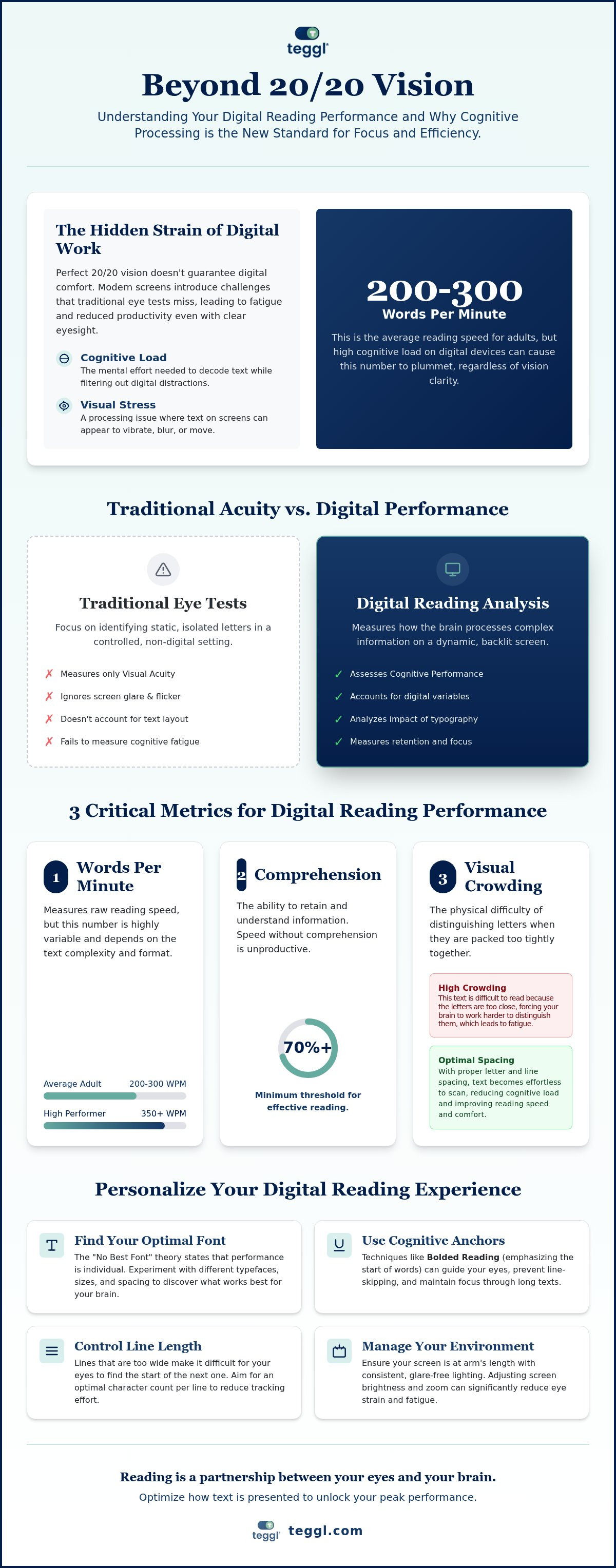
What if your struggle with digital focus isn't about your eyesight at all, but rather how your brain processes pixels? If you find yourself skipping lines or searching for an online reading speed test to understand why you're re-reading the same email three times, you aren't alone. In 2026, the average adult reads between 200 and 300 words per minute, yet digital fatigue remains at an all-time high. Traditional eye tests measure clarity, but they often miss the cognitive load that comes with modern screen work.
You deserve a reading experience that feels effortless instead of exhausting. This article explains how to measure your digital reading efficiency and why your brain's processing speed is just as vital as your visual acuity. We'll break down how to get a quantifiable WPM score, the impact of visual crowding on your focus, and actionable ways to optimize your digital environment for peak performance. It's time to move beyond standard vision checks and discover how your unique cognitive profile shapes the way you interact with the digital world.
Table of Contents
The Evolution of the Reading Test for Adults: Beyond Visual Acuity
A clinical eye exam tells you if you can see a tiny letter on a wall 20 feet away. It doesn't tell you how well you process a 2,000-word report on a high-glare backlit screen. Many people searching for a leessnelheid testen online are surprised to find that while they have 20/20 vision, their digital productivity is plummeting. Traditional tests focus on visual acuity, but modern reading requires high-level cognitive performance. Digital environments introduce variables like screen flicker, blue light, and layout complexity that a standard optician's chair simply cannot replicate.
Research into average reading speeds shows that most adults read at 200 to 300 words per minute. However, this speed often drops significantly when the brain is forced to manage "Cognitive Load." This is the mental effort required to decode text while simultaneously filtering out digital distractions and managing sensory input. When your cognitive load is too high, your reading speed slows down, and your ability to retain what you've just read begins to vanish.
Why Traditional Snellen Charts Fail Modern Digital Workers
Snellen charts measure your ability to identify isolated letters in a controlled, static environment. Reading digital paragraphs is a fundamentally different task involving rapid saccades, which are the small jumps your eyes make between words. On a screen, "Visual Stress" can occur, making text appear to vibrate or blur. This isn't a problem with your eyes' lenses; it's a processing issue. You can have perfect vision and still struggle with a leessnelheid testen online because your brain is working too hard to stabilize the image of the text.
The Role of Presbyopia vs. Cognitive Fatigue
As we age, presbyopia makes it harder to focus on close objects, but glasses are only a partial fix for the digital era. If you find yourself skipping lines or re-reading the same paragraph three times, you're likely experiencing cognitive fatigue rather than just physical eye strain. Instead of just reaching for a stronger prescription, focus on reducing cognitive load while reading. This strategy acknowledges that reading is a partnership between your eyes and your brain. By optimizing how text is presented, you can bypass the mental exhaustion that leads to digital burnout.
How to Measure Your Digital Reading Performance: 3 Critical Metrics
Evaluating your digital efficiency starts with looking beyond a simple timer. When you use a leessnelheid testen online, you're capturing more than just a speed score; you're measuring how your brain navigates a complex visual landscape. To get an accurate picture, you must control your environment. Ensure your screen is at arm's length, your lighting is consistent, and your browser zoom is set to a level that feels comfortable without causing strain.
The first metric is Words Per Minute (WPM), but it's rarely a static number. Your speed on a short email will differ vastly from your pace on a technical whitepaper. Second is Comprehension Retention. Recent cognitive research on reading performance emphasizes that speed is a liability if retention drops below 70%. Finally, you must assess "Visual Crowding." This is the physical difficulty of distinguishing letters when they're packed too tightly on a high-resolution screen, which is a common cause of digital fatigue.
The WPM Benchmark for Adults in 2026
In 2026, the standard for general reading remains between 200 and 300 WPM. High-performing professionals often aim for 350+ WPM while maintaining deep comprehension. Research from the University of Leeds suggests these numbers aren't fixed. They fluctuate based on line length and font choice. If your line length is too wide, your eyes struggle to find the start of the next sentence, which instantly tanks your score.
Self-Testing for Digital Focus Issues
You don't always need a formal tool to spot a problem. Ask yourself: Do you frequently lose your place? Does brain fog set in after just 20 minutes? These are signs of visual stress. You can often mitigate this by simulating a "Reading Ruler" effect, which helps the eye track text more reliably. If you're ready to see how these factors impact your specific speed, you can take a Reading Profile Test to discover your baseline and identify areas for optimization.
Optimising Results: Personalising the Digital Reading Experience
Searching for a leessnelheid testen online often reveals a score that feels static, but your performance is actually highly elastic. The "No Best Font" theory suggests that universal typography is a myth. While a colleague might thrive with the elegant serifs of Garamond, your brain might process the geometric clarity of Montserrat much faster. This isn't a matter of personal taste; it's a matter of how your unique visual system handles character width and x-height to minimize visual crowding.
Bolded Reading Mode serves as a powerful cognitive anchor in this process. By subtly emphasizing the initial characters of words, it guides your eyes through digital text with significantly less effort. This reduces the mental energy spent on visual navigation, leaving more bandwidth for deep comprehension. It's a functional remedy for the common struggle of losing one's place in a dense sea of pixels.
The Science of Personalisation: Adobe and Essex Research
Data supports this shift toward individual settings. A landmark Adobe study demonstrated that readers can achieve up to a 35% increase in speed when using fonts optimized for their specific needs. Similarly, research from the University of Essex highlights that larger x-heights (the height of lowercase letters) can dramatically reduce visual stress for both early and adult readers. These variables prove that your digital reading environment should be as unique as your fingerprint.
Implementing an Adaptive Typography Strategy
You don't have to manually adjust every website you visit. The Teggl Browser Extension uses a Reading Profile Test to identify your ideal settings and applies them automatically across the web. This creates a seamless, personalized layer over standard digital text. To start improving your focus today, try increasing your browser's line spacing to 1.5 or 2.0. This simple change reduces the crowding effect and makes it easier for your eyes to find the next line. Combining these manual tweaks with a personalized reading technology ensures your digital workspace supports your cognitive health rather than draining it.
Transform Your Digital Reading Experience
Modern reading is a complex cognitive feat, not just a test of visual clarity. You've discovered that understanding your performance requires looking at how your brain processes text on high-resolution screens. While searching for a leessnelheid testen online is a great first step, the real breakthrough comes from aligning your digital environment with your unique cognitive profile. By addressing visual crowding and optimizing font characteristics, you can reclaim the focus that digital overload often takes away.
Our personalized reading technology is already used by thousands of professionals to reduce cognitive load without altering website content. This approach is rooted in peer-reviewed research from Adobe and The Readability Consortium. You don't have to settle for digital fatigue or fragmented focus. Take the Teggl Reading Profile Test to discover your optimal digital settings and start experiencing text with newfound clarity.
It's time to stop fighting against your screen and start reading with the efficiency you deserve. Your path to a more productive, comfortable digital life starts with a single personalized adjustment.
Frequently Asked Questions
Can a personalised font really improve my reading speed as an adult?
Yes, personalising your font choice and layout can significantly increase your reading speed by reducing the cognitive effort needed to decode characters. Many adults assume they've reached a permanent ceiling in their abilities, but adjusting variables like character width and spacing helps the brain process information more fluidly. It's about finding the specific configuration that aligns with your unique visual and cognitive profile to eliminate unnecessary mental friction.
What is the difference between a reading test for glasses and a reading speed test?
A reading test for glasses measures visual acuity, whereas a reading speed test evaluates functional cognitive performance. When you use a leessnelheid testen online, you're measuring how effectively your brain decodes and retains meaning from digital text over time. An eye exam ensures you see letters clearly; a speed test ensures you process them efficiently without the mental fatigue that often occurs during long digital work sessions.
Why do I skip lines when reading on a computer screen but not on paper?
Line skipping on screens is often caused by visual crowding and the lack of physical anchors that paper naturally provides. Screens emit light and frequently involve higher glare, making it difficult for the eyes to track accurately from the end of one line to the start of the next. Using a leessnelheid testen online helps identify if your current digital layout is contributing to this tracking issue, allowing you to implement better spacing or bolded anchors.
Is there a universal best font for adults with dyslexia or ADHD?
No single font is universally superior for everyone with dyslexia or ADHD because neurodiversity manifests differently in every individual. While sans-serif fonts are frequently helpful, the most effective solution is always a personalised approach. Adjusting x-height, letter spacing, and using adaptive technologies allows each reader to create a setup that minimises their specific cognitive barriers rather than relying on a one size fits all font choice.



Comments