
Read Faster Online: 2026 Digital Readability Guide
Did you know that switching to a personally optimal font can increase your reading speed by up to 35% while maintaining 90% comprehension? When you understand how to read faster on the web, you stop fighting against visual fatigue and the nagging habit of reading every word aloud in your head. Most of us feel the daily strain of cluttered layouts and the frustration of losing our place in long articles. It's exhausting to feel like you're falling behind simply because of a screen's default settings.
You can reclaim your time and focus by mastering environmental optimization. This guide explores evidence-based techniques and personalized typography designed to slash your reading time in half. We'll show you how to use tools like the Reading Profile Test and Bolded Reading to transform your digital experience into one of clarity, speed, and ease. Prepare to navigate a text-heavy world with a new sense of relief and performance.
Table of Contents
The Cognitive Science of Web Reading: Why Digital Text Slows You Down
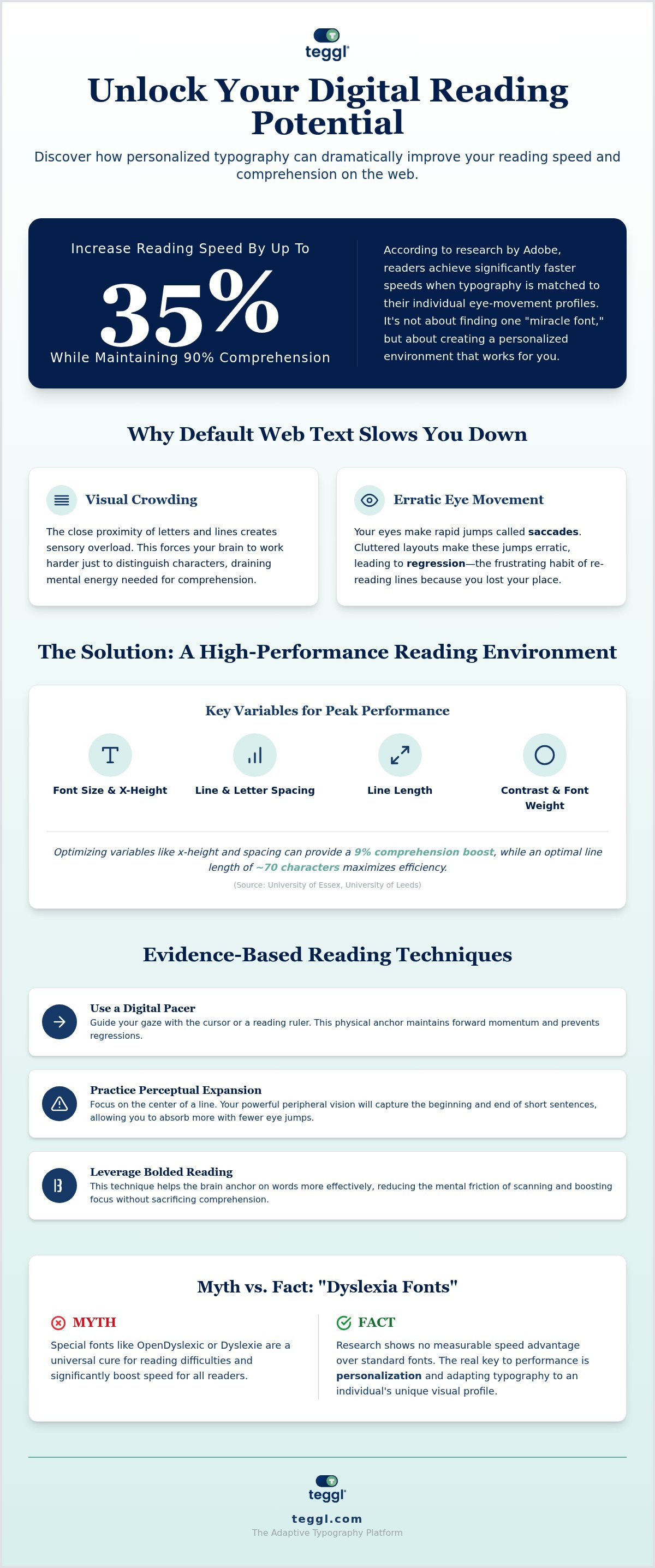
Digital readability is the ease with which your brain processes and understands text on a screen. Unlike print, the web presents unique obstacles that trigger cognitive friction. One primary culprit is visual crowding, where the close proximity of letters and lines creates sensory overload. This crowding forces your brain to work harder just to distinguish individual characters, draining the mental energy you need for deep comprehension.
Your eyes don't move smoothly across a page; they perform small, rapid jumps called saccadic movements. On standard, cluttered web layouts, these jumps often become erratic. This leads to regression, or the frustrating habit of re-reading the same line because your eyes lost their place. Learning how to read faster on the web starts with minimizing these physical and cognitive interruptions.
How Typographic Variables Impact Your Mental Processing Speed
Small changes in layout produce massive gains in efficiency. Research from the University of Essex found that optimizing x-height and line spacing can provide a 9% comprehension boost. Similarly, the University of Leeds identified that a line length of approximately 70 characters maximizes search-reading efficiency. Don't settle for defaults. Evidence shows that personalization is the only reliable way to achieve peak performance, as every reader's visual profile is unique and requires a tailored approach to visual ergonomics.
Evidence-Based Techniques to Increase Your Digital Reading Speed
Stop letting your eyes wander aimlessly across the viewport. Mastering how to read faster on the web requires active engagement with the interface. Use your digital cursor or a dedicated reading ruler as a pacer to guide your gaze. This physical anchor maintains forward momentum and prevents the regressions that typically stall progress. By providing a clear path for your eyes, you eliminate the cognitive load of finding your place after every line break.
Next, practice perceptual expansion. Instead of fixating on every individual word, train your eyes to focus on the center of the line. Your peripheral vision is powerful enough to capture the beginning and end of short sentences, allowing you to absorb more information with fewer eye jumps. For the best results, audit your environment: use clean sans-serif headings for quick navigation and serif body text for long-form instructional reading. This combination is the research-backed standard for maximizing visual comfort and processing speed.
The Myth of Dyslexia-Specific Fonts vs. Personalized Readability
You've likely heard of Dyslexie or OpenDyslexic, but the honest research tells a different story. These fonts show no measurable speed advantage over standard faces like Arial or Verdana. The real key to performance isn't a single miracle font; it's adaptation. According to an Adobe study, readers achieve 35% faster speeds when typography is matched to their individual eye-movement profiles. Tools like Bolded Reading Modus prioritize this visual focus, adapting the text to you rather than the other way around. Start with a Reading Profile Test to discover your optimal settings and unlock your true digital potential.
Building Your High-Performance Reading Environment in 2026
Static web design is the enemy of productivity. It forces your brain to adapt to rigid, universal font settings rather than catering to your specific visual needs. The shift toward adaptive typography is the defining trend of 2026, allowing text to flex based on your cognitive profile. To truly understand how to read faster on the web, you must optimize layout variables like contrast and font weight.
You can reduce online reading distractions by stripping away cluttered CSS and focusing on the mechanics of the digital interface. Finding your typographical sweet spot through a Reading Profile Test is the final step in creating a high-performance environment that balances speed with deep retention. It feels like a relief when the text finally works for you.
Leveraging Teggl for a Personalized Digital Reading Experience
The Teggl browser extension transforms your experience by applying Bolded Reading mode. This technique helps the brain anchor on words more effectively, reducing the mental friction of scanning. Unlike RSVP tools that flash words at high speeds, Teggl maintains the integrity of the layout, supporting deep reading and comprehension. By integrating with current W3C and accessibility standards, Teggl ensures a seamless experience across every site you visit. It adheres to WCAG 2.2 guidelines, making the web more inclusive while boosting your personal output.
It's about making technology flexible enough to meet your individual requirements. As an actionable step, use reading comprehension tools to measure your baseline. This allows you to track your 2026 performance gains and refine your strategy for how to read faster on the web. Embrace this visionary approach and turn digital overload into a competitive advantage.
Unlock Your Peak Digital Performance
You now have the tools to transform your relationship with digital text. By understanding the science of visual crowding and implementing adaptive typography, you can eliminate the cognitive friction that slows you down. Mastering how to read faster on the web is a journey from frustration to clarity. It's about creating a personalized environment where information flows effortlessly.
Research from Adobe and The Readability Consortium confirms that personalization increases reading speed by up to 35%. This evidence-based approach is why students and professionals worldwide are making the switch to combat digital overload. Don't let static designs hold you back any longer. Discover your optimal reading settings with the Teggl Reading Profile Test and start experiencing the relief of truly efficient reading. You've got this.
Frequently Asked Questions
Can a personalized font really improve my reading speed by 35%?
Yes, research from Adobe and The Readability Consortium confirms that matching typography to your unique eye-movement patterns can provide this speed boost. Personalization reduces the cognitive friction of decoding characters, which allows your brain to focus entirely on comprehension. It is one of the most effective methods for how to read faster on the web without sacrificing deep understanding of the material.
Is there a specific font that is best for everyone to read faster?
No universal best font exists because every reader has a unique visual profile. While some people process information better with clean sans-serifs like Arial, others require the structural anchors of serif fonts to maintain focus. Performance depends on a specific combination of x-height, weight, and spacing. This is why a Reading Profile Test is essential for identifying your personal typographical sweet spot.
Do dyslexia-friendly fonts like OpenDyslexic actually work?
Independent scientific research shows that specialized fonts like OpenDyslexic or Dyslexie don't provide a statistically significant speed advantage over standard faces like Verdana. While these fonts aim to reduce letter flipping, actual reading performance is driven by a wider set of variables including letter spacing and line height. Personalization remains a more reliable path to improvement than relying on a single font face.
Does typographic layout affect reading even when I am not under time pressure?
Poor layout causes visual fatigue regardless of how quickly you intend to read. Visual crowding and tight line spacing force the brain to work harder to distinguish text, leading to eye strain and reduced focus. Even during leisurely reading sessions, an optimized layout ensures you retain more information and feel less exhausted. It's about maintaining sensory comfort and mental clarity for the long term.
What is the most legible line length for web articles?
Research from the University of Leeds suggests that a line length of approximately 70 characters is optimal for both search-reading and deep comprehension. Lines that are too long cause your eyes to lose their place during the return sweep, while lines that are too short disrupt your natural saccadic rhythm. Balancing this width is a key strategy for how to read faster on the web.
How does Bolded Reading differ from standard speed-reading apps?
Bolded Reading Mode anchors your focus by highlighting the beginning of words, whereas many speed-reading apps use RSVP to flash words one by one. RSVP often fails for complex, technical material because it prevents the brain from performing natural eye movements. Bolded Reading maintains the full layout, allowing for the deep reading necessary for professionals and students to process dense information with total precision.



Comments