
Overcoming Reading Fatigue Online: A Science-Based Guide to Digital Stamina in 2026
What if the "brain fog" you feel after an hour of scrolling isn't a lack of discipline, but a biological reaction to static typography? You've likely felt that familiar throb behind your eyes or the frustration of re-reading the same sentence because the words seem to blur together as the afternoon wears on. It's physically draining to fight against a digital environment that hasn't been optimized for your unique visual needs.
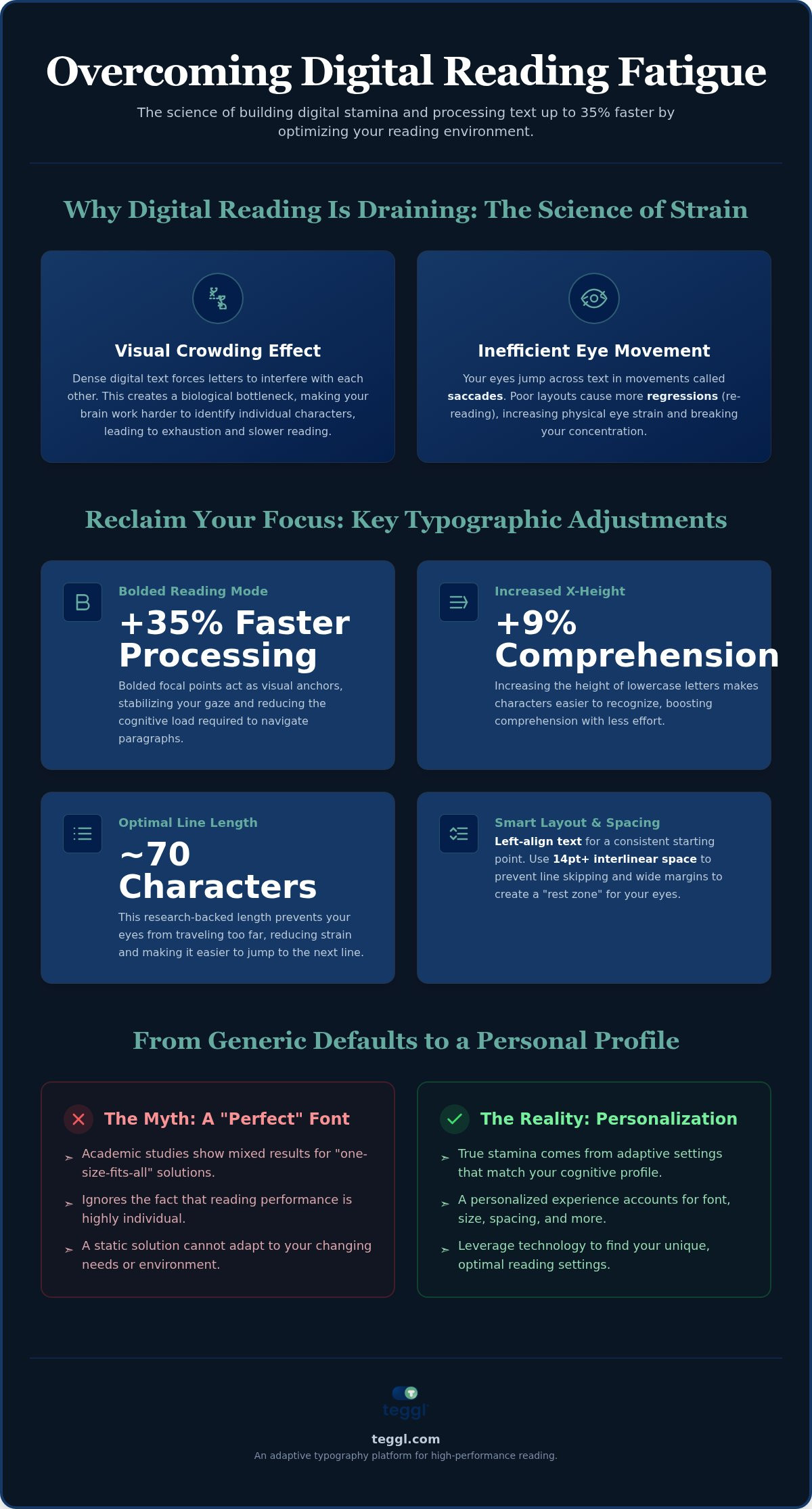
The good news is that you don't have to settle for digital burnout. By mastering the science of overcoming reading fatigue online, you can reduce physical discomfort and process text up to 35% faster without losing comprehension. This guide explores the latest 2026 research on foveal crowding and cognitive load to help you build lasting digital stamina. You'll learn how to implement personalized typographic strategies that transform your screen from a source of strain into a high-performance tool for clarity.
Table of Contents
The Science of Digital Reading Fatigue: Why Your Eyes and Brain Tire Online
Digital exhaustion isn't just about screen brightness; it's a complex combination of ocular strain and cognitive overload. When you're focused on overcoming reading fatigue online, you're actually fighting a phenomenon known as "Visual Crowding." This happens when dense digital text causes letters to interfere with one another, making it harder for your brain to isolate and identify individual characters. A July 2025 study in the Journal of Vision confirmed that crowding distance is a much stronger predictor of reading performance than standard visual acuity.
Most standard web fonts are built for broad compatibility rather than your specific peak performance. This mismatch forces your brain to work harder to decode shapes, leading to psychological exhaustion from information overload. Instead of absorbing high-level ideas, your mind wastes valuable energy simply processing the mechanics of the screen. This unnecessary friction is what makes long-form digital content feel like a chore by mid-afternoon.
Visual Fixations and Saccades: The Mechanics of Eye Strain
Your eyes don't glide smoothly across a line; they move in rapid jumps called saccades. When a layout is cluttered or the font is mismatched to your visual profile, you experience more "regressions," or the need to re-read the same sentence. Research from Adobe demonstrates that optimizing font weight and character width can significantly reduce fixation duration, allowing for smoother transitions between words. By mastering the science of overcoming reading fatigue online, you can minimize these physical interruptions.
Integrating a tool like bolded reading modus provides the visual anchors your eyes crave. These bolded focal points act as guides that stabilize your gaze and prevent your focus from wandering. This simple typographic shift helps you process text up to 35% faster by reducing the cognitive load required to navigate each paragraph. It's a practical, evidence-based way to transform your screen into a high-performance environment.
Optimising Your Visual Environment: Typographic Adjustments to Combat Fatigue
Optimising Your Visual Environment is the first step in overcoming reading fatigue online. Research from the University of Leeds confirms that a line length of approximately 70 characters, paired with wide margins, creates the most efficient layout (p < 0.01). Short lines prevent your eyes from traveling too far across the screen, while wide margins provide a "rest zone" that reduces peripheral noise. Additionally, the University of Essex found that increasing x-height, the height of lowercase letters, can boost comprehension by 9% by making character recognition nearly effortless.
Don't fall for the "universal font" myth. While specialized fonts like Dyslexie or OpenDyslexic are often marketed as total solutions, academic studies show mixed results. There isn't one font that works for everyone. True digital stamina comes from personal choice and adaptive settings that mirror your unique cognitive profile rather than static, generic templates.
To build a legible layout today, implement these research-backed standards:
Use left-aligned columns to provide a consistent starting point for each saccade.
Maintain a minimum of 14pt interlinear space to prevent accidental line skipping.
Prioritize high-contrast themes that meet 2026 W3C accessibility updates for text spacing.
The Role of Contrast and Spacing in Sustained Focus
Small adjustments to inter-letter and inter-word spacing can reduce visual stress for at least 5% of mainstream readers. By following W3C standards for contrast ratios, you can minimize the glare that often leads to headaches. Mastering the art of overcoming reading fatigue online requires a balance of visual comfort and mental clarity. Beyond typography, learning how to reduce distractions during online reading is vital to lower the cognitive cost of constant task-switching. If you aren't sure which settings suit you, taking a quick Reading Profile Test can help you identify your specific visual requirements.
Leveraging Personalised Reading Technology for Sustained Digital Focus
Generic settings are a relic of the past. True digital stamina requires an adaptive typography platform that evolves with your needs. Teggl applies the latest cognitive research to transform your browser into a high-performance environment. It's built on the Reading Profile Test. This diagnostic tool leverages Adobe's predictive models to identify your "Optimal Font Format." Instead of guessing which font might work, you receive a data-driven configuration tailored to your specific visual processing speed. It's the most effective method for overcoming reading fatigue online in 2026.
Integrating these tools into your daily professional workflow ensures you stay sharp from the first email to the final report. Bolded Reading mode acts as a cognitive accelerator by creating visual landmarks that guide your eyes. This reduces the effort required for character recognition, allowing you to process information up to 35% faster. By minimizing the physical and mental drain of standard typography, you'll maintain peak focus without the typical afternoon slump. It's about working smarter, not harder.
Implementing the 'Personalised Readability' Framework
Treat your digital setup like a scientific experiment. Begin by using the Teggl extension to test various font weights and character widths. Observe how different configurations affect your comfort levels. When tackling complex academic papers or technical documentation, utilize the tekstbegrip verbeteren tool features to manage visual density. Continually measure your performance and adjust your spacing to find your personal "sweet spot." This proactive approach to overcoming reading fatigue online ensures that your technology works for you, not against you.
Unlock Your Peak Reading Performance
Your digital environment shouldn't be a source of exhaustion. By understanding the mechanics of visual crowding and implementing research-backed typographic adjustments, you can reclaim your focus. Mastering the art of overcoming reading fatigue online isn't just about trying harder; it's about using tools that work with your biology. Optimized layouts and personalized font weights transform your processing speed from a bottleneck into a competitive advantage.
Ready to experience the difference for yourself? Our technology is built on Adobe research and the Readability Consortium's findings, ensuring you meet W3C 2026 accessibility standards while increasing your reading speed by up to 35%. Take the Reading Profile Test and discover your optimal settings with Teggl. You have the power to turn every screen into a high-performance workspace. It's time to read with clarity and comfort.
Frequently Asked Questions
What is the primary cause of reading fatigue when using a computer?
The primary cause is a combination of ocular strain and cognitive overload, often triggered by "Visual Crowding." This happens when the proximity of characters interferes with your brain's ability to identify individual letters. Unlike paper, screens often force your eyes into inefficient saccades and frequent regressions. Addressing these mechanics is the first step toward overcoming reading fatigue online.
Can changing my font really make me read 35% faster?
Yes, Adobe research indicates that individuals can read up to 35% faster when using a font weight and width optimized for their personal visual profile. There's no universal "best" font; instead, peak performance comes from finding your specific "Optimal Font Format." By reducing the cognitive friction of character recognition, you allow your brain to process information at its highest natural velocity.
Is there one specific font that is best for everyone with dyslexia?
No, there isn't a single font that works for everyone. While options like Dyslexie or OpenDyslexic are popular, peer-reviewed research shows mixed results regarding their effectiveness. The most reliable approach is personalization. Individual choice and adaptive typography tend to yield better results for readers with dyslexia than any static, one-size-fits-all font choice.
How does bolded reading help with ADHD-related focus issues?
Bolded Reading Mode creates strong visual anchors that guide the eye through dense text. For readers with ADHD, these anchors act as "focal points" that prevent the gaze from wandering or skipping lines. By reducing the visual crowding distance and highlighting the start of words, this technology helps maintain a steady flow and reduces the mental effort required to stay on track.
What are the best W3C settings for reducing eye strain on the web?
The 2026 W3C accessibility updates prioritize specific text spacing and contrast ratios to minimize glare. For sustained comfort, maintain a minimum interlinear space of 14pt and ensure your text remains left-aligned. These settings provide a predictable structure for your eyes, which is essential for overcoming reading fatigue online during long workdays. High-contrast themes also help reduce the ocular strain caused by low-quality rendering.
Do blue light glasses actually help with reading fatigue?
Evidence for blue light glasses is largely anecdotal and less impactful than ergonomic or typographic adjustments. While they might reduce some glare, they don't address the underlying issues of visual crowding or cognitive load. To truly reduce fatigue, focus on optimizing your reading environment through personalized font settings and proper layout spacing rather than relying solely on external eyewear.



Comments