
Optimal Text Display for Focus: The Science of Digital Readability in 2026
Did you know that switching to a font tailored to your specific visual needs could increase your reading speed by as much as 35%? Most of us spend our working hours fighting against visual crowding and digital eye strain, often losing our place because standard layouts don't provide the optimal text display for focus. It's frustrating when your digital tools feel like they're working against your concentration rather than supporting your long-term cognitive well-being. We've accepted a one-size-fits-all digital world for too long, but the latest advancements in visual ergonomics suggest a far more personalized way forward.
This guide explores the evidence-based mechanics of digital readability, moving beyond generic standards to show you how specific typographic adjustments can transform your reading experience. You'll learn how to leverage variables like x-height, character spacing, and line length to significantly reduce cognitive load. We'll preview the latest research on personalized reading technology to help you build a high-performance setup that works across every website you visit, turning every text-heavy task into an opportunity for deep clarity and sustained attention.
Table of Contents
The Science of Visual Ergonomics: Why Standard Text Fails Our Focus
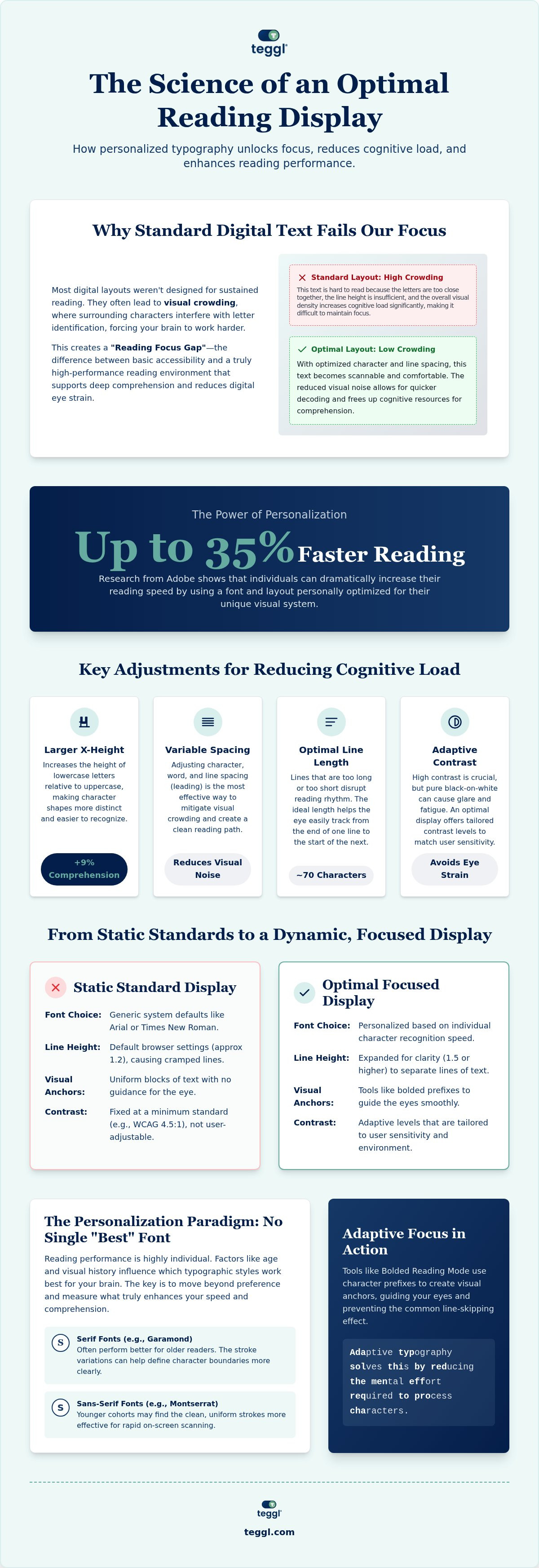
Reading focus is your cognitive ability to maintain attention on text strings without visual interference. While standard web design often prioritizes aesthetics, it frequently ignores how visual crowding disrupts the eye. This phenomenon occurs when surrounding characters interfere with the identification of a target letter, causing your brain to work harder just to decode the words. Most websites leave readers in a Reading Focus Gap because they treat accessibility as a finished goal rather than a performance baseline. To achieve an optimal text display for focus, we must move beyond static standards toward environments that actively support the brain.
Adaptive typography solves this by reducing the mental effort required to process characters. The science of readability demonstrates that when text is easier to decode, more cognitive resources are available for deep comprehension. It's about creating a frictionless path for your eyes, allowing you to absorb information without the constant distraction of visual noise.
Typographic Variables That Dictate Cognitive Load
Small adjustments lead to significant gains in clarity. For instance, research from the University of Essex found that a larger x-height, specifically 5.0mm compared to 4.2mm, can improve comprehension by approximately 9%. The Leeds Framework further refines this for instructional content, recommending 70-character line lengths and 14pt interlinear spacing to prevent the common issue of line-skipping. Font weight and character width also play critical roles; distinct letterforms prevent letter-swapping and reduce the mental fatigue associated with long-form digital reading. By fine-tuning these specific variables, you build an optimal text display for focus that adapts to your unique visual requirements.
Designing the Optimal Reading Environment for Sustained Attention
There is no single "best" font for everyone. Adobe Research confirms that personalization is the key to performance; individuals read up to 35% faster when using their personally optimal font. Achieving an optimal text display for focus requires moving beyond generic browser settings that treat every reader the same. While Harvard's digital accessibility guidelines provide an essential foundation for contrast and layout, true performance comes from tailoring the environment to your specific cognitive needs and visual history.
A focus-first digital display should prioritize these three pillars:
Adaptive Contrast: Use high contrast that avoids the harsh glare of pure white-on-black, which can cause significant visual fatigue over time.
Variable Spacing: Adjust inter-character and inter-linear spacing to mitigate the visual crowding effects discussed in previous sections.
Dynamic Font Selection: Choose a typeface based on your individual character recognition speed rather than aesthetic preference.
Research from the University of Leeds suggests that pairing sans-serif headings with serif body text often optimizes "search-reading" tasks. This combination creates visual anchors that help the eye navigate dense information efficiently. These anchors act like a digital reading ruler, helping you retain your place and reducing the mental fatigue that leads to distraction. By establishing an optimal text display for focus, you bridge the gap between simple accessibility and peak productivity.
The Personalization Paradigm: Matching Font to Reader
Age and visual history influence which fonts work best for your brain. Older readers often perform better with serif fonts like Garamond because the stroke variation helps define character boundaries, while younger cohorts may find clean sans-serif options like Montserrat more effective for rapid scanning. Surprisingly, your favorite font isn't always your fastest. Evidence shows that preference for fonts like Arial or Dyslexie rarely correlates with actual reading speed or comprehension levels. To find what truly works for your unique visual system, take a Reading Profile Test to identify your unique settings. Discovering your personal baseline is the first step toward effortless digital comprehension and long-term focus.
Implementing Adaptive Focus with Teggl’s Bolded Reading
Standard digital text often feels like an undifferentiated wall of characters that drains your mental energy. Teggl’s Bolded Reading Modus solves this by creating intentional cognitive focus points within every paragraph. By bolding the initial prefixes of words, the tool provides a visual anchor that guides your eye through complex text strings. This simple yet effective mechanism reduces the "skipping" effect, where readers accidentally jump lines or lose their place. It ensures you maintain an optimal text display for focus, letting you absorb long-form content with much less visual friction.
The relationship between Usability and text treatment is a core pillar of modern digital experience design. Effective reading requires more than just clear letters; it demands a synergy between typography and your physical surroundings. You can learn how to reduce online reading distractions by combining these adaptive typographic adjustments with broader environmental controls. Teggl acts as a comprehensive accessibility solution that bridges the gap between basic WCAG compliance and the high-performance needs of professionals.
From Accessibility to Peak Performance
Teggl isn't just another font; it's a sophisticated adaptive typography platform. It personalizes your entire reading experience based on individual factors and environmental variables like screen quality or ambient light levels. This dynamic approach guarantees an optimal text display for focus across every website you visit. Stop settling for a one-size-fits-all digital world that hinders your productivity. We invite you to try the Teggl extension to discover your unique reading settings and experience a new level of cognitive clarity today.
Master Your Digital Environment for Peak Performance
Digital reading doesn't have to be a battle against eye strain and distraction. We've seen how visual ergonomics and personalized typography can fundamentally change how your brain processes information. By applying evidence-based adjustments to x-height, spacing, and contrast, you move beyond basic accessibility. You create an optimal text display for focus that is uniquely yours. Research from Adobe and the University of Leeds shows that this level of personalization can increase your reading speed by up to 35%.
It's time to stop settling for static, standard layouts that drain your mental energy. Instead, embrace an adaptive typography platform designed to support your long-term cognitive health and productivity. Take the next step toward a more efficient, comfortable digital life. Discover your optimal reading settings with the Teggl Profile Test and start reading with clarity today. You have the power to transform every screen into a high-performance tool.
Frequently Asked Questions
Does a specific font like OpenDyslexic or Dyslexie really improve focus?
Research on specialized fonts like OpenDyslexic shows conflicting results and doesn't support the idea of a universal solution. Effective focus depends on a combination of factors like spacing and contrast rather than a single typeface. Teggl approaches this by offering an adaptive typography platform that adjusts multiple variables to find what works best for your specific visual processing needs.
How much can a personalized font actually increase my reading speed?
Switching to a personally optimal font can increase your reading speed by up to 35% according to Adobe Research. This significant gain happens because the brain spends less energy decoding characters and more on comprehension. By identifying your unique settings, you create an optimal text display for focus that maximizes both efficiency and comfort during long digital reading sessions.
What is the most legible line length for digital focus?
The most legible line length for sustained digital focus is approximately 70 characters. This standard, supported by the Leeds Framework, prevents the eye from getting lost when moving from the end of one line to the start of the next. Maintaining this consistent width helps reduce the mental fatigue often caused by excessively wide or narrow text blocks on modern screens.
Can larger fonts really reduce visual stress and the need for overlays?
Larger fonts and increased x-heights are proven to reduce visual stress and the mental effort required to read. University of Essex studies demonstrated that increasing x-height from 4.2mm to 5.0mm improved comprehension by roughly 9%. These adjustments often eliminate the need for colored overlays by naturally reducing the visual crowding that causes letters to blur or shift during reading.



Comments