
How to Increase Concentration While Reading: An Evidence-Based Guide to Visual Ergonomics
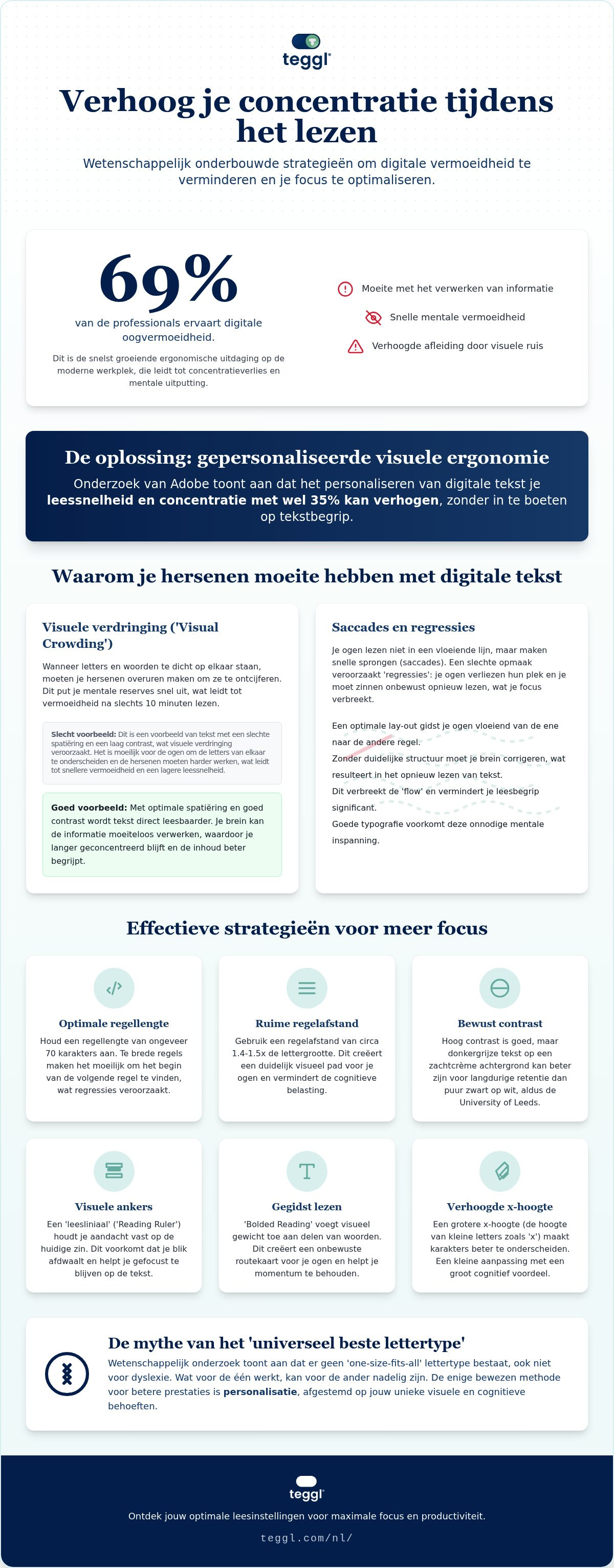
Recent data shows that 69% of professionals now suffer from digital eye strain, making it the fastest-growing ergonomic challenge in our modern workplace. You've likely felt the frustration of finishing a page only to realize you haven't processed a single word, searching for ways to concentratie verhogen bij het lezen without the mental burnout. It's exhausting to fight against screen glare and cluttered layouts while trying to stay productive. You aren't losing your edge; your digital environment is simply working against you.
If you're ready to reclaim your focus, the solution lies in visual ergonomics. Research from Adobe suggests that personalizing your digital text can boost reading speed and concentration by as much as 35%. This guide will show you exactly how to transform your screen into a high-performance reading environment. We'll break down the cognitive science of focus, explore how specific typographic adjustments reduce mental fatigue, and introduce tools that make text pop so you can finish your reading list in record time.
Table of Contents
The Cognitive Science of Visual Focus and Reading Concentration
Reading concentration isn't just a matter of willpower; it's the delicate balance between cognitive load and visual ergonomics. If your eyes struggle to distinguish characters, your brain has less energy available for comprehension. This phenomenon, known as "Visual Crowding," occurs when tight letter spacing or poor contrast forces the brain to work overtime just to decode text. When visual noise is high, your mental resources drain quickly, leading to the fatigue many feel after just minutes of digital reading.
Research from Adobe highlights that there's no single "best" font for everyone. However, their data shows that finding a personally optimal font can increase reading speed by up to 35% without sacrificing comprehension. This distinction is vital because the University of Leeds found a clear divide between "search reading" and "deep reading." High visual friction often traps readers in a shallow search mode, making it nearly impossible to enter the flow state required for deep, analytical work.
Why Your Brain Skips Lines: The Role of Saccades
Your eyes don't move smoothly across a line of text. Instead, they jump in rapid bursts called saccades. Studying eye movements during reading reveals that poor layout often causes "regressions," which is the scientific term for re-reading the same sentence because your eyes lost their place. Factors like x-height (the height of lowercase letters) and character width significantly impact how accurately your brain maps these jumps. If the text is too cramped, your saccades become erratic, and your focus shatters.
The Myth of the "Universal Best Font"
Many believe that specific "dyslexia fonts" like OpenDyslexic are a cure-all, but peer-reviewed research shows no universal benefit from these designs. Findings are often mixed, proving that what works for one person might hinder another. To effectively concentratie verhogen bij het lezen, you must move beyond the idea of a one-size-fits-all solution. Personalization is the only evidence-based path to better focus. By adjusting variables like weight and spacing to your specific needs, you transform the text from an obstacle into a clear path for information.
Evidence-Based Strategies to "Concentratie Verhogen bij het Lezen"
Designing your digital reading space is just as critical as the content you're consuming. To effectively concentratie verhogen bij het lezen, you must control how your eyes navigate the screen. Start by optimizing your line length. Research suggests an ideal width of approximately 70 characters per line. When lines are too wide, your eyes struggle to find the start of the next row, leading to the "regression" mentioned earlier. Pair this with a 14pt interlinear spacing to create a clear visual path that reduces the cognitive load of tracking.
Visual anchors are another powerful tool for focus. The "Reading Ruler" effect acts as a guide, keeping your attention locked on the current sentence and preventing your gaze from wandering to distracting paragraphs below. Regarding contrast, research from the University of Leeds suggests that while dark mode can reduce glare, high-contrast settings, such as dark grey text on a soft cream background, often yield better academic performance and long-term retention than pure white-on-black setups.
You can also use "Bolded Reading" to guide your eye through complex sentences. By adding visual weight to specific parts of words, you create a subconscious map that helps you maintain momentum. This prevents the mental "stalling" that happens when you hit a wall of dense, uniform text.
Managing Digital Distractions and Sensory Input
Reducing visual noise is essential for deep work. Use browser extensions to strip away sidebars, ads, and flashing elements that compete for your attention. Interestingly, studies show that increasing the x-height of your font to 5.0mm can raise measured reading age by 4 months in early or struggling readers. It's a small adjustment that provides a massive cognitive payoff by making characters more distinguishable at a glance.
The Role of Personalised Reading Profiles
Because every brain processes information differently, there's no universal "perfect" setting. You need to discover your own Reading Profile by testing various typographic weights, sizes, and spacing configurations. To find what works for your unique visual needs, you can compare your reading performance using diagnostic tools. Identifying these preferences is the final step in moving from a standard, fatiguing layout to a high-performance digital environment.
Personalization: How Teggl Transforms Digital Reading Performance
Static layouts and rigid font choices often ignore the reality of biological diversity in how we process text. Teggl shifts this paradigm by operating as an adaptive typography platform rather than a simple font replacement. The Teggl Browser Extension applies real-time Bolded Reading to any website, instantly converting dense blocks of text into a high-performance visual environment. By dynamically adjusting the weight and prominence of characters, it allows you to concentratie verhogen bij het lezen regardless of the original site's design.
This technology integrates seamlessly into professional and academic workflows. Whether you're parsing a 50-page technical report, a complex academic paper, or a long-form article, the platform reduces the physical effort required to stay on track. It transforms the digital landscape from a source of fatigue into a streamlined path for information, ensuring that your mental energy is spent on analysis rather than just decoding words.
Bolded Reading: Anchoring Your Focus
The mechanism behind Bolded Reading is designed to support the saccadic eye movements discussed earlier. By providing clear visual anchors, the technology prevents line skipping and reduces the frequency of regressions. It guides your eye naturally from one focal point to the next, maintaining momentum even when your cognitive energy is low. The user-centric design also allows you to flip between different modes. You can use a more aggressive bolding for high-stakes research or a lighter setting for casual reading, matching the tool to your current mental state.
Getting Started with Personalised Accessibility
The journey to optimal focus begins with the Reading Profile Test. This scientific assessment identifies your unique requirements for x-height, character weight, and spacing. Instead of guessing which settings might help, you receive a data-driven profile that serves as your personal blueprint for readability. It's the most effective way to concentratie verhogen bij het lezen by removing the visual obstacles that lead to digital eye strain. Discover your optimal settings today and Experience the future of reading with the Teggl Browser Extension.
Master Your Reading Focus Through Personalization
Your ability to stay focused isn't a fixed trait; it's a direct result of the visual environment you create. By addressing the science of visual crowding and optimizing your digital layout, you move beyond the frustration of mental fatigue and line skipping. Peak performance isn't about finding a magic universal font, but about tailoring variables like x-height, spacing, and weight to your unique cognitive needs.
When you align these ergonomic factors with your personal Reading Profile, you'll find it much easier to concentratie verhogen bij het lezen. This evidence-based approach, rooted in research from Adobe and the University of Leeds, allows you to transform demanding technical reports into clear, manageable information. You don't have to settle for digital eye strain or the constant need to re-read paragraphs.
It's time to reclaim your productivity and experience text that stays sharp and engaging. Discover your optimal reading settings with Teggl’s Reading Profile Test. You deserve a digital experience that supports your well-being while driving your performance. Start your journey toward frictionless reading today.
Frequently Asked Questions
How can I "concentratie verhogen bij het lezen" if I have ADHD?
Reducing visual noise and using focal anchors is the most effective way to manage reading with ADHD. While technology doesn't cure ADHD, adjusting your digital environment to reduce "visual crowding" can lower the cognitive effort required to stay on a line. Using visual bumpers like Bolded Reading helps maintain momentum by providing clear entry points for each word, which prevents your gaze from drifting to other parts of the page.
Does a specific font really help with reading speed and focus?
No single font is universally superior for every reader. Instead, reading performance is influenced by a combination of variables like x-height, character weight, and interlinear spacing. What works for one person might actually slow another person down. This is why testing your own Reading Profile is more effective than switching to a generic font that hasn't been personalized to your specific visual needs.
What is Bolded Reading and how does it work?
Bolded Reading is a visual guidance system that adds weight to the initial parts of words to anchor your focus. It works by creating a clear visual path for your eyes to follow, which minimizes line skipping and reduces the mental energy required for decoding. This allows your brain to spend more resources on comprehension and less on the physical act of tracking text across a digital screen.
Is there a difference between reading on paper versus a digital screen for concentration?
Digital screens introduce unique challenges like backlight glare and blue light that can lead to faster mental fatigue compared to paper. However, digital platforms offer the significant advantage of adaptive typography. You can't change the font size or spacing on a printed page, but you can use digital tools to concentratie verhogen bij het lezen by personalizing the text layout to your exact environmental and visual requirements.



Comments