
How to Improve Reading Comprehension Online: A Scientific Approach for 2026
Why does your brain feel like it's hitting a wall every time you open a complex digital report? You aren't alone in feeling that digital drift where your eyes skim the words but your mind absorbs nothing. It's frustrating to battle visual crowding and cognitive fatigue just to get through your daily reading list. You want to begrijpend lezen verbeteren online, but traditional methods aren't keeping up with the demands of 2026.
This guide reveals how to transform your digital environment using evidence-based strategies and adaptive typography. Research from Adobe shows that personalizing text can increase reading speed by up to 35 percent. We'll explore how to reduce mental effort, sharpen recall, and master the art of reading on a screen without burnout. Discover how to turn your browser into a high-performance tool for focus and clarity.
Table of Contents
The Science of Digital Reading Comprehension: Why Online Content is Different
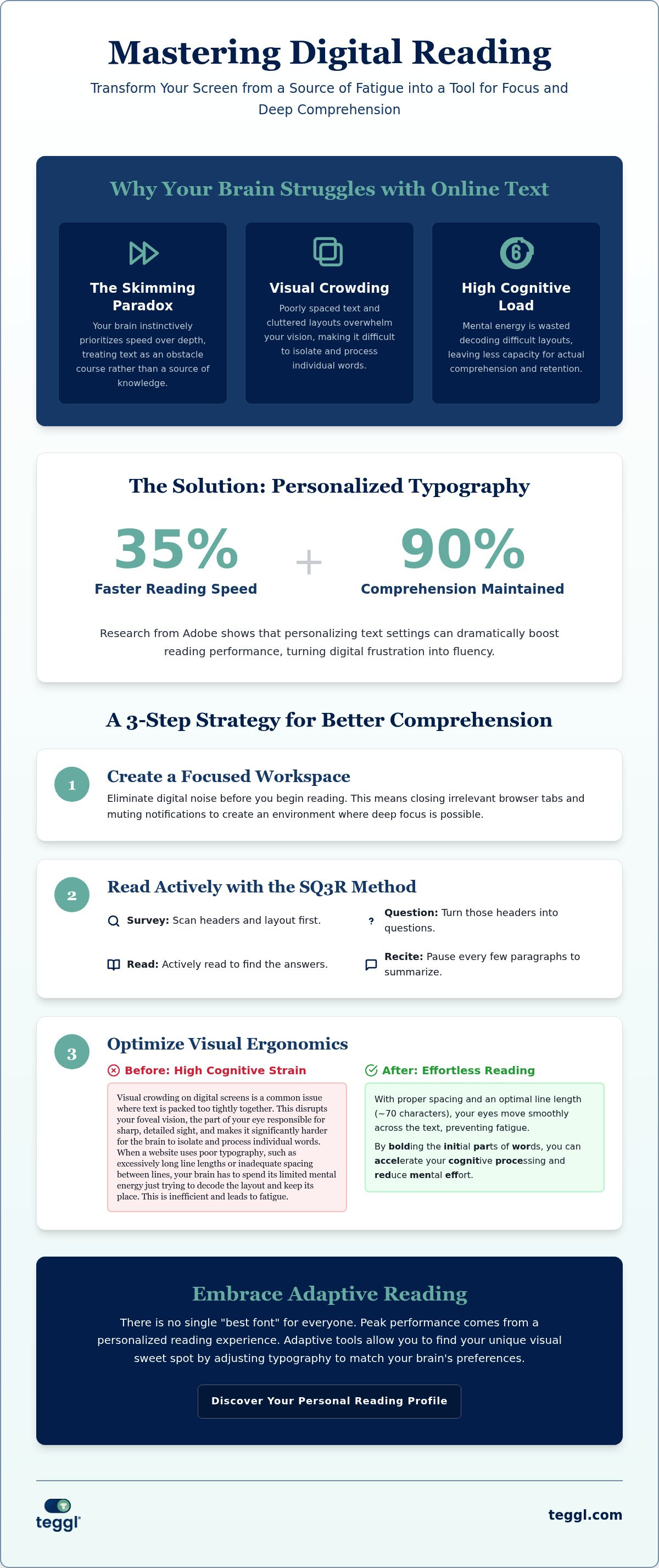
Digital reading isn't just about moving your eyes across a screen; it's a specialized cognitive skill. It requires the ability to synthesize information from non-linear, hyperlinked environments where distractions are only a click away. When you aim to begrijpend lezen verbeteren online, you must first master The Science of Digital Reading Comprehension. Most readers today fall victim to the "Skimming Paradox." This is where the brain instinctively prioritizes speed over depth while scrolling, treating paragraphs as hurdles to jump rather than concepts to absorb.
To better understand how these cognitive processes work, watch this helpful video:
This struggle is often amplified by "Visual Crowding." On digital screens, text is frequently packed too tightly, which disrupts your foveal vision and makes it harder for the brain to isolate individual words. This creates a massive "Cognitive Load." When a website uses poor typography or cluttered sidebars, your brain spends its limited mental energy just trying to decode the layout. Addressing these visual hurdles is essential if you want to begrijpend lezen verbeteren online and maintain high levels of productivity.
Visual Ergonomics and the Cognitive Cost of Reading
Optimizing your visual environment is the first step toward peak performance. Research from the University of Leeds highlights how specific typographic layouts improve reading efficiency even when you aren't under time pressure. For instance, maintaining a line length of roughly 70 characters and increasing inter-line spacing prevents your eyes from getting lost during the "return sweep" to a new line. Using a "Reading Ruler" effect can further ground your focus, acting as a visual anchor in a distracted digital world. These small adjustments remove the physical obstacles to understanding, allowing you to process complex information with significantly less mental strain.
Evidence-Based Strategies to Improve Reading Comprehension Online
Mastering your digital space is the first hurdle to peak performance. To effectively begrijpend lezen verbeteren online, start by taking steps to afleidingen verminderen tijdens online lezen. This means closing irrelevant tabs and muting notifications to protect your focus. Once your environment is clear, adapt the SQ3R method for the browser. Survey the headers, turn them into questions, and read specifically to find those answers. This active engagement prevents the passive skimming that often leads to digital drift.
Visual anchoring is another powerful tactic to keep your eyes on track. Bolding the initial parts of words guides your gaze and prevents the common frustration of skipping lines. Pair this with meta-cognitive checks. Pause every three paragraphs to mentally summarize what you've just processed. This ensures you're actually absorbing the material before you scroll further down the page.
The Role of Personalized Typography and Bolded Reading
Science confirms there's no universal "perfect" font for everyone. True success comes from using a tekstbegrip verbeteren tool that prioritizes personalization. Adobe research reveals that individuals read up to 35% faster with optimal personalized fonts while maintaining 90% comprehension. This is the core of Bolded Reading Mode. By highlighting specific fixation points in words, it accelerates cognitive processing and reduces the mental effort required to decode text. Implementing Digital Tools for Long-Term Comprehension Gains involves moving beyond static text. You can start your journey toward effortless reading by taking a Reading Profile Test to find your unique visual sweet spot.
Implementing Digital Tools for Long-Term Comprehension Gains
To truly begrijpend lezen verbeteren online, you must move beyond static text and embrace "Adaptive Reading." This approach uses digital tools to modify the visual structure of any website in real-time. It's not about changing the content; it's about changing how your eyes interact with it. This shift aligns with IES research on digital reading comprehension, which highlights technology-based solutions as essential for modern information processing. Integrating these tools into your daily workflow is seamless. Whether you're scanning industry reports or clearing a dense inbox, adaptive typography ensures you maintain focus without the usual eye strain.
You're no longer just struggling to get through a page. You're optimizing for peak performance. This transformation turns reading from a draining task into a high-speed data acquisition process. By removing the physical friction of poor web design, you free up cognitive resources for deeper understanding and better recall. It is the ultimate way to begrijpend lezen verbeteren online while staying productive and keeping your mental energy high throughout the day.
Finding Your Optimal Reading Profile with Teggl
The first step to this transformation is the Teggl Reading Profile Test. This isn't a generic settings menu. It uses your actual performance data to calibrate your Bolded Reading Mode settings, identifying the exact weight, width, and spacing that your brain prefers. Once your profile is set, the Teggl Browser Extension applies these optimizations across the web instantly. It's a data-driven, personalized experience that replaces "one-size-fits-all" accessibility with a sophisticated tool built for your specific needs. Don't settle for the default view. Take control of your digital environment and unlock a faster, clearer way to read.
Master Your Digital Focus and Elevate Your Reading Performance
Digital reading doesn't have to be a battle against fatigue and distraction. By applying visual ergonomics and active engagement strategies, you can reclaim your focus and process information with total clarity. Remember that there is no single "best" font for everyone; personalization is the scientific key to success. Research from Adobe and the University of Leeds confirms that the right settings can help you read up to 35% faster without losing comprehension.
It's time to stop skimming and start mastering every report and article you encounter. You have the power to begrijpend lezen verbeteren online by aligning your digital environment with your brain's unique needs. Take the first step toward a more efficient, stress-free reading experience today. Discover your optimal reading settings with the Teggl Reading Profile Test and unlock your full potential. You're ready to master the screen.
Frequently Asked Questions
Can a personalized font really improve my reading comprehension?
Yes; personalized fonts significantly impact how your brain processes text. Research from Adobe indicates that individuals read up to 35% faster when using a font tailored to their visual preferences. By using the Reading Profile Test, you identify the exact weight and spacing that reduces your cognitive load. This makes it easier to absorb complex information without feeling drained by the end of a page.
Is Bolded Reading the same as Bionic Reading?
Bolded Reading Mode is a specialized tool designed to highlight word fixation points, helping your brain process text more efficiently. It works by reducing visual crowding, which is a common issue where text feels too dense on a digital screen. This helps your eyes move through sentences with more precision. It prevents the "skimming paradox" where you read quickly but retain almost nothing from the content.
How do I stop myself from skimming when reading online?
You can stop skimming by using visual anchors that guide your eyes through the text. Implementing a tool like the Teggl Browser Extension helps you begrijpend lezen verbeteren online by bolding key parts of words to maintain focus. Additionally, practice "meta-cognitive pausing." Stop every few paragraphs to summarize what you've read. This ensures your mind stays active rather than just scrolling passively through the page.
Do larger fonts help adults with reading comprehension?
Larger fonts can help, but they aren't a universal fix. For many adults, the real issue is visual crowding and poor line spacing rather than just character size. Personalization is the superior approach because it adjusts multiple typographic variables simultaneously. Finding your unique visual sweet spot allows you to process information efficiently without needing excessively large or distracting text sizes that break your flow.



Comments