
How to Better Remember What You Read Online: A Science-Backed Checklist for 2026
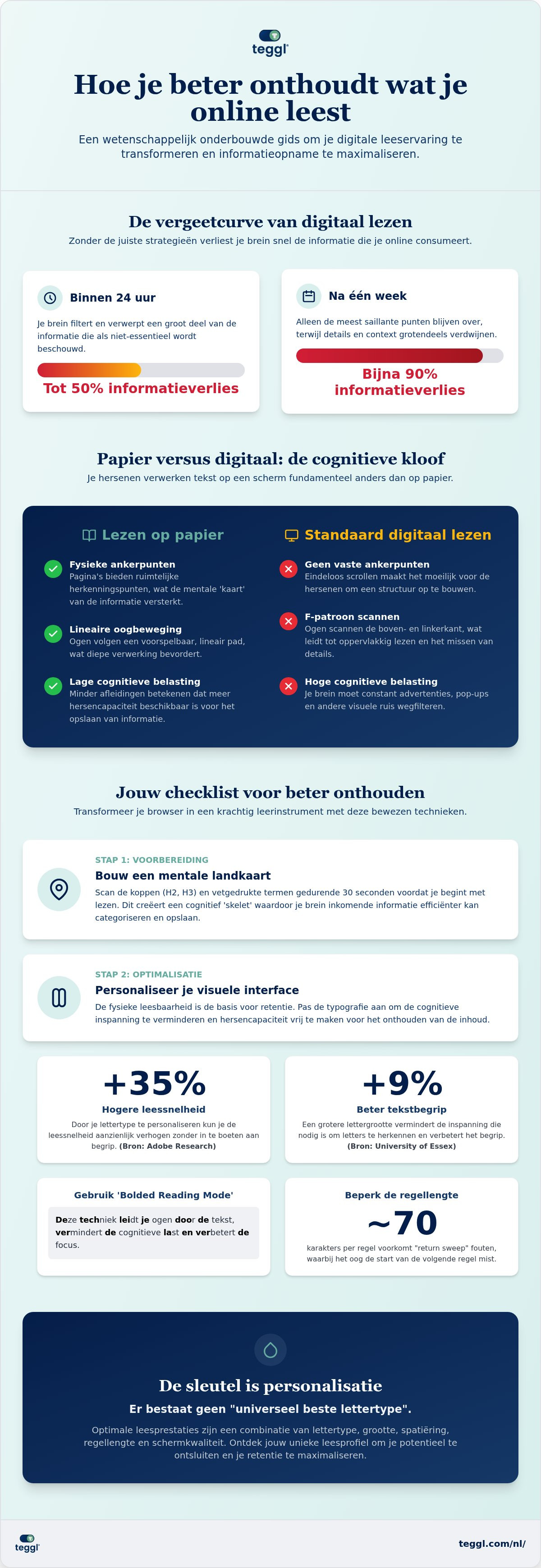
Did you know that within 24 hours of reading an article, your brain will likely discard up to 50% of that information? By the end of a week, research suggests you might only retain a mere 10% of what you consumed. It's a frustrating reality for anyone navigating our text-heavy digital world; you spend valuable time on a deep dive only to feel the key insights slipping away before you've even closed the browser tab. If you've been searching for ways to beter onthouden wat je online leest, you're not just fighting a memory problem, you're battling a visual processing bottleneck and digital overload.
You can break this cycle of forgetting and double your information retention by aligning your digital environment with your brain's natural mechanics. This article provides a comprehensive, science-backed checklist for 2026 designed to help you read faster and reduce the cognitive effort required to stay focused. We will explore how active engagement, strategic visualization, and personalized reading technology can transform every screen into a high-performance learning tool.
Table of Contents
The Science of Digital Reading: Why Screens Make Us Forget
Reading on a screen isn't the same as reading a book. Most digital readers fall into a habit called "shallow reading." Instead of absorbing every word, your eyes naturally follow an F-pattern, scanning the top and left sides of the page for quick keywords. This behavior prevents deep encoding in the hippocampus; the part of your brain responsible for long-term memory. Developing strong digital literacy is the first step toward breaking this habit, as it helps you recognize when you're skimming rather than processing. To understand why your brain treats these mediums differently, consider the fundamental physiological contrasts below.
To better understand this concept, watch this helpful video:
Physical books provide spatial landmarks; a specific quote might be on the bottom left of a page halfway through the book. Browsers lack these anchors. Without them, your brain struggles to map out the information, making it much harder to beter onthouden wat je online leest. This is compounded by Cognitive Load Theory. If a website's design is cluttered, your brain uses its limited energy just to filter out distractions, leaving nothing left for actual learning.
The Role of Visual Crowding in Memory Loss
Visual crowding occurs when characters are too close together, overwhelming your peripheral vision. This often leads to line-skipping and fatigue. Following W3C standards for line length and spacing is vital because it stabilizes your eye-tracking. When a page is filled with ads or sidebars, it triggers an "attentional blink." This is a brief lapse in attention where your brain literally misses new information because it's still processing a previous visual distraction.
Typography as a Cognitive Filter
Your font choice acts as a filter for your focus. Research from the University of Leeds shows that layout significantly impacts search-reading efficiency. There is no "universal best font" because every reader's visual system is different. However, the impact of personalization is undeniable. According to Adobe Research, personalized font choices can increase reading speed by up to 35% without any loss in comprehension. Studies from the University of Essex also indicate that larger font sizes can improve comprehension by approximately 9%. By reducing the effort needed to decode letters, you free up cognitive resources to beter onthouden wat je online leest.
The Ultimate Checklist for Beter Onthouden Wat Je Online Leest
Transforming your browser from a distraction machine into a focus tool requires a tactical approach. Before you read a single word, spend thirty seconds building a mental map. Scan the H2 headers and bolded terms to create a cognitive skeleton. This preparation allows your brain to categorize incoming facts more efficiently. You can find more Smart Strategies for Reading Digital Texts that emphasize this structural awareness.
Step 1: Optimize the Visual Interface
Physical readability is the foundation of retention. If your eyes are straining, your brain isn't storing information. Start by adjusting your font size. Research from the University of Essex found that an x-height of 5.0mm can raise reading age equivalents by four months. Follow these technical guidelines for a frictionless experience:
Enable Bolded Reading Mode: This technique highlights the initial characters of words, guiding your eye through sentences and reducing the cognitive load of decoding.
Limit Line Length: Keep text blocks to approximately 70 characters wide. This prevents "return sweep" errors where the eye loses its place moving from the end of one line to the start of the next.
Reduce Visual Noise: Use dark mode or high-contrast settings to minimize glare and sensory fatigue.
To identify the exact layout that works for your unique visual system, consider taking a Reading Profile Test to find your optimal "retention settings."
Step 2: Active Digital Annotation
Many readers fall into the "Fluostift" or highlighter trap, where they color the page without actually processing the content. This creates an illusion of competence but fails to trigger long-term memory. To beter onthouden wat je online leest, you must engage with the text. Use browser extensions to leave digital marginalia; short, personal notes in the margins that act as retrieval cues. Implement the "One-Sentence Summary" rule: after finishing every H2 section, write one self-contained sentence that explains the core concept in your own words. This forces you to use the Feynman Technique, ensuring you truly understand the material before moving forward.
Finally, respect the consolidation phase. Your brain needs "digital breaks" to move information from short-term to long-term storage. Step away from the screen for five minutes after a deep-dive article to let the memory pathways solidify.
Personalization: The Key to Unlocking Your Reading Potential
For years, designers searched for a "universal best font" that would work for everyone. However, research from The Readability Consortium has debunked this myth. Individual variance is the rule, not the exception. Factors like your age, visual acuity, and even the device you're using change how your brain processes text. To truly beter onthouden wat je online leest, you must move beyond static layouts and embrace adaptive typography that fits your specific needs.
Finding Your Optimal Reading Profile
Your "sweet spot" for reading isn't a guess; it's a measurable data point. Performance data shows that minor adjustments to x-height and character width have a massive impact on your ability to encode information. For some, a wider character width reduces visual crowding. For others, a taller x-height provides the clarity needed for speed. Determine your optimal settings by taking a Reading Profile Test to see immediate gains in focus. These personalized settings don't just help you read faster. They reduce the visual stress that often leads to fatigue for readers with ADHD or high cognitive loads, allowing for a more inclusive digital experience.
Integrating Technology into Your Workflow
Modern tools make these scientific insights easy to apply without manual effort. The Teggl Browser Extension automatically implements Bolded Reading Mode across any website you visit. This creates a focused environment that strips away digital debris while maintaining typographic integrity. This isn't just about aesthetics; it's a sophisticated accessibility solution. By using technology to adjust to environmental factors like lighting and screen size, you can maintain peak performance throughout the day.
Automated Spacing: Apply personalized character and line spacing to eliminate line-skipping.
Visual Guidance: Use bolded character starts to guide your visual path and maintain momentum.
Environmental Adaptation: Adjust contrast and layout based on your current screen size and light levels.
This technology is built on collaborative research between industry leaders like Adobe and top academic institutions. By personalizing your digital environment, you transform the act of reading into an act of retention. It's the most effective way to ensure you actually beter onthouden wat je online leest in 2026 and beyond.
Master Your Digital Mind
The frustration of forgetting a brilliant article minutes after closing the tab is now a solvable challenge. By understanding the mechanics of visual crowding and implementing active digital annotation, you've already taken the first steps toward cognitive clarity. Your brain is capable of incredible retention; it simply requires an environment that respects its natural processing limits. Moving from passive scanning to a structured, personalized reading flow is the most effective way to beter onthouden wat je online leest.
Data from Adobe Research and various university studies show that the right typographic settings can increase reading speed by up to 35% while maintaining high comprehension levels. You don't have to settle for the "universal" defaults that drain your mental energy. It's time to align your browser with your unique visual system. Discover your optimal reading settings with the Teggl Reading Profile Test and experience how a science-backed interface transforms your learning potential. Take control of your digital workspace today and turn every screen into a gateway for lasting knowledge.
Frequently Asked Questions
Is it better to read on paper than online for memory?
Reading on paper often results in higher retention due to physical landmarks, but you can achieve similar results online by creating digital anchors. Use browser tools to leave notes or summaries in the margins. This mimics the spatial memory triggers found in physical books. When you eliminate distractions and use a focused layout, the gap between paper and screen reading narrows significantly.
Can a specific font really help me remember more?
No single font is universally superior for memory; instead, the font that best matches your visual system will help you beter onthouden wat je online leest. When text is easy to decode, your brain doesn't waste energy on visual processing. This allows more cognitive resources to be directed toward the hippocampus for long-term storage. Personalization is the key to reducing the visual noise that hinders memory.
What is Bolded Reading and how does it improve focus?
Bolded Reading Mode is a typographic technique that highlights the first few letters of each word to guide your eye through the text. This reduces the effort your brain spends on word recognition and eye-tracking. By providing clear visual anchors, it prevents the common F-pattern scanning habit. This results in a smoother reading rhythm and improved focus on the actual content rather than the act of reading.
Does font size affect how much I understand?
Font size directly impacts comprehension by reducing the effort required for letter identification. If text is too small, your brain enters a high-effort state that triggers fatigue and decreases retention. Increasing the x-height allows for faster processing of information. Optimal sizing varies by individual, but ensuring characters are large enough to be seen without squinting is a fundamental step in improving digital understanding.
How can I stop skimming and start reading deeply online?
You can stop skimming by building a mental map before you start and practicing active engagement. Scan headers to create a structure, then use the One-Sentence Summary rule to beter onthouden wat je online leest after every section. Writing your own summaries forces your brain to move from passive consumption to active processing. This shift is essential for moving information from short-term to long-term memory.
Are there specific settings for readers with ADHD or Dyslexia?
Readers with ADHD or Dyslexia often benefit from increased line spacing, larger character widths, and high-contrast settings to manage visual stress. These adjustments don't cure the conditions, but they do reduce the cognitive load that causes focus to drift. Features like Bolded Reading Mode can be particularly helpful for maintaining a consistent visual path. Every reader should test different combinations to find the profile that provides the most comfort.



Comments