
Hoe je gefocust blijft tijdens het lezen van lange artikelen online: de ultieme gids voor 2026
Updated: Jul 17
Wat als je moeite met concentratie geen gebrek aan wilskracht is, maar een direct gevolg van de interface op je scherm? Veel lezers zoeken dagelijks naar how to stay focused reading long articles online omdat ze worstelen met dansende letters en een overweldigende visuele overload op drukke websites. De waarheid is dat je brein simpelweg niet is gebouwd voor de digitale chaos van 2026. Dit leidt vaak tot snelle mentale uitputting en brandende ogen na slechts een uur schermtijd.
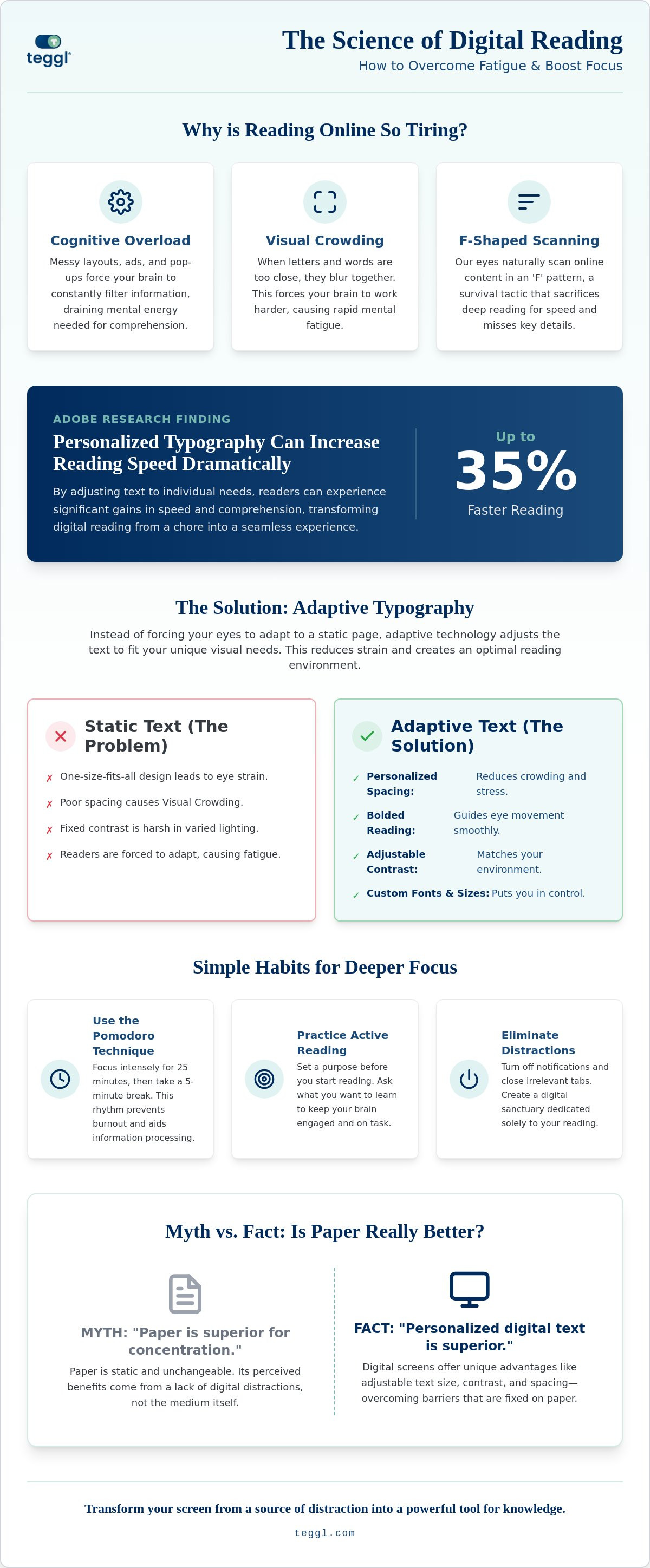
Het is frustrerend om halverwege een belangrijk artikel de draad kwijt te raken of regels per ongeluk over te slaan. Wij begrijpen die digitale overprikkeling en bieden een oplossing die rust en helderheid terugbrengt in je dagelijkse workflow. In deze gids ontdek je wetenschappelijk onderbouwde technieken en technologische hulpmiddelen om je concentratie te verdubbelen tijdens het lezen van complexe digitale teksten. Onderzoek van onder andere Adobe toont aan dat gepersonaliseerde typografie de leessnelheid met wel 35% kan verhogen in specifieke contexten.
We duiken in de wereld van adaptieve typografie en visuele ergonomie, zodat je sneller door artikelen heen komt met een dieper begrip en zonder die vervelende hoofdpijn. Je leert hoe je jouw digitale omgeving transformeert van een bron van afleiding naar een krachtig instrument voor optimale kennisopname.
Inhoudsopgave
waarom je brein moeite heeft met lange online teksten
Het menselijk brein is niet geprogrammeerd om urenlang naar een oplichtend scherm te staren. Wanneer je probeert te begrijpen how to stay focused reading long articles online, stuit je direct op een biologische barrière: ons aangeleerde scan-gedrag. We lezen online meestal in een zogenaamde F-vorm. Hierbij vliegen onze ogen horizontaal over de bovenkant van de pagina, om daarna slechts korte fragmenten aan de linkerkant van de tekst mee te pakken. Dit mechanisme is een overlevingsstrategie tegen informatie-overload, maar het belemmert diepgaand lezen omdat we cruciale nuances missen.
Daarnaast putten rommelige lay-outs met flitsende advertenties en zijbalken je werkgeheugen uit. Dit noemen we cognitieve belasting. Je hersenen moeten constant filteren wat relevant is en wat niet, waardoor er minder energie overblijft voor de tekst zelf. Dit proces wordt verergerd door blauw licht en schermschittering, factoren die je visuele systeem zwaar belasten en je aandachtsspanne verkorten. Om dit proces beter te begrijpen, kun je kijken naar de wetenschap van aandacht, die uitlegt hoe onze focus versnipperd raakt in een digitale omgeving.
Bekijk deze video voor drie praktische tips om je focus tijdens het lezen te verbeteren:
de wetenschap achter visuele crowding
Een specifiek en vaak genegeerd probleem bij digitaal lezen is visual crowding. Onderzoek van onder andere Adobe Research toont aan dat dit optreedt wanneer letters en woorden te dicht op elkaar staan. Hierdoor lijken ze voor je brein in elkaar over te vloeien, wat de herkenning vertraagt. Je hersenen moeten dan harder werken om individuele tekens te identificeren, wat leidt tot snelle mentale uitputting. Ruime witruimte en een optimale regelafstand zijn daarom geen esthetische keuzes, maar essentiële voorwaarden om visuele stress te verminderen en je leesflow te behouden.
waarom printen niet de enige oplossing is
Vaak wordt beweerd dat papier superieur is voor concentratie, maar dat is een achterhaalde gedachte. Papier is statisch en onveranderlijk. Een digitaal scherm biedt juist unieke voordelen zoals schaalbaarheid en aanpasbaar contrast. Door de interface te personaliseren, neem je barrières weg die op papier vaststaan. Het gaat er niet om dat je stopt met digitaal lezen, maar dat je leert how to stay focused reading long articles online door technologie te gebruiken die zich aanpast aan jouw visuele behoeften.
praktische technieken om je concentratie te verhogen bij het lezen
Focus is geen statische eigenschap, maar een vaardigheid die je kunt trainen. Als je wilt leren how to stay focused reading long articles online, begin dan bij je workflow. De pomodoro-techniek werkt uitstekend voor zware leestaken: lees 25 minuten met volledige overgave en neem daarna 5 minuten pauze. Je hersenen gebruiken die rust om informatie te verwerken, waardoor je de volgende sessie weer fris start. Combineer dit met actief lezen door jezelf een doel te stellen voordat je begint. Vraag je af welke specifieke informatie je uit de tekst wilt halen. Dit dwingt je brein om gericht te zoeken in plaats van passief te dwalen.
Daarnaast is het cruciaal om prikkels te elimineren die om je aandacht schreeuwen. Zet notificaties op al je apparaten uit en gebruik extensies die visuele ruis wegfilteren. Er zijn effectieve technieken om afleiding te vermijden die je helpen een digitale bubbel te creëren. Binnen die bubbel fungeren visuele ankers zoals Bolded Reading als wegwijzers voor je ogen. Door het begin van woorden subtiel te benadrukken, help je je visuele systeem om de flow vast te houden en voorkom je dat je per ongeluk regels overslaat.
pas je omgeving en hardware aan
Je fysieke houding beïnvloedt je mentale prestaties direct. Zorg dat je scherm op ooghoogte staat om nekspanning te voorkomen, want fysiek ongemak is een sluipmoordenaar voor je focus. Experimenteer ook met je contrastinstellingen. Terwijl 'dark mode' prettig kan zijn in een donkere kamer, geeft een lichte achtergrond met zwarte letters vaak meer scherpte bij daglicht. Pas dit aan totdat je merkt dat je ogen ontspannen blijven tijdens het lezen.
ontdek jouw unieke leesprofiel
Wat voor de een werkt, is voor de ander vermoeiend. Er bestaat geen universeel perfect font omdat elk brein informatie anders verwerkt. Factoren zoals lettergrootte, regelafstand en dikte van de letters zijn uiterst persoonlijk. Je kunt jouw ideale leesomgeving nauwkeurig in kaart brengen met de Reading Profile Test van Teggl. Door je digitale tekst te personaliseren, verminder je de cognitieve druk aanzienlijk. Je kunt direct je eigen prestaties verbeteren door te ontdekken welke instellingen voor jou het beste werken.
de rol van adaptieve typografie en personalisatie
De oplossing voor digitale vermoeidheid ligt niet in minder lezen, maar in slimmer lezen. Terwijl traditionele media statisch zijn, biedt de digitale wereld de kans op adaptieve typografie. Dit betekent dat de tekst zich aanpast aan de lezer in plaats van andersom. Als je wilt weten how to stay focused reading long articles online, is dit de meest fundamentele verandering die je kunt maken. In plaats van te vechten tegen een rigide lay-out, creëer je een omgeving die samenwerkt met je brein.
Een krachtig onderdeel hiervan is bolded reading. Door het begin van woorden subtiel dikgedrukt te maken, worden de saccadische sprongen van je ogen ondersteund. Dit zijn de razendsnelle bewegingen die je ogen maken terwijl ze over een regel glijden. Onderzoek van de University of Leeds bevestigt dat lay-out variabelen zoals regellengte en spatiëring cruciaal zijn voor hoe we informatie verwerken. Wetenschappers leggen op BrainFacts.org uit waarom online lezen moeilijker is door de manier waarop ons brein visuele informatie op een scherm filtert. Personalisatie is daarom geen luxe, maar de toekomst van digitale productiviteit.
de voordelen van de Teggl browser-extensie
Met de Teggl browser-extensie transformeer je elke website direct tot een rustige leesomgeving. Je activeert bolded reading met één klik, waardoor je ogen direct meer houvast krijgen. Het gaat echter verder dan alleen dikgedrukte letters. De kracht zit in de combinatie van fontgrootte, x-hoogte en de juiste spatiëring voor jouw unieke profiel. In de ultieme gids voor een bolded reading extensie in 2026 lees je precies hoe deze instellingen je leeservaring optimaliseren.
implementatie in je dagelijkse workflow
Focus behouden wordt een automatisme wanneer je de juiste tools integreert in je dagelijkse routine. Gebruik Teggl niet alleen voor lange artikelen, maar ook om sneller door je inbox en nieuwsbrieven te gaan. Door visuele ruis te elimineren, bespaar je kostbare mentale energie voor de taken die er echt toe doen. Kijk voor een bredere aanpak ook naar andere leestools voor productiviteit om je digitale tekstbergen definitief te bedwingen.
transformeer je digitale leeservaring
Je hebt nu de tools in handen om de biologische en technologische barrières van het schermlezen te doorbreken. Door te begrijpen hoe cognitieve belasting en visuele crowding je werkgeheugen uitputten, kun je gerichte stappen zetten om je workflow te verbeteren. Of je nu kiest voor de pomodoro-techniek of de kracht van adaptieve typografie, de weg naar how to stay focused reading long articles online begint bij het personaliseren van je omgeving. Het is geen kwestie van harder werken, maar van slimmer inrichten.
Onze benadering is puur gericht op focus-optimalisatie en wordt al dagelijks ingezet door professionals bij toonaangevende bedrijven wereldwijd. Deze methode is gebaseerd op onderzoek van Adobe en de Readability Consortium. We maken geen medische claims, maar bieden een wetenschappelijk onderbouwde manier om de interface tussen tekst en brein te stroomlijnen. Het gaat erom dat de tekst zich aanpast aan jouw unieke behoeften, zodat je weer met plezier en diepgang kunt lezen.
Ben je klaar om je concentratie te verhogen en oogvermoeidheid definitief achter je te laten? probeer de Teggl browser-extensie gratis en ontdek jouw ideale leesinstellingen. Het is tijd om digitale tekst weer toegankelijk en minder intimiderend te maken. Je brein zal je dankbaar zijn.
veelgestelde vragen over gefocust digitaal lezen
waarom raak ik mijn focus kwijt na slechts een paar alinea's online?
Je raakt je focus kwijt omdat digitale omgevingen vaak zijn ontworpen voor oppervlakkig scannen in plaats van diepgaand lezen. Visuele afleidingen zoals advertenties en pop-ups strijden om je aandacht, terwijl de tekst zelf vaak niet geoptimaliseerd is voor jouw ogen. Dit dwingt je brein om constant te filteren wat relevant is, wat je werkgeheugen snel uitput. Het is een van de grootste biologische barrières bij how to stay focused reading long articles online.
is Bolded Reading hetzelfde als snellezen?
Nee, Bolded Reading is geen snelleestechniek waarbij je delen van de tekst overslaat. Het is een vorm van adaptieve typografie die de natuurlijke fixatiepunten van je ogen ondersteunt door het begin van woorden subtiel te benadrukken. In plaats van door de tekst te jagen, zorgt het voor een rustiger leesritme en een betere tekstverwerking. Je ogen vinden makkelijker hun weg door de zin, wat de kans op het overslaan van regels aanzienlijk verkleint.
welk font is het beste voor het lezen van lange artikelen?
Er bestaat geen universeel beste font omdat leesprestaties afhangen van individuele variabelen zoals fontgrootte, x-hoogte en spatiëring. Wat voor de een prettig leest, kan voor de ander juist visuele stress veroorzaken. Wetenschappelijk onderzoek benadrukt dat personalisatie de enige echte oplossing is voor optimale leesprestaties. In plaats van blind te vertrouwen op een standaard font, kun je beter experimenteren met instellingen die jouw specifieke visuele behoeften ondersteunen.
helpt een leesmodus in mijn browser echt tegen oogvermoeidheid?
Een leesmodus helpt zeker door visuele ruis zoals zijbalken en banners te verwijderen, wat de cognitieve belasting direct verlaagt. Echter, oogvermoeidheid wordt vaak veroorzaakt door de tekst zelf, zoals een te hoge contrastverhouding of een ongunstige regellengte. Een goede leesmodus in combinatie met gepersonaliseerde typografie biedt de beste resultaten. Het vermindert de noodzaak voor je ogen om constant te corrigeren, waardoor je langer comfortabel en scherp blijft tijdens het lezen.
hoe kan ik beter onthouden wat ik online heb gelezen?
Je onthoudt informatie beter door de cognitieve druk te verlagen en actieve leesstrategieën toe te passen. Wanneer je minder energie verspilt aan het decoderen van onoverzichtelijke letters door tools voor how to stay focused reading long articles online te gebruiken, blijft er meer capaciteit over voor informatieopslag. Stel jezelf een doel voordat je begint en gebruik visuele ankers om de structuur van een artikel beter te doorgronden. Dit helpt je brein om verbanden te leggen en de inhoud langer vast te houden.
werkt Teggl op alle websites en browsers?
De Teggl browser-extensie is ontworpen om naadloos te werken op moderne browsers die gebaseerd zijn op Chromium, waaronder Google Chrome, Microsoft Edge en Brave. Je kunt de extensie activeren op vrijwel elke website die tekst bevat. Hierdoor heb je overal toegang tot je persoonlijke leesprofiel en Bolded Reading mode, of je nu een complex nieuwsartikel leest, een wetenschappelijke publicatie bestudeert of simpelweg je zakelijke e-mails sneller wilt verwerken.



Comments