
Eye Strain from Screen Reading: The 2026 Guide to Digital Readability and Performance
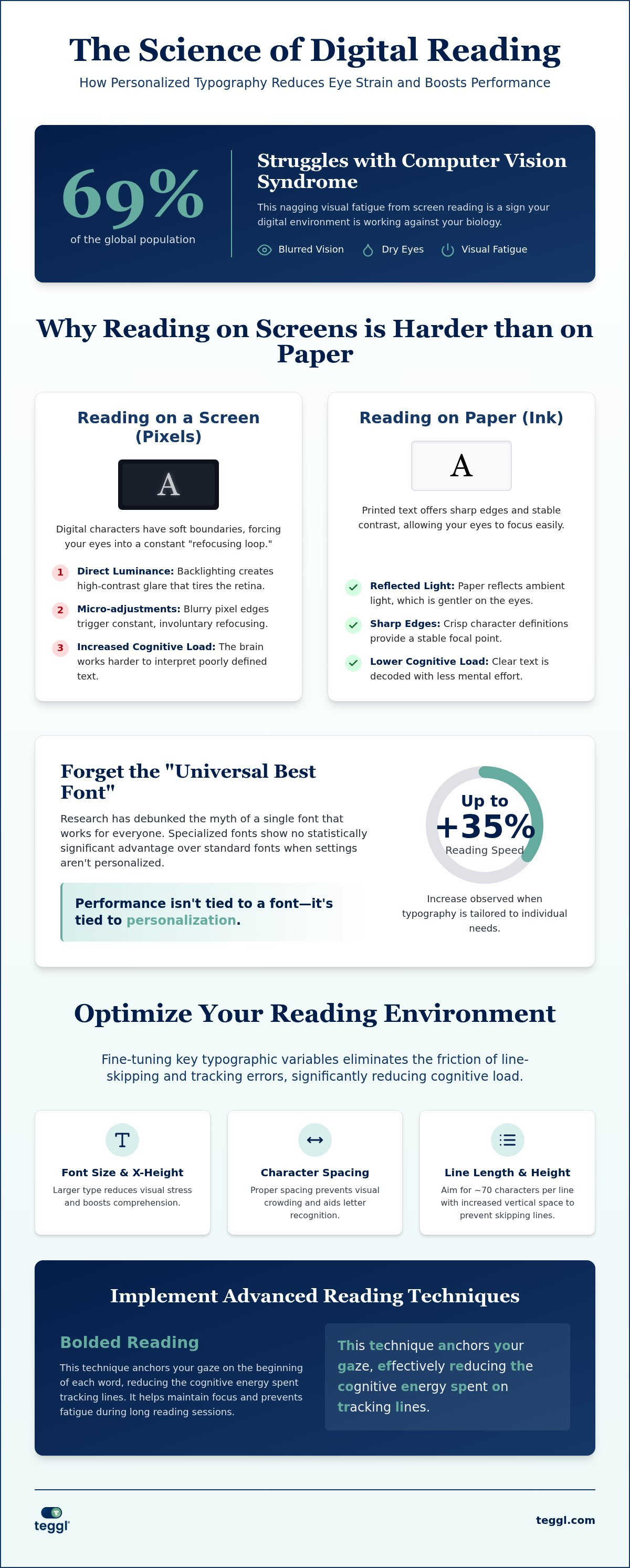
Did you know that 69% of the global population now struggles with the blurred vision and dry eyes associated with computer vision syndrome? It's a frustrating reality for the modern professional. You likely recognize the feeling; it's that nagging visual fatigue after just twenty minutes of reading or the way you constantly lose your place in a long report. Chronic eye strain from screen reading isn't just an inconvenience. It's a clear sign that your digital environment is currently working against your biology.
You can reclaim your focus and protect your well-being. This guide explores the scientific causes of digital fatigue and shows how personalised reading technology can transform your screen-based comfort. We'll break down the mechanics of visual ergonomics and help you build a science-backed browser setup designed for your unique needs. It's time to stop fighting the screen and start optimising your performance.
Table of Contents
The Science of Digital Eye Strain and Visual Fatigue
Digital Eye Strain (DES), often called Computer Vision Syndrome, is a physiological response to the unique properties of light-emitting pixels. This condition is the primary driver of eye strain from screen reading. Unlike printed text, which offers sharp edges and stable contrast, digital characters are made of tiny dots with soft boundaries. This lack of definition forces your eyes into a refocusing loop. Your ciliary muscles constantly hunt for a crisp focal point that isn't there. This process happens thousands of times during a single reading session. Your brain works harder. It's a constant battle for clarity that causes physical exhaustion.
Visual crowding also plays a role. This happens when surrounding text interferes with your ability to recognize individual letters. When characters are too close together, your eyes must strain to decode the message. This interference slows you down and increases the physical pressure on your visual system. To better understand this concept, watch this helpful video:
Why Reading Pixels is Harder Than Reading Ink
The core issue is how light reaches your retina. Paper reflects light, but screens project it. This direct luminance creates a glare that ink lacks. The design of the font itself also matters. A font's x-height and character definition dictate how many micro-adjustments your eyes perform. When text is poorly optimised, the reading experience suffers. While uncorrected vision problems make symptoms worse, eye strain from screen reading is largely a product of the digital medium.
Luminance: Direct backlighting creates high-contrast glare that tires the retina.
Micro-adjustments: Blurry pixel edges trigger constant, involuntary refocusing.
Cognitive Load: Poor spacing increases the energy needed to track lines and identify words.
Personalised Readability: Beyond the 20-20-20 Rule
Traditional advice like the 20-20-20 rule offers temporary relief, but it fails to address the static nature of digital text. You can follow Digital eye strain tips religiously, yet the underlying fatigue often persists. Research from the Readability Consortium has debunked the myth of a "universal font." Their findings show that individual readers perform up to 35% better when using personalised typography. This proves that eye strain from screen reading is frequently caused by a mismatch between the text's structure and your unique visual processing.
While some advocate for specialized fonts like Dyslexie or OpenDyslexic, peer-reviewed evidence indicates these don't provide a statistically significant advantage over standard fonts. Performance isn't tied to a single "best" font. Instead, it's the result of fine-tuning variables like spacing and character definition to match the reader's needs.
The Impact of Typography on Cognitive Load
Typography directly dictates how much cognitive energy you consume. Research from the University of Essex highlights that larger type and increased x-height significantly reduce visual stress while boosting comprehension. When you adjust character width and inter-letter spacing, you eliminate the friction of line-skipping and tracking errors. These micro-adjustments prevent the brain from overworking during long sessions. You can identify your own optimal settings by taking a Reading Profile Test, which transforms your browser into an adaptive typography platform tailored for peak performance.
Optimising Your Digital Environment for Peak Performance
You don't need to wait for a clinical diagnosis to mitigate Computer Vision Syndrome. Transformation begins with actionable data. First, conduct a Reading Profile Test to establish your unique baseline for speed and comfort. This removes the guesswork from your digital setup. Once you identify your optimal settings, implement Bolded Reading Mode. This technique anchors your gaze, effectively reducing the cognitive energy spent on tracking lines and preventing the common fatigue associated with eye strain from screen reading.
Structure your environment for efficiency. Leeds research suggests that typographic layout affects efficiency even without time pressure. Aim for a 70-character line length and approximately 14pt of interlinear space to resolve visual crowding. Narrower columns prevent the eye from wandering, while increased vertical space ensures you don't skip lines during complex reading tasks. These adjustments create a clear path for your eyes, reducing eye strain from screen reading and making long-form content feel effortless rather than exhausting.
Leveraging Adaptive Reading Technology
Browser extensions like Teggl function as an adaptive typography layer that personalises every page you visit. Most web users default to Z-pattern or F-pattern scanning, which prioritises speed over depth. These patterns are often a survival mechanism against digital clutter. Adaptive tools disrupt these habits, encouraging a transition from passive scanning to deep, intentional focus. To explore these methods further, consult our guide on Reading Comprehension Tools in 2026: A Guide to Bionic and Bolded Reading. By tailoring the medium to your biology, you ensure that high performance never comes at the cost of your physical comfort.
Take Control of Your Digital Performance
You've seen how the refocusing loop and visual crowding create unnecessary friction in your daily workflow. Managing eye strain from screen reading isn't about doing less; it's about reading smarter. By moving beyond generic browser settings and embracing adaptive typography, you align your digital environment with your biological needs. This shift allows you to transition from passive scanning to deep, effortless focus without physical discomfort.
Join thousands of high-performance readers who have already transformed their focus through evidence-based readability optimization. It's time to stop settling for a one-size-fits-all web experience. Discover your personalised reading settings with the Teggl Reading Profile Test and personalise your reading experience in seconds. Your eyes deserve a workspace that supports your well-being and your ambition. Start your journey toward frictionless reading today.
Frequently Asked Questions
Is there a specific font that reduces eye strain for everyone?
No single font exists that universally eliminates eye strain from screen reading for every individual. Research indicates that readers achieve up to 35% faster speeds when using settings tailored to their personal visual profile. Factors like x-height, character width, and stroke weight all play a role. You shouldn't settle for a default font; instead, find a configuration that fits your biology.
Can bolded reading actually improve my focus on a screen?
Bolded reading improves focus by creating visual anchor points within the text. This technique reduces the cognitive energy your brain spends on tracking lines and identifying word boundaries. By highlighting the initial characters of words, it guides your eye through sentences with less physical effort. It's a practical way to manage fatigue during long reading sessions and maintain a high level of comprehension.
Do blue light glasses work for eye strain from screen reading?
Evidence regarding the effectiveness of blue light glasses is mixed, and they don't address the structural causes of eye strain from screen reading. While they might reduce glare for some, the primary issues are often related to poor typography, low contrast, and the refocusing loop. Optimising your browser's layout and font settings usually provides more significant relief than using external filters.
How do I know if my font size is too small for digital reading?
You'll know your font size is too small if you find yourself leaning toward the screen, squinting, or frequently losing your place. Small text increases visual crowding, making it harder for your brain to distinguish between characters. If you experience headaches after short sessions, try increasing the size. Research suggests that larger type reduces visual stress and helps maintain consistent reading speed.
Does screen resolution affect how much my eyes hurt?
Screen resolution significantly impacts visual comfort because higher pixel density creates sharper character edges. When resolution is low, letters appear fuzzy, which triggers a refocusing loop as your eyes hunt for a clear focal point. Using a high-resolution display helps, but you must still pair it with proper line lengths and spacing to truly minimise the physical toll of digital reading.



Comments