
Digital Reading Ergonomics: The 2026 Guide to Visual and Cognitive Comfort
Did you know that as of 2026, roughly 69% of people globally suffer from Digital Eye Strain? It's frustrating when your eyes burn and your focus slips after only an hour of scrolling, yet most advice ignores the vital role of digital reading ergonomics in daily productivity. You're likely dealing with the modern reality of digital overload, where cluttered websites make long-form content feel like an exhausting chore. You've probably tried adjusting your chair or monitor height, but physical posture is only half of the battle.
You can transform this experience by optimizing your environment to align with how your brain actually processes text. This guide will show you how to combine physical alignment with evidence-based visual and cognitive comfort. We'll explore how adaptive typography can reduce ocular fatigue, increase reading speed by up to 35%, and help you build a sustainable digital reading workflow that feels effortless and clear.
Table of Contents
The Two Pillars of Digital Reading Ergonomics: Physical and Cognitive
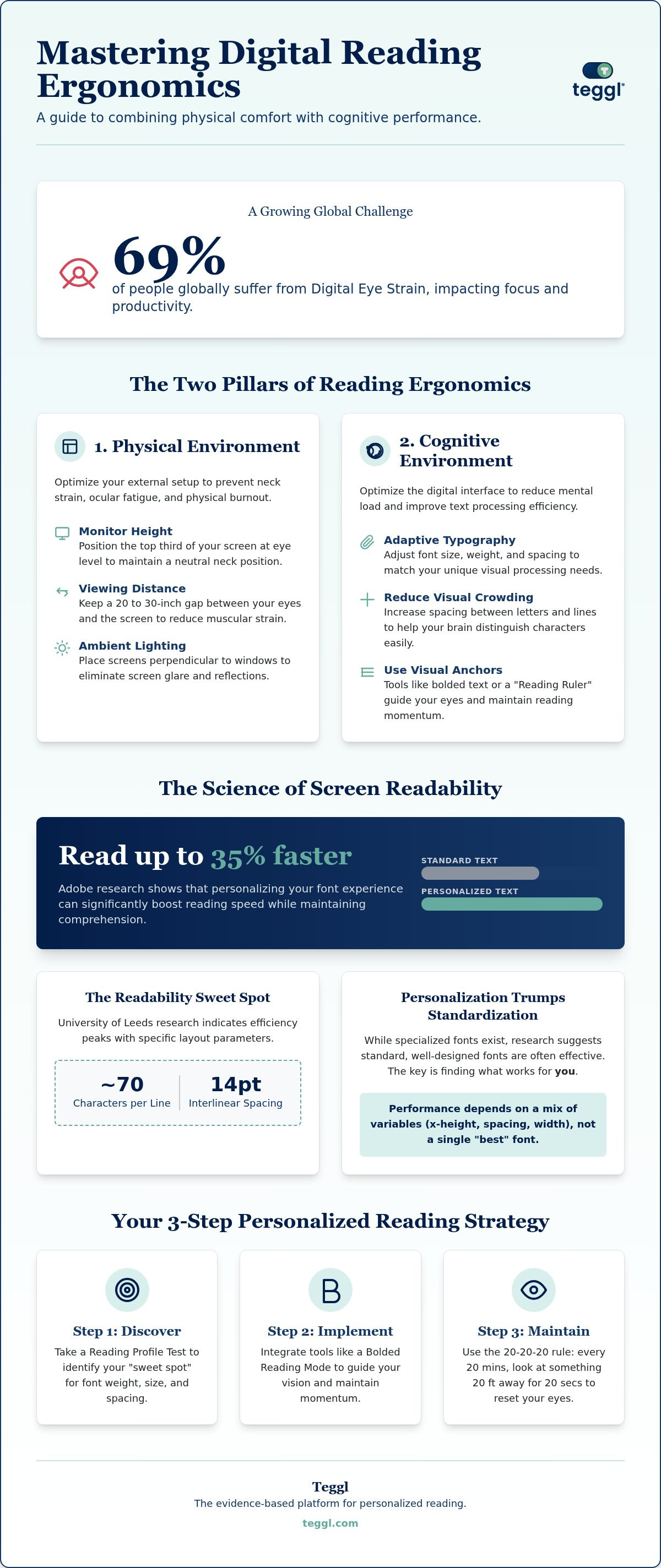
Achieving peak performance at your desk requires more than just a high-quality chair. True digital reading ergonomics exists at the intersection of physical posture and cognitive processing efficiency. While your body needs support, your brain requires a visual environment that minimizes the effort needed to decode text. By balancing these two pillars, you can read longer and faster without the typical burnout associated with screen work.
The physical pillar focuses on your external setup. Start by organizing your environment to prevent physical fatigue:
Monitor Height: Position the top third of your screen at eye level to keep your neck in a neutral position.
Viewing Distance: Maintain a gap of 20 to 30 inches to allow your eyes to focus without constant muscular strain.
Ambient Lighting: Place screens perpendicular to windows to eliminate glare.
Mastering digital reading ergonomics isn't just about furniture; it's about how you process pixels. The cognitive pillar involves cognitive ergonomics, which evaluates the mental load of digital tasks. You can optimize this by adjusting typography and line spacing, or by using a bolded reading modus to guide your focus. These adjustments transform a cluttered page into a streamlined path for your foveal vision.
Understanding Visual Crowding and Ocular Fatigue
Visual crowding is the inability to recognize objects in clutter, which increases cognitive load. It happens when tightly packed characters strain your peripheral vision, making it hard to distinguish one letter from the next. This clutter forces your brain to work harder just to identify words, leading to rapid exhaustion. Implementing a digital "Reading Ruler" effect helps your eyes track lines accurately without skipping. By increasing letter spacing and using visual anchors, you reduce the noise that leads to physical fatigue and mental fog.
The Science of Screen Readability: Optimizing Layout and Typography
While OSHA guidelines for computer workstations provide a vital foundation for physical health, the science of screen readability specifically addresses cognitive load. Adobe research demonstrates that personalizing your font experience can improve reading speed by up to 35%. This isn't a one-size-fits-all solution. University of Leeds findings indicate that efficiency peaks when line lengths stay around 70 characters with 14pt interlinear spacing to help the eye navigate without losing its place.
There is significant debate regarding specialized accessibility fonts. While options like OpenDyslexic are popular, recent 2026 studies suggest they don't necessarily outperform standard fonts. In fact, standard sans-serif options like Verdana often provide better results for the average user because of their balanced proportions. Scientific integrity requires acknowledging that performance depends on a mix of variables rather than a single "best" font choice.
Personalization vs. Standardization in Typography
University of Essex research confirms that individual visual requirements vary based on x-height and character width. Static designs often fail because they ignore these differences. You can effectively reduce online reading distractions by shifting toward adaptive typography that allows for real-time adjustments. This approach is the core of modern digital reading ergonomics. By modifying contrast and font weight, you remove the obstacles that lead to cognitive fatigue and visual crowding. To discover your own optimal settings, consider taking a Reading Profile Test to see how personalized adjustments change your daily digital experience.
Implementing a Personalized Digital Reading Strategy with Teggl
Modern digital reading ergonomics requires a proactive approach that moves beyond static screen settings. You can begin by taking a Reading Profile Test to identify your specific "sweet spot" for font weight, size, and character spacing. This data-driven starting point ensures your digital environment isn't just generic; it's scientifically tailored to your unique visual processing needs.
Once you've established your profile, integrate Bolded Reading Mode to guide your foveal vision. This method highlights the initial parts of words to maintain momentum through dense paragraphs, preventing your focus from drifting. For a truly holistic strategy, combine these software-level adjustments with the 20-20-20 rule. Every 20 minutes, look at something 20 feet away for 20 seconds to reset your ocular muscles and prevent long-term strain.
Setting Up Your Ergonomic Reading Profile
Implementing a system for digital reading ergonomics is straightforward with the right tools. Transforming cluttered web pages into clean, readable text is a seamless process with the Teggl browser extension. After installation, you can activate your personalized profile across any site you visit, instantly removing visual noise that creates cognitive friction. Use these tekstbegrip verbeteren tools to manage high-volume information intake without sacrificing speed or clarity. Teggl acts as a personalized reading technology layer that adapts any website to your optimal settings.
Follow these steps to optimize your workflow:
Install the extension and sync your Reading Profile Test results.
Toggle Bolded Reading Mode to increase focus on long-form articles.
Adjust the background contrast to match your ambient office lighting.
Master Your Digital Environment
You've seen how integrating physical posture with cognitive processing can revolutionize your daily workflow. By addressing visual crowding and applying layout principles from the University of Leeds, you can significantly reduce ocular fatigue. Remember that there's no single perfect font; instead, success lies in personalizing variables like spacing and x-height to your own visual needs. Adobe research confirms that this level of personalization can boost reading speeds by up to 35% while protecting your long-term well-being. Mastering digital reading ergonomics is about moving from a static screen experience to an adaptive one that respects your unique cognitive limits. Take the Teggl Reading Profile Test to find your optimal ergonomic settings and start building a more sustainable reading habit. You have the power to transform how you consume information; make your technology work for you.
Frequently Asked Questions
What is the most ergonomic way to read on a screen?
The most ergonomic approach combines physical alignment with adaptive digital adjustments. Position your monitor so the top third is at eye level, roughly 20 to 30 inches from your face. Beyond hardware, you must optimize your digital reading ergonomics by tailoring font size and line spacing to your visual needs. This dual strategy reduces musculoskeletal strain and cognitive fatigue simultaneously.
Can a specific font reduce eye strain for everyone?
No single font is universally the best for reducing eye strain. While some users prefer specialized fonts, research from the University of Essex and Adobe suggests that personalized variables like x-height and letter spacing matter more than the font face itself. Standard sans-serif fonts often perform just as well as specialized ones when adjusted to the individual's specific visual profile.
Does font size affect reading comprehension in adults?
Yes, font size significantly impacts both reading speed and comprehension in adults. Research from the University of Essex indicates that text that's too small increases the cognitive load required to decode characters; this leaves less mental energy for understanding the content. Finding your specific "sweet spot" ensures that your brain processes information efficiently without the distraction of visual crowding.
How does bolded reading improve cognitive ergonomics?
Bolded reading improves cognitive ergonomics by creating visual anchors that guide your foveal vision through dense text. By highlighting the initial characters of words, this method helps maintain reading momentum and reduces the number of regressive eye movements. It simplifies the tracking process, allowing your brain to focus on meaning rather than the mechanical effort of staying on the correct line.
How often should I change my digital reading settings?
You should update your settings whenever your physical environment or visual comfort changes. Factors like ambient lighting, screen quality, and even daily fatigue levels can alter what constitutes an optimal setup. It's helpful to retake a Reading Profile Test every few months or when you switch to a new device to ensure your digital reading ergonomics remain perfectly aligned with your needs.



Comments