
Browser Reader Mode vs. Extension: Which is Best for Focus in 2026?
The "Reader View" button in your browser toolbar might actually be the biggest obstacle to your deep work session. It's a common frustration; you click a button to escape the clutter, only to find yourself squinting at a generic font that doesn't fit your visual needs. While the debate of browser reader mode vs extension often centers on convenience, the real winner is determined by cognitive performance. You likely feel the drain of digital eye strain and the struggle to stay focused on long-form articles. It's exhausting to fight against a layout that treats every reader the same when your brain requires a specific visual anchor to process information efficiently.
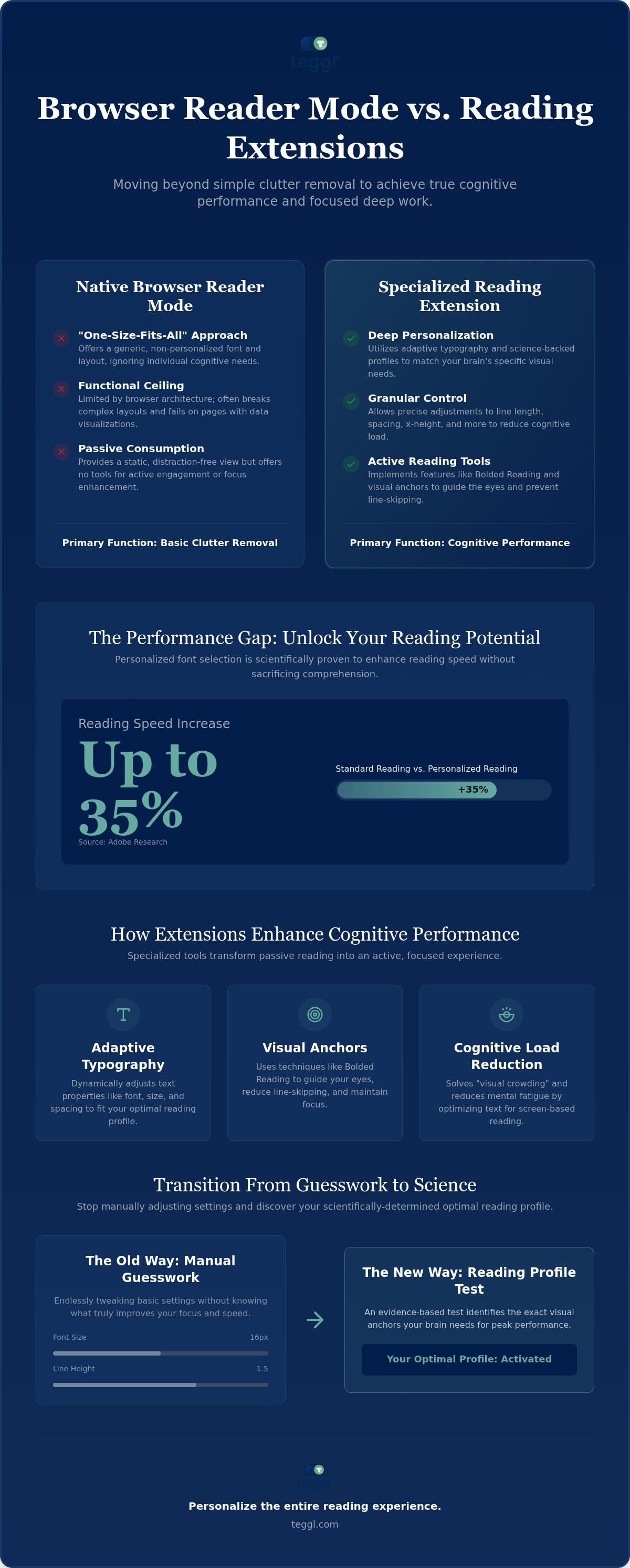
This guide explores the scientific differences between built-in tools and specialized extensions to find your optimal digital reading environment. You'll learn how adaptive typography can increase reading speed by up to 35% without sacrificing comprehension. We'll examine native feature limitations and show you how a personalized profile transforms your screen into a tool for peak performance.
Table of Contents
Native Browser Reader Modes vs. Extensions: A Functional Comparison
Most modern browsers like Safari, Firefox, and Edge include a native "Reader View" to strip away intrusive ads. These tools provide a basic level of comfort through simple font scaling and background color changes. However, when evaluating a browser reader mode vs extension, it's clear that native tools operate under a functional ceiling. They are built directly into the browser's engine. This architecture prioritizes broad compatibility over deep personalization. It's a "Privacy vs. Power" trade-off where security constraints limit how much a native tool can alter a webpage's core structure.
A detailed Comparison of web browsers reveals that while native modes are convenient, they are inherently passive. They offer a "one-size-fits-all" approach that fails to address individual cognitive needs. Specialized extensions bypass these limitations. They allow you to reduce distractions during online reading by introducing active reading tools that native code simply cannot support.
The Functional Ceiling of Built-in Reader Views
Native modes often struggle with complex web elements. If an article uses multi-column layouts or integrated data visualizations, the built-in reader view frequently breaks the formatting. Layouts break. This leads to a fragmented experience that actually increases cognitive load. You spend more energy fixing the layout in your mind than processing the text.
Built-in views are also static. They provide a distraction-free environment but offer no tools for active engagement. Focus matters. Extensions transform the page into an interactive space. They use visual anchors and adaptive typography to guide your eyes. This movement from passive consumption to active processing is the key difference in the browser reader mode vs extension debate.
The Science of Personalization: Why Your Browser Settings Aren't Enough
Standard browser settings offer a false sense of control. While native tools allow for basic scaling, they ignore the cognitive mechanics of how we process text. When comparing a browser reader mode vs extension, the critical factor is individual variability. Adobe Research indicates that users can read up to 35% faster when using their personally optimal fonts. This isn't about finding a 'universal' best font. Research from the University of Essex suggests that common fonts like Verdana or Arial often outperform specialized 'dyslexia-friendly' designs. Performance depends on the unique interaction between your visual system and the digital screen.
Efficiency also relies heavily on layout. University of Leeds studies highlight that line lengths around 70 characters and specific spacing ratios significantly reduce visual fatigue. Native tools rarely allow for this level of granular control, forcing you into rigid structures that may not match your needs.
Cognitive Load and Typographic Variables
Typographic variables like x-height and line spacing impact visual search performance. A meta-analysis on digital distractions shows that poor text presentation increases cognitive load. This is central to the browser reader mode vs extension debate; native settings lack the adaptive typography required to solve 'visual crowding.' Teggl's platform functions as a tekstbegrip verbeteren tool. You can discover your optimal reading settings to reduce your mental effort.
Beyond Distraction-Free: Implementing Bolded Reading for Peak Performance
Removing ads is just the first step toward digital clarity. While native tools focus on aesthetics, true peak performance requires a shift toward cognitive optimization. In the browser reader mode vs extension debate, the primary advantage of an extension is its ability to modify the text's architecture itself. Bolded Reading provides visual anchoring, which significantly reduces line-skipping and helps you maintain focus during high-stakes work. This method addresses "visual crowding," a common issue that leads to mental fatigue and reduced comprehension.
Recent research on cognitive load in online learning confirms that information presentation directly affects our processing capacity. Teggl integrates these findings by adhering to W3C standards and modern web accessibility guidelines. It isn't a passive filter; it's a dynamic interface built for a sophisticated 2026 workflow. You don't have to guess which settings work. By utilizing the Reading Profile Test, you move from manual adjustments to evidence-based personalization that evolves with your needs.
Discovering Your Optimal Reading Profile
Standard browsers like Chrome offer a basic serif vs. sans-serif toggle. This approach is often too blunt for deep work. When evaluating browser reader mode vs extension, consider that generic settings ignore your unique visual search patterns. You can use the bolded reading modus to find your personal 'sweet spot' for font weight and spacing. Personalized settings consistently outperform static browser defaults. Identifying your specific reading profile turns your browser into a high-performance environment tailored to your brain's unique requirements.
Master Your Digital Reading Environment
Choosing between a browser reader mode vs extension is a choice between basic comfort and peak cognitive performance. Native tools effectively clear visual noise. However, they cannot provide the adaptive typography required for high-speed comprehension. By embracing research-backed personalization, you move beyond simple clutter removal into a state of deep focus. Adobe Research principles demonstrate that finding your unique typographic "sweet spot" can unlock significant gains in efficiency. It's time to stop settling for generic defaults that cause visual stress. You deserve a reading experience that aligns with your brain's specific processing needs.
Take the Reading Profile Test and optimize your browser with Teggl to discover your optimal settings at no cost. Transform your screen into a precision tool for focus today.
Frequently Asked Questions
Is a browser reader mode extension safer than the built-in version?
Built-in versions are often more private because they run on native code with restricted permissions. However, reputable extensions provide significantly more power without sacrificing safety. When comparing a browser reader mode vs extension, look for Manifest V3 compliance to ensure your data stays secure. This standard forces extensions to use strict permission models while still delivering the advanced personalization that native tools cannot provide.
Can a reading extension really help with ADHD or dyslexia focus?
Yes, extensions improve focus by reducing visual crowding and providing visual anchors. While research on fonts like OpenDyslexic shows no significant speed advantage over standard fonts, personalized settings are effective. No tool cures ADHD or dyslexia, but reducing cognitive load helps. Performance depends on variables like line length and contrast, which is why individual results vary based on your specific cognitive needs.
Do reader mode extensions work on all websites, including paywalls?
Most extensions work on the majority of text-heavy websites by reformatting the page's HTML structure. However, they don't bypass paywalls or unlock restricted content. If the text isn't visible on the screen due to a subscription block, the extension can't process it. Once you've logged in, the tool seamlessly applies your preferred settings to create a personalized and distraction-free reading environment.
Will using a reader extension like Teggl slow down my computer?
No, modern extensions like Teggl are extremely lightweight and only run when active. They don't consume significant memory or CPU power. In fact, when comparing a browser reader mode vs extension, both often speed up the reading experience by removing resource-heavy advertisements. You'll likely notice a smoother, faster interaction with the text rather than any lag in your system's performance.



Comments