
Bolded Text Reading Technique Software: The 2026 Professional Buyer’s Guide
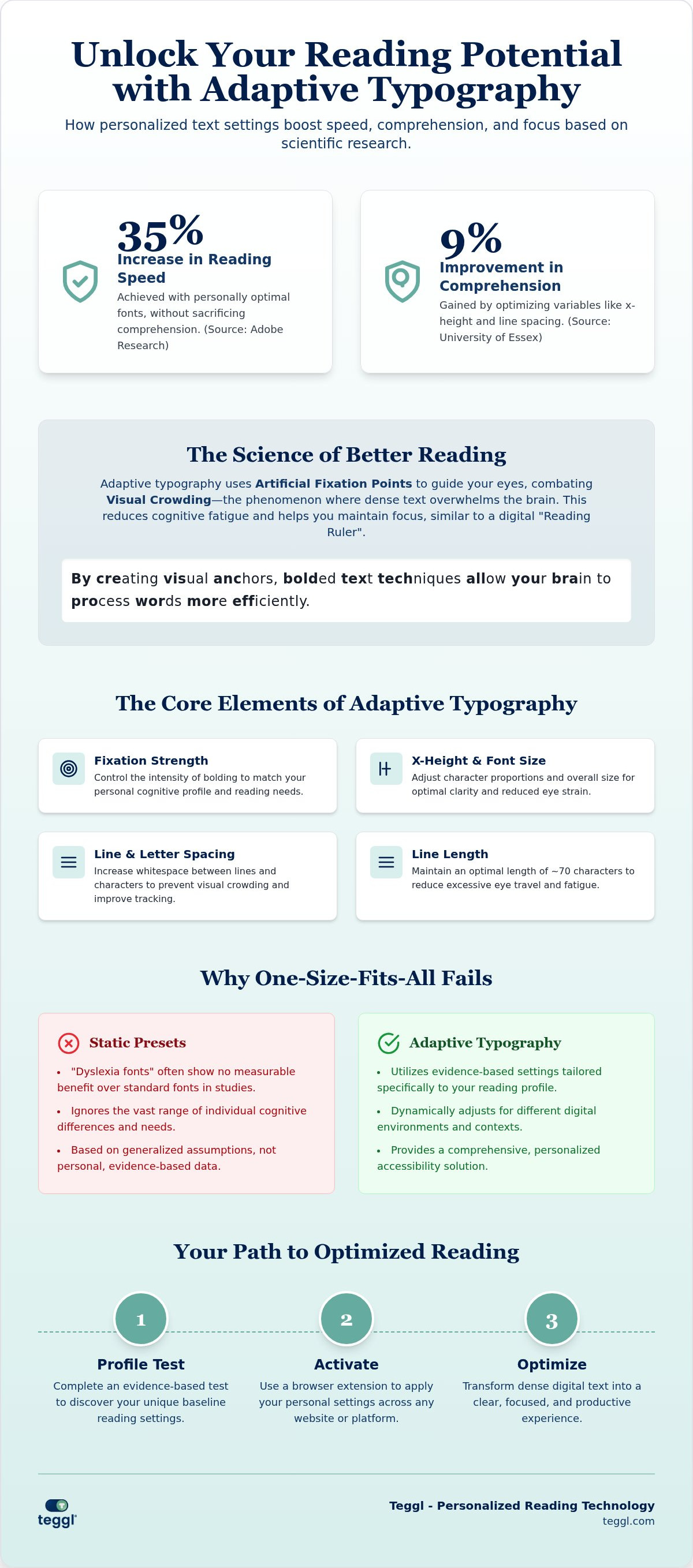
What if the wall of text on your screen is actually sabotaging your productivity? You've likely felt the frustration of skipping lines or losing your place in a dense report, leaving you mentally drained before lunch. It's a common struggle, but the solution isn't just reading more. It's reading better. By leveraging bolded text reading technique software, you can transform static digital pages into a focus-driven experience. Research from Adobe suggests that using personally optimal fonts can increase reading speed by up to 35% without losing comprehension.
This guide explores the evolution of adaptive typography and the latest 2026 accessibility standards. We'll examine how personalized settings reduce visual crowding and eye strain, moving beyond generic layouts to find what works for your unique cognitive profile. You'll learn how to build a reading environment that supports peak performance. It's time to stop fighting the screen and start optimizing it.
Table of Contents
The Science Behind Bolded Text Reading Technique Software
Bolded reading software isn't just a visual filter. It's a cognitive tool that emphasizes word prefixes to create artificial fixation points. This bolded text reading technique software guides your eyes across a page, reducing the mental energy required to process each word. While traditional methods focus on manual pacing, this software automates the process by making the text itself more accessible for your individual needs.
For many, standard web typography creates "Visual Crowding." This phenomenon happens when dense, uniform text overwhelms the brain's ability to isolate characters, leading to rapid mental fatigue. Research from Adobe found that using personally optimal typography can increase reading speed by up to 35% while maintaining 90% comprehension. Effective bolded text reading technique software simulates the "Reading Ruler" effect, providing a visual anchor that helps you maintain focus without losing your place.
Fixation Points and Visual Crowding: Why Bold Matters
During saccadic eye movements, the brain uses the first few letters of a word to fill in the gaps of meaning. Bolded techniques facilitate both "search reading" for quick scanning and "deep reading" for complex analysis. You can explore The Science Behind Speed Reading to see how these mechanics compare to older training methods. However, research shows conflicting results. Some readers find bolding distracting rather than helpful, which emphasizes the need for a customizable bolded reading modus to find your specific balance.
How to Choose the Right Bolded Reading Software in 2026
Selecting the ideal bolded text reading technique software requires looking beyond simple aesthetic changes. You need a tool that offers granular control over fixation strength, font size, and inter-line spacing. These variables are not just preferences; they are cognitive requirements. Research from the University of Essex indicates that optimizing x-height and using larger type-sizes can improve comprehension by 9%. Additionally, findings from the University of Leeds highlight that maintaining a line length of roughly 70 characters with left alignment significantly reduces visual stress for most readers.
When evaluating platforms, consider the utility of a browser extension versus a standalone app. Extensions provide a seamless experience across all websites, which is essential for professional workflows. However, be wary of overblown marketing. A 2025 study on Eye Movement Research on Bionic Reading suggests that bolding alone does not fundamentally change eye behavior for everyone. This makes personalization the most important feature to seek out in any digital reading aid.
Personalization vs. Static Presets: The Adobe Readability Findings
Static presets often fall short of their promises. Peer-reviewed studies, including Boer (2009) and reports in the Annals of Dyslexia (2017), found that specialized "dyslexia fonts" frequently offer no measurable benefit over standard typefaces. The most effective bolded text reading technique software utilizes an adaptive typography approach. By using a tekstbegrip verbeteren tool or a performance-based profile test, you can identify the specific settings that unlock your focus. You can test your own reading profile to discover which variables actually move the needle for your productivity.
Maximizing Productivity with Adaptive Typography Platforms
Teggl functions as an Adaptive Typography Platform, moving beyond the limitations of static font files. It treats reading as a dynamic interaction between the user and the screen. By utilizing the Reading Profile Test, you move from guesswork to evidence-based settings that reflect how your brain actually processes information. This personalized approach addresses Visual Stress by allowing for contrast adjustments and precise spacing; these factors are just as critical as bolding itself.
To optimize your output, audit your current digital reading workflow for Visual Crowding bottlenecks. Identify the specific platforms where your focus drops. Is it a dense research database or a cluttered internal dashboard? Once you recognize these friction points, you can deploy targeted typographic interventions using bolded text reading technique software to restore clarity and speed.
Integrating Bolded Reading into Your Digital Workflow
Using the Teggl Browser Extension is straightforward. First, complete your profile test to establish your baseline. Next, activate the extension across your most-used sites, from news outlets to complex data sheets. You can balance bolding with other accessibility features, such as dark mode or high-contrast settings, to create a soothing visual environment. We encourage you to discover your optimal reading settings through a personalized performance trial. This systematic integration ensures that your bolded text reading technique software works in harmony with your existing tools, providing a seamless transition between different types of digital content.
Take Control of Your Digital Reading Experience
The journey toward peak digital performance begins by acknowledging that your brain is unique. You've seen how bolded text reading technique software uses artificial fixation points to bridge the gap between scanning and deep comprehension. By moving away from static layouts and embracing adaptive typography, you significantly reduce the mental fatigue caused by visual crowding. Evidence from peer-reviewed readability research shows that these personalized adjustments allow you to maintain high focus in a text-heavy world. It's not about working harder; it's about making your technology work for your specific cognitive profile. Ready to transform your workflow? Take the Reading Profile Test and Optimize Your Reading Today. You have the power to create a seamless, high-performance reading environment that supports your professional goals every day.
Frequently Asked Questions
Does bolded reading software help with ADHD and Dyslexia?
Bolded reading software provides visual anchors that may help some neurodiverse readers maintain focus, but it isn't a cure for ADHD or Dyslexia. Scientific evidence in this field is mixed. For example, a 2024 study by Joshua Snell found no measurable speed difference for the general population. However, many individuals report that these tools reduce visual stress and help them stay on track.
Is there a universally best font for reading speed and comprehension?
No single font is universally superior for every reader. While some studies suggest Verdana performs well for early learners, Adobe Research confirms that personalization is the key to maximizing performance. Effectiveness depends on multiple variables like x-height, spacing, and screen quality. Instead of searching for one perfect typeface, you should focus on finding the specific typographic profile that works for you.
Can a personalized font really improve my reading speed by 35%?
Yes, research conducted by Adobe shows that individuals can read up to 35% faster when using their personally optimal font settings. This improvement happens without sacrificing comprehension, which typically stays around 90%. By using bolded text reading technique software to find your ideal configuration, you remove the visual crowding that often slows down standard digital reading and exhausts your mental energy.
What is the difference between Bionic Reading and Teggl's Bolded Reading Mode?
While both use fixation points, Bionic Reading often focuses on a proprietary method applied broadly. Teggl's Bolded Reading Mode is part of a larger Adaptive Typography Platform. It uses a Reading Profile Test to move beyond static presets. This allows you to customize fixation strength, x-height, and spacing based on evidence from your own performance rather than relying on a one size fits all approach.
Does bolded reading software work on all websites?
The Teggl Browser Extension is designed to optimize your experience across the entire web. It works on research databases, news sites, and professional dashboards by adjusting the underlying code of the page. This ensures your bolded text reading technique software provides a consistent environment. You don't have to switch between different apps or copy and paste text to maintain your personalized settings.
What are the most important typographic settings for reducing eye strain?
Beyond bolding, x-height and line spacing are critical for comfort. University of Essex research shows that larger x-heights can improve comprehension by 9%. Additionally, the University of Leeds recommends a line length of approximately 70 characters and left alignment to prevent visual fatigue. Combining these layout variables with contrast adjustments creates a sustainable digital environment that supports long form reading without physical strain.



Comments