
Bionic Reading vs. Bolded Reading: The Science of Digital Readability in 2026
You might think that bolding the first few letters of every word is the ultimate shortcut to focus, but the data from 2026 suggests your brain might be craving something much more personal. It's exhausting to battle eye fatigue and constant distractions while trying to process dense digital text. You aren't alone in feeling like you're constantly skipping lines or losing your place in a sea of pixels.
This guide provides an evidence-based comparison of bionic reading vs bolded reading to help you find the exact typographic setup that reduces your cognitive load and boosts your speed. We'll explore the latest research from The Readability Consortium, debunk common myths about universal fonts, and show you how to build a reading profile tailored to your unique visual ergonomics. It's time to stop settling for static text and start optimizing your digital environment for peak performance.
Table of Contents
Decoding the Mechanics: Bionic Reading vs. Bolded Reading
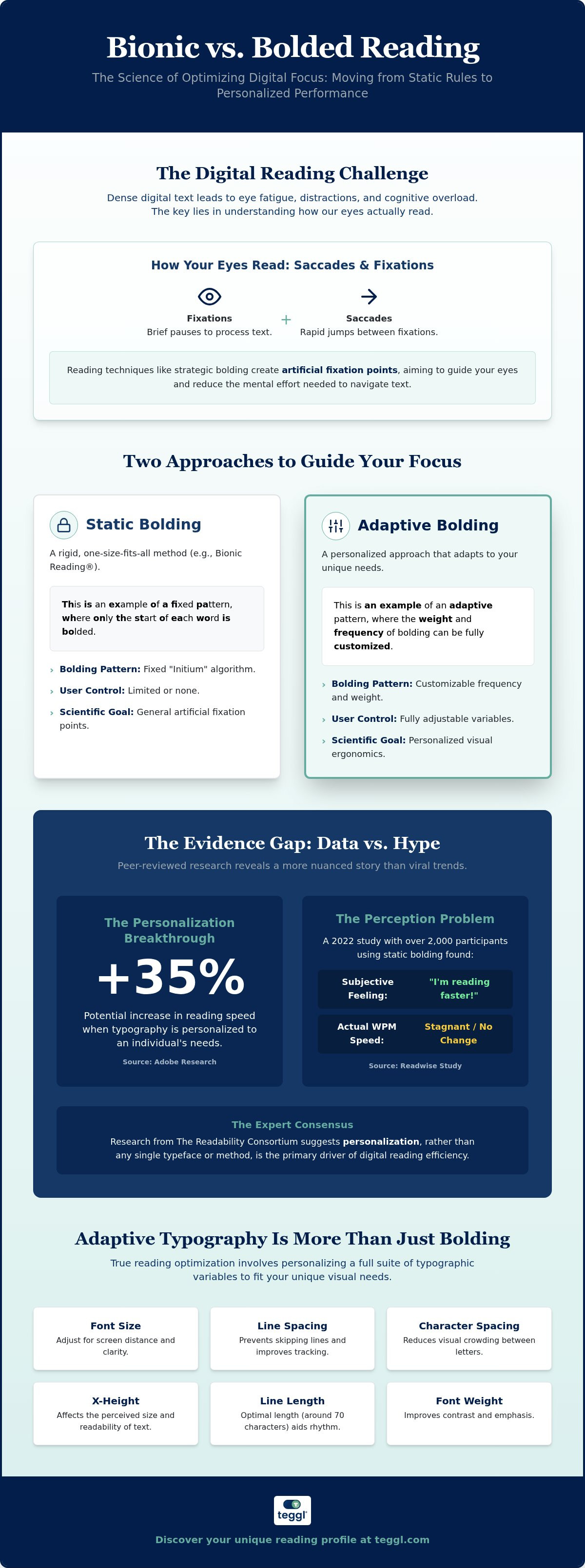
Digital reading isn't a smooth glide; it's a series of rapid jumps called saccades. Between these jumps, your eyes stop to process information during fixations. Traditional speed reading techniques often focus on minimizing these pauses, but modern digital tools use artificial fixation points instead. By bolding specific parts of a word, these tools aim to guide your eye directly to the most informative characters, potentially reducing the mental effort needed to anchor on a line of text.
When comparing bionic reading vs bolded reading, the primary difference lies in flexibility. Bionic Reading is a specific, patented algorithm developed in Switzerland that bolds the "initium," or the very beginning of every word. In contrast, Bolded Reading is an adaptive approach. It doesn't force a single pattern on everyone; instead, it allows you to adjust the weight and frequency of bolding to match your brain's specific needs.
To better understand how these visual anchors function, watch this helpful video:
This technique directly addresses "Visual Crowding," a phenomenon where surrounding letters make it harder for your brain to identify a specific word. Strategic bolding acts like a lighthouse in a storm of pixels, helping your brain isolate each word faster and maintain momentum.
The Role of Saccades and Fixations in Digital Text
Every reader has a unique Reading Profile. While one person might benefit from bolding every third word, another might need heavy weight on every single word to prevent skipping lines. This variability is why we focus on personalization rather than a one-size-fits-all font. You can explore how these variables impact your focus in our guide to Reading Comprehension Tools in 2026: A Guide to Bionic and Bolded Reading. By adjusting these anchors to fit your personal saccadic rhythm, you can reduce the need for re-reading and maintain a steadier flow through dense paragraphs.
The Evidence Gap: Peer-Reviewed Research vs. Viral Trends
Social media often presents productivity hacks as universal truths, but the data tells a more nuanced story. In a 2022 Readwise study, over 2,000 participants reported a subjective feeling of increased speed, yet their actual words-per-minute (WPM) remained stagnant. Recent eye-tracking data confirms this discrepancy; readers still scan the entire word even when only the first few letters are bolded. When weighing bionic reading vs bolded reading, it's clear that a rigid algorithm isn't a magic bullet for everyone.
The real breakthrough comes from personalization. Adobe research found that individuals can read up to 35% faster when using a font and layout optimized for their specific needs. Research from The Readability Consortium suggests that personalization, rather than any single typeface, is the primary driver of digital reading efficiency. The following table highlights why a flexible approach often outperforms a fixed one.
Why Static Methods Fail Where Adaptive Typography Succeeds
Static algorithms apply a fixed bolding pattern regardless of your environment or cognitive style. Adaptive typography moves beyond this by considering variables like x-height, spacing, and line length. Studies from the University of Leeds highlight that a legible layout, including a roughly 70-character line length, is essential for efficiency. Meanwhile, University of Essex research indicates that adjusting x-height can improve comprehension by 9%. You can discover which variables unlock your focus by exploring your unique Reading Profile Test to create a truly seamless experience.
Engineering Your Optimal Reading Environment
Digital reading is often a battle against chaotic layouts and visual noise. Finding the right balance in the bionic reading vs bolded reading debate requires moving from theory to practical application. The Teggl Browser Extension empowers you to take control of your digital environment by normalizing every site you visit into a consistent, high-performance format. This normalization reduces the mental friction of switching between different typographic styles across the web.
To start, follow a structured 5-step process to build your Reading Profile: conduct a baseline speed test, adjust bolding frequency, calibrate character weight, set inter-line spacing, and verify your comprehension levels. You can discover your optimal reading settings by taking a Reading Profile Test designed to pinpoint your unique visual requirements. This data-driven approach ensures your setup is based on performance rather than guesswork.
Beyond Boldness: The Variables of Personalized Readability
Focus isn't just about bold letters; it's about the space between them. While standard web design often triggers "Z-pattern" scanning, where your eyes jump between ads and sidebars, a customized Bolded Reading Mode enforces a linear path. This linear focus is essential for deep work, ensuring your brain processes the text's meaning rather than just its location on the page. When contrast and spacing are calibrated correctly, they act as silent partners to bolded text, reducing eye fatigue during long sessions.
Use this checklist to refine your distraction-free environment:
Increase inter-line spacing to 1.5x or 2x to prevent line-skipping.
Adjust character weight to match your screen’s specific contrast and your ambient lighting.
Limit line length to approximately 70 characters to minimize saccadic strain.
Use browser-based tools to strip away non-essential UI elements and sidebar clutter.
By treating typography as an adaptive platform, you transform your screen from a source of fatigue into a tool for cognitive clarity. It's about making the technology work for your brain, not the other way around.
Reclaim Your Cognitive Clarity
The debate between bionic reading vs bolded reading reveals a vital truth: static fixes can't keep pace with our individual cognitive needs. You've discovered that true efficiency isn't found in a single font, but in an adaptive environment where character weight and spacing align with your unique visual rhythm. Research shows that personalizing these variables can lead to speed increases of up to 35%. Professionals now rely on this level of customization to manage digital overload without sacrificing comprehension. By moving beyond viral trends and embracing evidence-based tools, you can reclaim your focus and eliminate mental fatigue. It's time to transform your screen into a high-performance workspace tailored specifically for your brain.
Take the Reading Profile Test and try the Teggl Browser Extension for free. Start your journey toward effortless digital clarity today.
Frequently Asked Questions
Does Bionic Reading actually work for everyone?
No, evidence shows that reading performance varies significantly between individuals. While many users report subjective focus gains, a 2022 study of over 2,000 readers found no objective increase in words per minute. This discrepancy highlights why a single algorithm isn't a universal solution. It's better to experiment with different fixation points to see what reduces your specific cognitive load rather than relying on a static tool.
What is the difference between Bionic Reading and Bolded Reading?
The primary distinction in the bionic reading vs bolded reading debate is the level of user control. Bionic Reading uses a patented algorithm to bold the first few letters of every word in a fixed pattern. Bolded Reading is a more adaptive method that allows you to adjust the weight, frequency, and intensity of the bolding. This flexibility helps you create a personalized visual environment that matches your brain's processing speed.
Can Bolded Reading help people with ADHD or Dyslexia?
While these tools aren't a cure for ADHD or dyslexia, they often provide significant support by creating visual anchors. These anchors help reduce visual crowding and prevent the eye from wandering or skipping lines in dense text. By bolding specific segments, the technology helps the brain isolate words faster. This reduction in mental effort can lead to better engagement and less fatigue during long reading sessions on digital screens.
Is there a free version of Bionic Reading or Bolded Reading?
Yes, you can find free versions of both technologies. Bionic Reading offers a basic version, and many browser extensions provide standard bolding features without a subscription. For those seeking a scientific approach, Teggl offers a free Reading Profile Test. This test helps you identify your optimal settings before you apply them through the extension, ensuring your setup is based on actual performance data rather than a guess.
Will using a reading extension slow down my browser performance?
Most modern extensions have a negligible effect on browser performance because they modify existing CSS rather than re-loading the page content. They are designed to be lightweight and efficient, ensuring your browsing remains fast and responsive. If you experience lag, it's often due to running multiple conflicting extensions at once. Using a single, well-optimized platform like Teggl helps maintain a smooth experience while normalizing the layouts of diverse websites.
What does the research say about the best font for reading speed?
Research from Adobe and The Readability Consortium confirms that there is no single "best" font for everyone. Instead, speed and comprehension are the result of multiple variables like font size, line length, and spacing. Some readers perform 35% better with a specific serif font, while others thrive with a clean sans-serif. The key is personalization; finding the right combination of typographic elements that fits your unique visual ergonomics.
How does line length impact saccadic eye movements?
Line length is a critical factor in digital readability that often goes overlooked. Research from the University of Leeds suggests that a line length of approximately 70 characters is optimal for search-reading tasks. When lines are too long, your eyes struggle to find the start of the next line, causing saccadic strain. Combining a proper line length with bolded anchors creates a frictionless path for your eyes to follow.
What role does x-height play in digital reading comprehension?
X-height refers to the height of lowercase letters and plays a major role in how easily your brain identifies characters. Studies from the University of Essex show that increasing x-height can improve silent reading comprehension in children by 9%. For adults, a larger x-height reduces the effort needed to distinguish between similar letters. This variable, when combined with bolded text, helps create a more accessible and comfortable reading environment for everyone.
Can contrast settings improve focus alongside bolded text?
Contrast and spacing are the silent partners of effective typography. High contrast between text and background reduces eye strain, while proper inter-line spacing prevents the crowding effect that leads to re-reading. When you pair these wellness-oriented settings with a Bolded Reading Mode, you create a comprehensive solution for digital overload. These adjustments ensure that your brain spends less energy on visual processing and more energy on understanding the content.
Is it better to bold every word or just specific anchors?
This depends entirely on your personal reading profile. Some individuals find that bolding every word provides the most stable visual anchor, while others prefer bolding only every third or fourth word to maintain a faster rhythm. There is no right answer; it's about what works for your brain. Using an adaptive platform allows you to test both methods and see which one results in higher comprehension and lower mental fatigue.
How do browser extensions handle complex web layouts?
Advanced extensions use sophisticated logic to normalize web layouts without breaking the underlying site structure. They identify the main text body and apply your personalized settings while leaving navigation menus and advertisements untouched. This creates a consistent, distraction-free view across the entire web. By normalizing these diverse layouts into a single high-performance view, you reduce the cognitive friction caused by constantly adapting to different site designs, font sizes, and typographic styles.
Why should I conduct a baseline speed test before changing settings?
Conducting a baseline test is the essential first step in verifying if your settings are actually improving your performance. Without a baseline, it's easy to be misled by a subjective feeling of speed that doesn't translate to actual gains. By measuring your words per minute and comprehension levels before and after making changes, you can scientifically determine your optimal setup. This data-driven approach is the foundation of a truly personalized, high-performance, and effective reading experience.



Comments