
Best Focus Reading Browser Plugins in 2026: A Scientific Comparison
Adobe Research indicates that a personalized font experience can increase your reading speed by up to 35%. You've likely felt that familiar frustration when lines skip or your focus shatters during a long research session. Visual crowding and mental fatigue shouldn't be the price you pay for staying informed. Finding the right focus reading browser plugin isn't just about hiding ads. It's about optimizing the text itself for your unique cognitive profile.
In this comparison, we'll explore how adaptive typography and personalized reading profiles outperform static tools to help you achieve a true flow state. You will discover how adjusting variables like x-height and line spacing can reduce eye strain while boosting comprehension. We're breaking down the top tools of 2026 to help you find the specific settings that finally click for your brain.
Table of Contents
The Evolution of Focus Reading Plugins: Beyond Simple Reader Modes
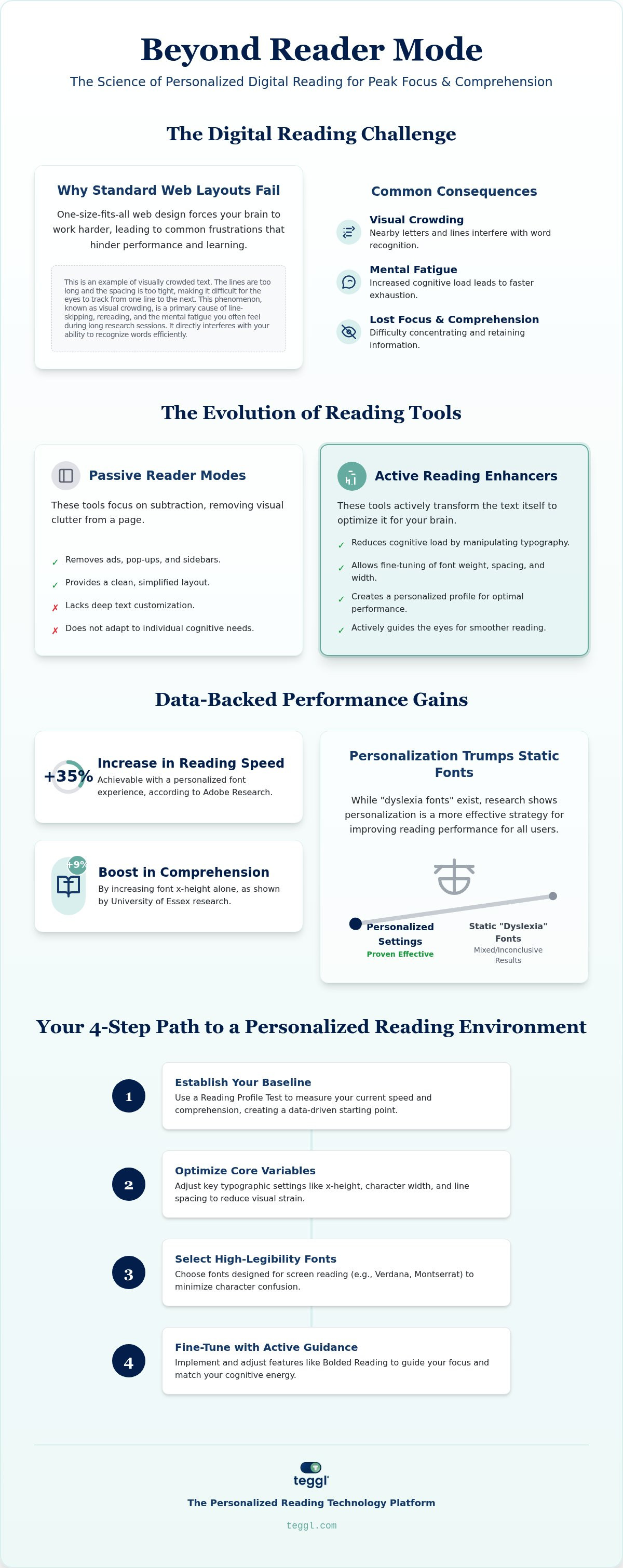
For years, digital reading tools focused solely on distraction removal. A modern focus reading browser plugin goes much deeper than hiding pop-ups. It manipulates typography and layout to actively reduce cognitive load. While passive reader modes simply hide ads, active reading enhancers transform the text itself to align with your brain's processing patterns. This shift directly addresses visual crowding. This is a phenomenon where nearby characters or lines interfere with your ability to recognize words. It's a primary cause of line-skipping and mental fatigue for both neurotypical and neurodivergent readers.
Standard web design relies on a one-size-fits-all approach. This creates a significant barrier to efficiency. Because every individual processes visual information differently, static layouts often force the brain to work harder than necessary. Effective tools now move toward personalization, recognizing that the "perfect" font or layout doesn't exist in a vacuum. You need an environment that adapts to you, not the other way around.
The Science of Legibility: Why Standard Web Layouts Fail
Research from the University of Leeds highlights how typographic layout dictates search-reading efficiency. Many websites utilize line lengths that far exceed 70 characters. This frequently slows task completion because the eye struggles to track back to the start of the next line accurately. Left-aligned columns and generous inter-line spacing are critical for maintaining momentum. Proper spacing reduces perceptual interference during deep reading sessions. While some users explore speed reading techniques to manage digital overload, optimizing the visual environment provides a more sustainable boost to focus. By adjusting these variables, you create a frictionless experience that honors your cognitive profile.
Top Focus Reading Browser Plugins of 2026: A Comparative Analysis
Basic extensions like Reader View or Just Read are excellent for removing sidebars. However, they lack the technical depth needed for true cognitive optimization. A sophisticated focus reading browser plugin like Teggl goes beyond layout cleaning. It allows you to fine-tune font weight, character width, and x-height to match your specific visual needs. Many studies on reading comprehension highlight the screen inferiority effect. This makes text optimization essential for closing that clarity gap.
The rise of Bolded Reading represents a shift toward active visual guidance. By highlighting the initial characters of words, this method helps anchor your attention as you scan sentences. If you want to compare different Reading Comprehension Tools, you'll see that bolding creates a rhythmic scanning pattern that minimizes eye regressions and line-skipping. This level of customization ensures that the tool adapts to your brain's pace rather than forcing you to follow a rigid design.
Evidence Check: Dyslexia Fonts vs. Personalization
Research on fixed dyslexia fonts like Dyslexie or OpenDyslexic remains mixed. Independent studies often show no statistically significant speed advantage for these static designs. Contrast this with Adobe Research, which found that personal font matching can increase reading speed by up to 35%. This is why Teggl focuses on a bolded reading modus rather than a single static font. Essex Research also suggests that increasing x-height alone can improve comprehension by approximately 9%. You can install the Teggl extension today to discover the specific typography that unlocks your personal focus.
How to Build Your Personalized Focus Reading Environment
Constructing a high-performance reading space requires moving beyond subjective preference. While it's tempting to adjust settings until they simply "look good," your brain's actual performance often tells a different story. Start by using a focus reading browser plugin that incorporates a Reading Profile Test to establish a baseline. This shift from aesthetic choice to performance data ensures you're actually reducing cognitive load rather than just changing the scenery.
Follow these steps to calibrate your environment:
Baseline Performance: Conduct a reading test to identify your current speed and comprehension levels.
Optimize x-Height: Align your settings with University of Essex findings by aiming for an x-height of approximately 5.0mm.
Select Proven Fonts: Use fonts with high digital legibility, such as Verdana or Montserrat, to minimize character confusion.
Adjust Intensity: Scale your Bolded Reading intensity to match your cognitive energy throughout the day.
Implementing Teggl: The Authoritative Solution for 2026
Teggl integrates these scientific principles directly into your daily workflow. The extension embeds the Reading Profile Test into your initial setup, making personalization effortless. When you activate Bolded Reading Mode, the transition is seamless across different websites. This consistency is vital to avoid the "context-switching" penalty. This penalty happens when your eyes must constantly adapt to new typographic rules on every tab. By providing a unified, optimized experience, this focus reading browser plugin preserves your mental energy for the content that matters most.
Master Your Digital Focus
Achieving deep work in a text-heavy world requires more than just hiding distractions. You've seen how the right focus reading browser plugin transforms static web pages into personalized cognitive environments. By prioritizing variables like x-height and line spacing, you align digital text with your brain's natural processing speed. Research from Adobe and the University of Leeds confirms that these specific typographic adjustments lead to measurable gains in both speed and comprehension. You don't have to settle for the screen inferiority effect any longer. It's time to move beyond generic reader modes and embrace a tool that adapts to your unique visual profile.
Join over 100,000 power readers worldwide who have already optimized their digital workflow. Take our zero-cost Reading Profile Test to discover your optimal reading profile and try Teggl for free. Start reading with clarity and confidence today.
Frequently Asked Questions
Can a personalized font plugin really improve my reading speed?
Yes, a personalized font plugin can significantly boost reading speed. Research from Adobe indicates that readers achieve up to 35% faster processing when matched with their optimal typeface. Unlike generic reader modes, this technology identifies the specific character widths and weights that reduce your cognitive burden. This tailored approach ensures that your reading speed increases without sacrificing the comprehension rates typically maintained during these performance sessions.
Is there a difference between generic bolding methods and Teggl's Bolded Reading?
Teggl's Bolded Reading Mode distinguishes itself through adaptive algorithms rather than static patterns. While basic bolding methods apply a uniform weight to the start of every word, Teggl calibrates the intensity based on your specific Reading Profile Test results. This personalized focus reading browser plugin ensures the visual anchors are strong enough to guide your eyes but subtle enough to prevent visual overstimulation during long research sessions.
Do larger fonts help adults as much as they help children?
Larger fonts are equally beneficial for adults, particularly those navigating high-volume digital workloads. While children see a 9% comprehension boost with a 5.0mm x-height, adults benefit from reduced visual stress and eye fatigue. Optimizing your focus reading browser plugin to increase font size and spacing creates a more comfortable ergonomic environment. This reduces the mental energy required for decoding, allowing you to dedicate more cognitive resources to complex analysis.
Will these plugins work on all websites, including PDFs?
Most modern plugins are designed for broad compatibility across HTML-based websites. Teggl's extension provides a consistent typographic experience on blogs, news sites, and digital journals to eliminate the context-switching penalty. While PDF support often depends on the specific browser's rendering engine, the primary benefit is the persistence of your reading profile. This ensures that your optimized settings follow you throughout your digital research journey, maintaining a stable environment for deep focus.



Comments