
Best Browser Extensions for Scientific Papers: 2026 Guide
What if the biggest obstacle to your research isn't the complexity of the data, but the static way it's displayed on your screen? You likely spend hours squinting at dense, double-column PDFs, fighting digital eye strain and the frustrating tendency to skip lines in technical text. Finding the right browser extension for reading scientific papers can transform this exhausting cycle into a high-performance flow state that preserves your cognitive energy.
You deserve a digital environment that works with your brain, not against it. This guide explores how to build a personalized research toolkit that adapts to your unique cognitive profile. We will examine the latest 2026 tools and adaptive typography platforms designed to boost reading speed by up to 35% while reducing the fatigue that usually follows a long session in the archives.
Table of Contents
The Science of Digital Readability: Why Academic Papers are Hard to Read
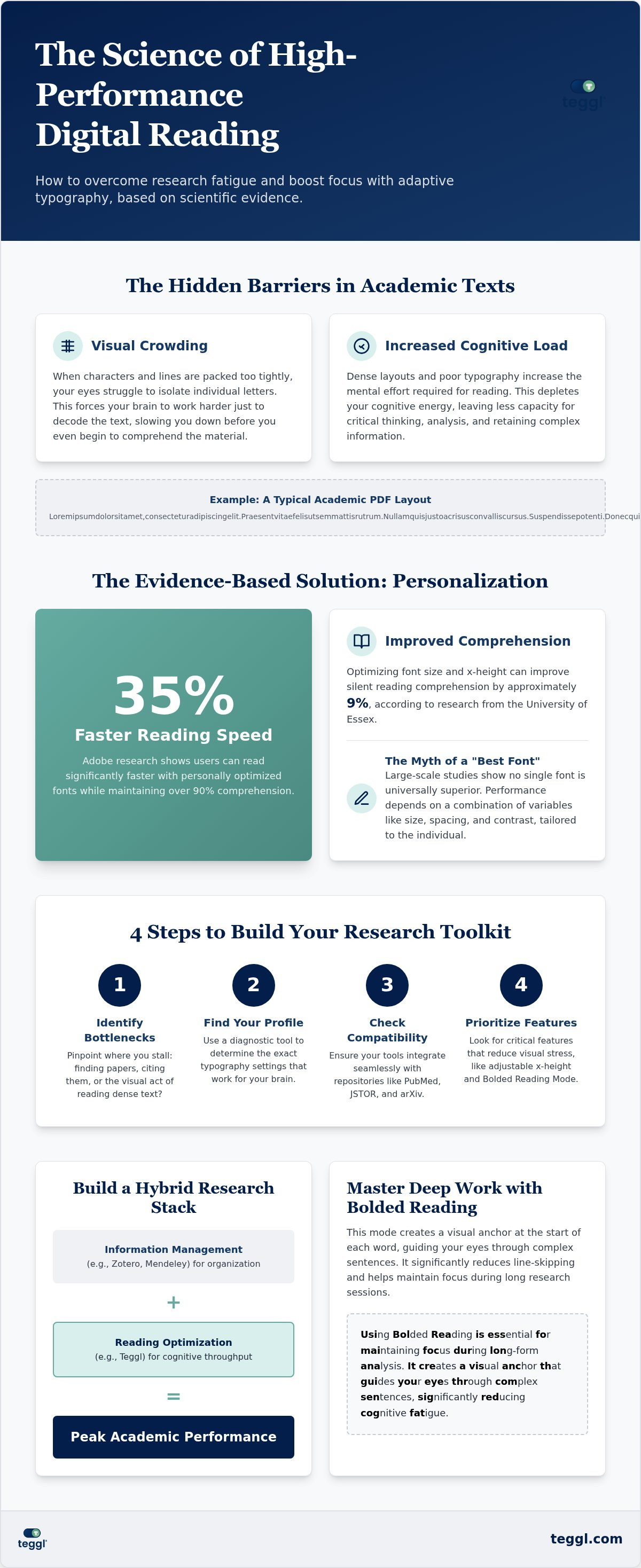
Academic papers often feel impenetrable because of visual crowding. This phenomenon happens when characters are packed too tightly, making it harder for your eyes to isolate individual letters in a stream of text. When you combine this with dense jargon, your cognitive load spikes. Your brain exerts so much effort simply decoding the visual symbols that it has less energy left to synthesize the complex arguments.
Standard browser defaults frequently ignore these ergonomic needs. They present high-level research in the same way they display a casual blog post. Using a dedicated browser extension for reading scientific papers allows you to implement adaptive typography. This approach moves beyond static layouts, adjusting the ease with which a reader can understand the text based on individual visual thresholds.
Evidence-Based Typography: What the Research Actually Says
Scientific research highlights the power of personalization over universal "best" settings. Adobe research demonstrates that users can read up to 35% faster with personally optimal fonts while maintaining 90% comprehension. Similarly, findings from the University of Leeds show that maintaining a line length of approximately 70 characters and an inter-line spacing of 14pt optimizes search-reading efficiency.
We must also address common misconceptions about specialized fonts. Large-scale experiments and a 2017 study revealed no statistically significant advantage for OpenDyslexic over standard fonts like Arial. This suggests that reading performance depends on a combination of variables, including font size, x-height, and contrast, rather than a single typeface. Personalization is the only evidence-based path to peak academic focus.
Finding the right browser extension for reading scientific papers is about more than just accessibility; it's about engineering a workspace that respects your cognitive limits. By tailoring the visual environment, you reduce the physical strain that leads to research burnout.
How to Choose the Best Browser Extension for Your Research Workflow
Start by identifying your primary bottleneck. Are you struggling to find papers, cite them, or actually process the information on the page? Many researchers find that while they have plenty of sources, the visual act of consuming dense text is where they stall. You should assess your visual needs using a diagnostic tool like the Teggl Reading Profile Test to determine the exact typography settings that work for your brain.
Verify that your chosen tools offer full compatibility with major academic repositories like PubMed, JSTOR, and arXiv. A high-performance browser extension for reading scientific papers must integrate seamlessly with these platforms to be effective. Prioritize features that actively reduce visual stress. Settings for adjustable x-height and Bolded Reading Mode are critical for preventing line-skipping in technical documents.
Management vs. Optimization: Building a Hybrid Research Stack
Don't confuse information management with reading optimization. Citation managers like Zotero or Mendeley are excellent for organization, but they don't improve the on-screen reading experience. A robust hybrid stack combines these with a browser extension for reading scientific papers that focuses on adaptive typography. This dual approach ensures you're organized while also maximizing your cognitive throughput.
Using Bolded Reading Mode is essential for maintaining focus during long-form analysis. It creates a visual anchor that guides your eyes through complex sentences, significantly reducing cognitive fatigue. Ensure your chosen tools support W3C accessibility standards for contrast and scalability. This creates a sustainable research environment that protects your physical well-being while driving peak performance.
Implementing Personalized Reading: A Guide to Peak Academic Focus
Calibrating your browser extension for reading scientific papers is the final step in reclaiming your focus. Different academic tasks require specific visual profiles. For data-heavy tables, prioritize high contrast and crisp spacing to isolate variables. When you're tackling abstract theory, engage a "Deep Work" session using Bolded Reading to minimize digital distractions. This mode provides a visual anchor that guides you through dense paragraphs without losing the thread of the argument.
Research from the University of Essex found that optimizing font size and x-height can improve silent reading comprehension by approximately 9%. You shouldn't settle for the tiny 10pt or 12pt settings found in most standard PDF viewers. Instead, integrate your extension with your browser-based viewer to override these defaults with a layout that respects your visual ergonomics. This creates a seamless experience whether you're reading a live webpage or a downloaded document.
Scaling Focus with Adaptive Layouts and Bolded Reading
To navigate complex sentence structures effectively, try using bolded reading modus. This technique highlights the start of words, creating a rhythmic path for your eyes to follow. Research from the University of Leeds suggests that left-aligned, single-column layouts with wide margins are superior for academic search-reading. These layouts prevent line-skipping by providing a clear return path for the eye at the end of each line. You can easily adjust these settings to match the specific journal you're analyzing.
Your research workflow is as unique as your cognitive profile. Discover your optimal settings today by taking the Teggl Reading Profile Test. It's the most direct way to transform your browser extension for reading scientific papers into a truly adaptive typography platform that evolves with your needs.
Master Your Research Workflow Today
Digital research shouldn't feel like an uphill battle against your screen. By addressing visual crowding and cognitive load through adaptive typography, you can transform how you process complex information. You've learned that the right browser extension for reading scientific papers does more than just organize citations; it recalibrates the text to fit your brain's unique needs.
Based on research from Adobe and The Readability Consortium, we know that personalization is the key to academic focus. There's no one-size-fits-all setting for peak performance. Instead of struggling with static defaults, you can discover your optimal reading settings with the Teggl Reading Profile Test. Take control of your digital environment today and experience the clarity of a truly personalized reading experience.
Frequently Asked Questions
Can a browser extension really help me read scientific papers faster?
Yes, because they address the visual mechanics of reading rather than just the content. By adjusting variables like x-height, letter spacing, and line length, an extension reduces the physical effort required to scan text. This optimization allows your brain to focus on comprehension instead of decoding characters. A high-quality browser extension for reading scientific papers creates a personalized environment that aligns with your specific visual processing speed.
Is there a specific font that is best for reading academic text?
No single font is universally superior for every researcher. While some claim specialized fonts improve readability, evidence shows that personal preference and environmental factors are much more significant. Performance depends on a combination of font size, contrast, and screen quality. Instead of searching for a "magic" typeface, use a tool that lets you test different configurations to find what feels most comfortable for your eyes.
How do reading extensions differ from summarization tools like Scholarcy?
Reading extensions focus on the visual experience of the full text, while summarization tools use AI to condense the paper into key points. Summarizers are excellent for quick screening to see if a study is relevant. In contrast, a browser extension for reading scientific papers helps you engage deeply with the original source. It preserves the nuances of the full argument while making the long-form PDF easier to navigate visually.
Will these extensions work on restricted-access library databases?
Most modern extensions are designed to function across various platforms, including PubMed, arXiv, and university library proxies. Since they modify how your browser renders text, they typically work as long as the paper is displayed as HTML or within a browser-based PDF viewer. If you encounter a paywalled PDF that requires a specific external reader, you'll need to download the file and open it in a compatible browser tab to apply your custom settings.



Comments