
ADHD Reading Tools: 2026 Guide to Science-Based Focus
Did you know that June 2026 research confirms adults with ADHD experience significantly stronger visual crowding, often making standard web layouts feel like a blurry wall of text? It's exhausting to reach the end of a long paragraph only to realize you've re-read the same sentence four times without absorbing a single word. You aren't lazy or unfocused; your brain is simply struggling to filter out the digital noise that modern browsers force upon you.
This guide reveals how the right ADHD reading tools for browser can eliminate that visual clutter and boost your reading speed by up to 35% using science-based personalization. We'll explore how adaptive typography and custom reading profiles transform your screen into a high-performance environment built for your unique neurobiology. It's time to stop fighting your browser and start reading with clarity.
Table of Contents
The Science of Visual Crowding: Why Standard Browsers Fail ADHD Readers
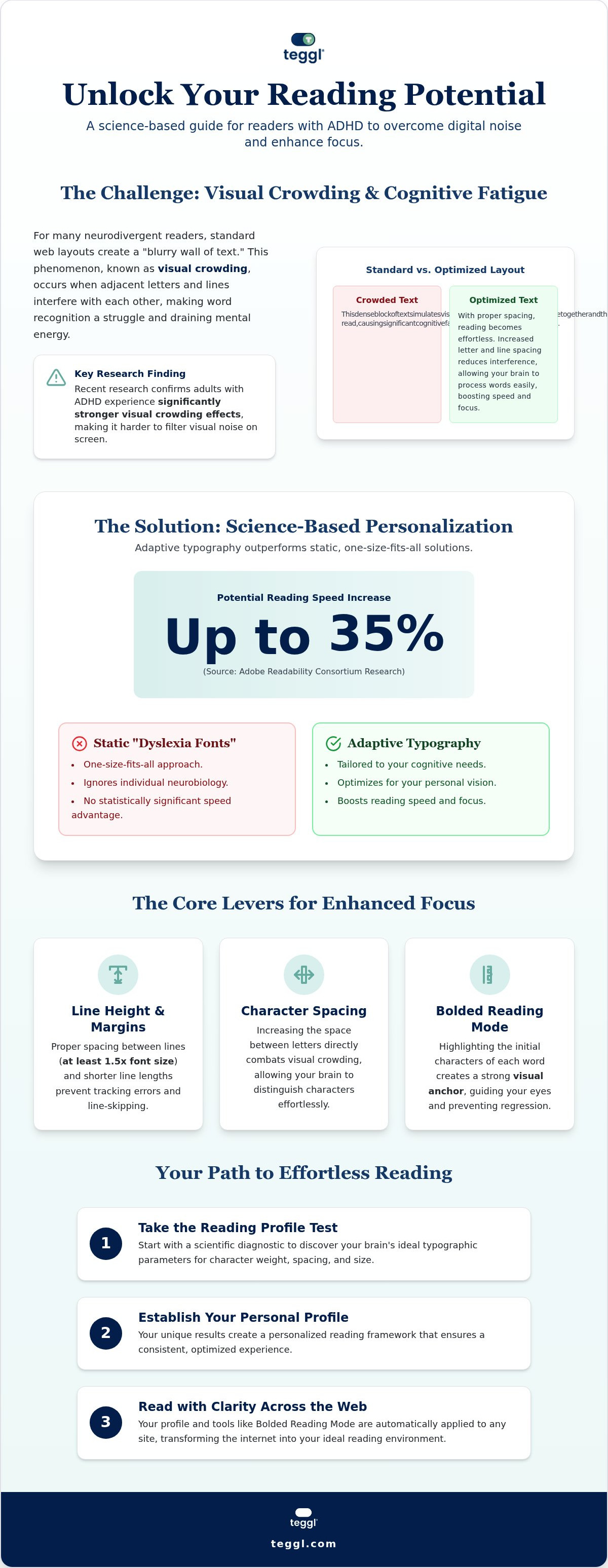
Standard browsers aren't built for neurodivergent minds. They present information in dense, uniform blocks that trigger visual crowding. This phenomenon occurs when adjacent letters and lines interfere with each other, making word recognition a constant struggle. A June 2026 study comparing adults with ADHD to neurotypical controls found that the ADHD group exhibited significantly stronger foveal crowding effects. This isn't just a focus issue; it's a perceptual hurdle where your brain struggles to filter irrelevant visual noise.
Adobe research recently debunked the myth that a single "dyslexia-friendly" font works for everyone. Their data confirms that personalizing typography can boost reading speed by up to 35%. This is why generic ADHD reading tools for browser often fall short. They ignore the specific typographic variables that your unique brain requires to process information without exhaustion.
Research-Driven Barriers to Digital Comprehension
Text layout dictates how well you absorb information. A study from the University of Essex found that small changes to x-height, or the height of lowercase letters, can impact comprehension by 9%. Additionally, research from the University of Leeds shows that line length and inter-linear spacing are the main factors in search-reading efficiency.
When these elements aren't optimized, you're more likely to experience line-skipping and regression. Utilizing a tekstbegrip verbeteren tool allows you to mitigate these barriers by creating a custom visual anchor. By fine-tuning your digital environment, you reduce the mental tax of processing text. Effective ADHD reading tools for browser give you the power to bypass standard layout flaws and maintain peak performance during long-form research.
Evaluating ADHD Reading Tools: Features That Actually Improve Focus
Selecting the right ADHD reading tools for browser requires looking past aesthetic gimmicks. You need a tool that manipulates three core variables: character weight, letter spacing, and x-height adjustment. These aren't just design choices; they're cognitive levers. The bolded reading modus serves as a critical visual anchor by highlighting the initial characters of each word. This mechanism guides your eye's natural movement, effectively preventing the frustration of line-skipping and regression.
Layout customization is equally vital. Following Leeds School of Design guidelines, adjusting margins and line height creates a structured path for your focus. Wide margins prevent tracking errors where the eye loses its place at the end of a long line. Proper inter-linear spacing ensures your brain doesn't have to work overtime just to find the start of the next sentence, reducing the mental fatigue associated with long-form digital research.
Why Personalization Beats Static Dyslexia Fonts
Many users start with fixed fonts like OpenDyslexic, but research published in the Annals of Dyslexia shows no statistically significant speed advantage for these static designs. In contrast, the Adobe Readability Consortium found that readers are up to 35% faster when using a font personally optimized for their vision. To afleidingen verminderen tijdens online lezen, follow this quick checklist:
Set line height to at least 1.5x the font size.
Increase character spacing to reduce visual crowding.
Tighten page margins to shorten line length.
You can identify your specific typographic needs by taking the Reading Profile Test to see which configuration unlocks your peak focus.
Implementing a Personalized Reading Strategy with Teggl
Stop guessing which settings help your focus. While many ADHD reading tools for browser offer static adjustments, Teggl operates as a sophisticated adaptive typography platform. It begins with the Reading Profile Test, a scientific diagnostic that determines your ideal typographic parameters. This isn't about what looks good; it's about identifying the specific character weights and spacing that your brain processes most efficiently. Once established, your profile applies Bolded Reading Mode across every site you visit, providing a consistent cognitive anchor whether you're scanning dense academic journals or navigating complex professional dashboards.
This adaptive approach ensures that your personalized reading environment moves with you. It eliminates the need to manually adjust settings for every new tab, reducing the context switching tax that often drains ADHD energy. By maintaining a stable visual framework, you can preserve your mental stamina for the actual content rather than the mechanics of reading. It transforms a fragmented digital experience into a seamless flow of information.
Step-by-Step Optimization for the Modern Web
Identify your baseline by taking the Reading Profile Test to isolate your specific needs for font weight and character spacing. Once you have your results, configure the Teggl extension to apply these settings automatically. For high-density research sites, you might choose to increase line height further to create additional breathing room between paragraphs. This simple adjustment prevents the visual crowding that typically leads to cognitive overwhelm.
Integrate these tools into a broader digital wellness strategy. Combine your personalized Teggl environment with scheduled focus blocks and browser-level notification silencers. This multi-layered approach transforms the web from a chaotic wall of text into a streamlined, accessible workspace. By aligning your digital environment with your neurobiology, you turn reading from a source of fatigue into a tool for peak performance.
Transform Your Digital Focus Today
Digital overload doesn't have to be your default state. You've seen how visual crowding creates physical barriers to comprehension and how generic fonts often miss the mark. By shifting to science-backed ADHD reading tools for browser, you're choosing to align your technology with your neurobiology. Peer-reviewed research from Adobe and the University of Essex proves that personalized typography isn't just a preference; it's a performance multiplier that can increase your reading speed by up to 35%. You deserve a reading environment that supports your focus instead of draining it. Take the first step toward a frictionless experience by identifying your unique typographic needs. Stop fighting the text and start mastering it with tools built for your brain.
Discover your optimal reading settings with the Teggl Reading Profile Test
Frequently Asked Questions
Does a specific font like OpenDyslexic really help with ADHD reading?
Research published in the Annals of Dyslexia indicates that fixed fonts like OpenDyslexic don't provide a universal speed advantage. While they might feel more comfortable for some, they don't address the individual nature of visual crowding. True progress happens when you move beyond static designs and embrace a system that adapts to your unique neurodivergent processing needs.
Can a browser extension actually increase my reading speed by 35%?
Adobe research confirms that personalized typography can indeed increase reading speed by up to 35%. By implementing ADHD reading tools for browser, you're not just changing a font; you're optimizing the information's delivery. This reduction in visual noise allows your brain to focus on meaning instead of struggling to distinguish individual letters in a crowded block of text.
What is the difference between bionic reading and Teggl’s Bolded Reading Mode?
Bionic reading uses a standardized bolding pattern to guide the eye. In contrast, Teggl’s Bolded Reading Mode is a dynamic feature that responds to your personal Reading Profile Test results. It offers a more sophisticated level of customization, adjusting the visual anchors on the page to match the specific character weights and spacing that work best for your brain.
How do I know which font settings are best for my specific ADHD symptoms?
You can determine your ideal settings by using a diagnostic tool like the Reading Profile Test. This eliminates the frustration of manual tweaking and provides a clear data point for your configuration. Professional ADHD reading tools for browser use these tests to isolate variables like x-height and letter spacing, creating a reading environment that directly addresses your specific focus challenges.



Comments