
2026 Guide: Using Software to Increase Reading Speed
Updated: Jul 31
What if your computer screen was the biggest obstacle standing between you and your peak productivity? Most professionals spend hours every day squinting at dense emails, searching for the right leessnelheid verhogen software to manage a mounting information backlog. It's a common struggle to maintain focus when the very tools we use to work feel like they're working against our natural visual processing and causing unnecessary eye strain.
You don't have to settle for slow progress or mental fatigue. Research from Adobe suggests that users can read up to 35% faster with personally optimal font settings. By leveraging specialized digital tools, you can reclaim your time and energy. It's about more than just forcing your eyes to move faster. It's about creating a personalized reading environment that feels intuitive and effortless. When you align technology with your unique visual needs, the friction of digital reading simply disappears.
In this 2026 guide, we'll show you how to leverage advanced software and adaptive typography to sharpen your focus. We'll explore how to reduce cognitive load during deep work and transform your browser into a high-performance reading machine. Get ready to discover a way of processing information that feels natural, fast, and remarkably clear.
Table of Contents
The Science of Digital Reading Speed and Software Mechanics
Many people search for leessnelheid verhogen software thinking they'll find a program that forces their eyes to move like a machine. In reality, the most effective tools are those that modify digital text layouts to align with how our brains actually process information. Instead of training your muscles, these technologies optimize cognitive processing by removing the visual friction inherent in standard web design. They act as a digital bridge between the static text on your screen and your brain's ability to decode it.
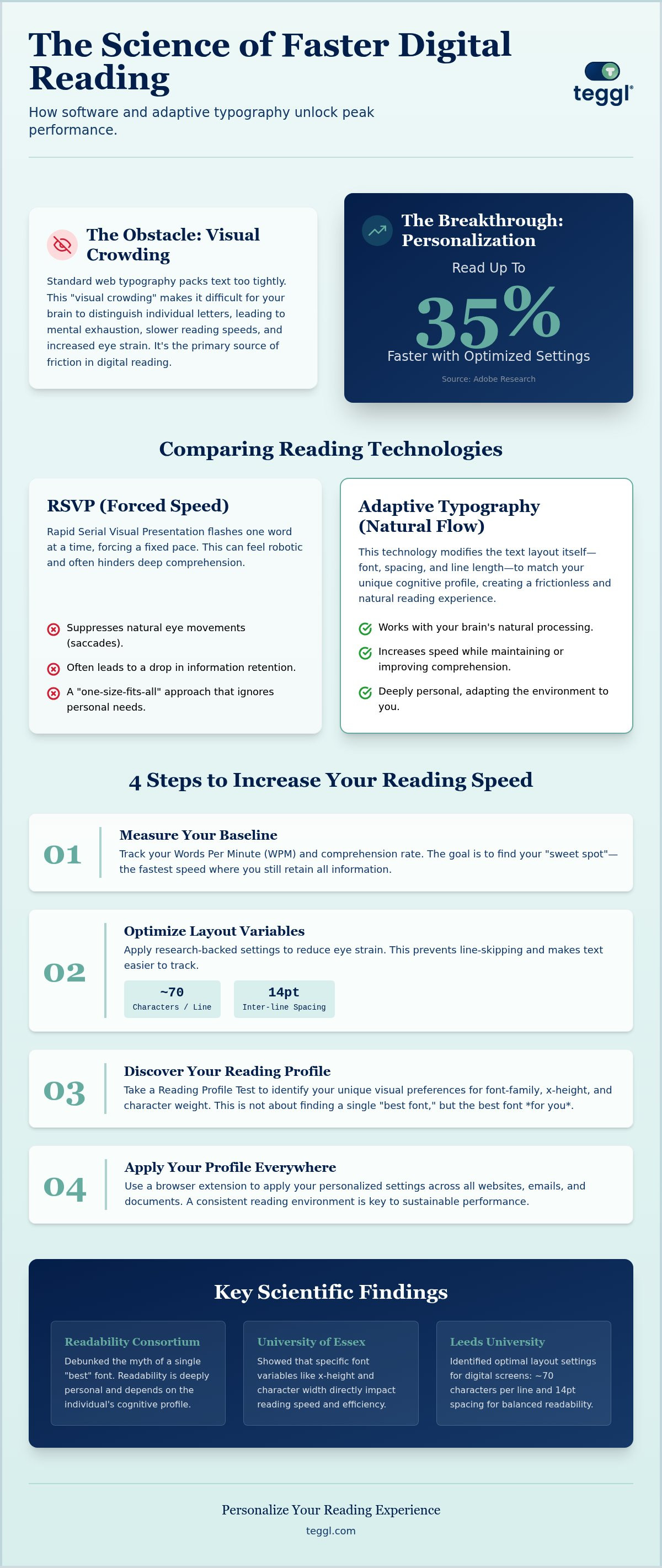
One of the primary obstacles to fast reading is "Visual Crowding." This occurs when characters are packed too tightly or in an unoptimized format, making it difficult for the brain to distinguish individual letters quickly. Standard web typography often ignores this, leading to mental exhaustion and slower speeds. Research from the Readability Consortium has debunked the idea of a universal "best" font. They found that readability is deeply personal. What works for one person might significantly slow another down. Similarly, findings from the University of Essex highlight how specific variables like x-height and character width directly impact reading age and speed. When these factors aren't aligned with your needs, your brain works harder than it has to.
While traditional Speed reading techniques often focus on manual drills and eye exercises, software-driven optimization provides a more sustainable path. It adapts the environment to the user, creating a frictionless experience that feels natural rather than forced.
Why Traditional Web Typography Fails the Modern Reader
Standard websites often use fixed line lengths that are too wide for the human eye to track comfortably. This leads to "line skipping," where you lose your place and have to restart the sentence. Poor contrast and cramped spacing also increase the cognitive cost of subvocalization; that "inner voice" that repeats every word in your head. By using visual cues to guide the eye, you can bypass this bottleneck and process information more fluidly.
The 35% Rule: How Personalization Outperforms General Tips
You don't need generic advice; you need a layout that fits your vision. Adobe research shows that personalizing font settings can lead to a 35% increase in reading speed without losing comprehension. This is why a Reading Profile Test is the essential first step for any leessnelheid verhogen software. It identifies your unique needs so the technology can adapt to your specific cognitive profile, rather than forcing you to adapt to a rigid standard.
Step-by-Step Guide: Increase Reading Speed with Software
Establishing your baseline is the first step toward meaningful optimization. You can't improve what you don't track. Most scientific research on reading speed emphasizes that as speed increases, comprehension often drops. Your goal is to find the "sweet spot" where you process text faster without losing the narrative thread. Start by measuring your current words per minute (WPM) and comprehension rate on a standard digital article to see where you stand.
Next, refine your workspace. Leeds University research suggests that a line length of roughly 70 characters and inter-line spacing of 14pt provides the best balance for digital screens. These settings prevent your eyes from wandering and make leessnelheid verhogen software much more effective. When you control these variables, you reduce the physical effort required to move from the end of one line to the start of the next.
Step 1: Discovering Your Optimal Reading Profile
Take a Reading Profile Test to identify your unique visual preferences. Some readers thrive with the classic elegance of Garamond; others need the clean, geometric structure of Montserrat. You'll also learn if your brain prefers a larger x-height or heavier character weights to decode text efficiently. This isn't about finding a "perfect" font for everyone, but rather discovering what works specifically for your cognitive profile.
Step 2: Applying Adaptive Typography Across the Web
Don't limit these benefits to a single application. Use a browser extension to apply your profile to news sites, emails, and PDFs. This creates a consistent, high-performance environment across all your digital tasks. Many users find that "Reading Rulers" or visual guides within the leessnelheid verhogen software help prevent line-skipping during intense deep work sessions. It's about building a reading environment that feels like a natural extension of your focus.
Remember that your needs aren't static. Factors like screen quality and daily fatigue can change how you process text. If you're feeling strained after a long day, you can adjust your reading settings to provide immediate relief while maintaining your processing speed.
Comparing Speed Reading Technologies: RSVP vs. Adaptive Typography
When choosing leessnelheid verhogen software, you'll likely encounter two distinct philosophies: forced pacing and environmental adaptation. Rapid Serial Visual Presentation (RSVP) is a common method where words flash one at a time in a fixed position. While this feels high-tech, it often fails when you're tackling complex technical text or long-form reports. The lack of context makes it difficult for the brain to synthesize information as you go.
Contrast this with adaptive typography, which modifies the text layout while keeping the entire document visible. This approach respects your natural eye movements, or saccades. By using Teggl's Bolded Reading Mode, you gain a "natural" speed increase. The software highlights the most informative parts of words, allowing your brain to decode them faster without the stress of a moving target. It's a more sustainable way to process digital information during a long workday.
The Pitfalls of RSVP and "One-Word-at-a-Time" Apps
Research indicates that RSVP can lead to significantly lower retention for non-fiction content. The primary reason is the loss of "regression," the natural tendency for the eye to flick back to a previous word to clarify context. When software removes this ability, you can't build the mental models necessary for deep comprehension. You might see the words faster, but you don't necessarily understand them better. For professionals who need to act on the information they read, this trade-off simply isn't worth it.
Why Teggl is the Evidence-Based Choice for 2026
Teggl stands apart as a comprehensive adaptive typography platform that prioritizes visual ergonomics. Instead of forcing a mechanical pace, Bolded Reading Mode creates a visual anchor for your brain. This reduces the cognitive load required for decoding, freeing up mental energy for high-level analysis.
While some tools use fixed fonts like OpenDyslexic, studies show that these don't provide a universal speed benefit. True leessnelheid verhogen software must be flexible. By combining a Reading Profile Test with a seamless browser extension, Teggl ensures your reading environment is always optimized for your unique needs. It's about empowering the reader, not just speeding up the screen.
Transform Your Digital Reading Experience
Digital overload isn't a personal failure; it's a design challenge. By optimizing your visual environment, you can process information with greater clarity and less mental strain. We've explored how adaptive typography respects your brain's natural mechanics, allowing for faster decoding without the loss of comprehension often found in forced-pacing apps. The right leessnelheid verhogen software shouldn't demand more from your eyes; it should demand more from the technology you use every day.
Ready to see the difference for yourself? Take the Reading Profile Test and start reading faster with Teggl. Based on research showing up to 35% faster reading, this technology is used by professionals to manage digital overload and reclaim their time. There's no training required; you simply install and read. Reclaim your focus and turn every long-form article or dense report into a seamless experience. Your optimal reading profile is just a few clicks away.
Frequently Asked Questions
Can software really increase my reading speed without losing comprehension?
Yes, software can increase your reading speed by optimizing how text is presented on your screen. Research from Adobe indicates that users can read up to 35% faster when they use font settings tailored to their specific needs. By reducing visual obstacles like crowding, these tools allow your brain to process information more efficiently without the cognitive strain that usually leads to comprehension loss.
Is there one specific font that is best for speed reading?
There isn't a single "perfect" font that works for everyone. Scientists at the Readability Consortium have found that reading performance is highly individual. While some people thrive with serif fonts like Garamond, others process sans-serif options like Montserrat much faster. Factors like x-height, character weight, and line length all play a role, which is why a personalized approach is more effective than any fixed font choice.
What is the difference between RSVP and Bolded Reading software?
RSVP software flashes one word at a time in a fixed spot, which can feel fast but often hinders deep comprehension because it prevents your eyes from looking back at previous text. Bolded Reading is a form of adaptive typography that modifies the layout of the entire page. It creates visual anchors that guide your eye movement naturally, preserving your ability to build mental models and retain complex information without the stress of a moving target.
Does "leessnelheid verhogen software" work for people with ADHD or dyslexia?
While this leessnelheid verhogen software isn't a cure for clinical conditions, it serves as a powerful accessibility tool. By personalizing text and using Bolded Reading Mode, individuals with ADHD or dyslexia can reduce the visual noise that often leads to distraction or decoding fatigue. It helps create a more structured and predictable reading environment that accommodates different cognitive processing styles, making digital text feel more manageable and less overwhelming.



Comments