
2026 Guide: Browser Tools for Better Digital Reading
Did you know that the way text appears on your screen could be slowing you down by more than a third? Most of us accept visual crowding and the mental exhaustion of long-form reading as an inevitable part of the digital workday. You've likely felt that familiar strain when lines blur together or you find yourself losing your place while scrolling through dense research. Finding the right browser tool for improved reading in 2026 isn't just about convenience; it's about reclaiming your cognitive energy and protecting your focus.
This guide reveals how personalized typography and adaptive tools can increase your reading speed by up to 35% while slashing mental fatigue. We'll explore the latest science of visual ergonomics and the specific browser extensions that transform static web pages into high-performance, personalized environments. Discover how to optimize your digital experience for maximum clarity and speed.
Table of Contents
Beyond Standard Web Fonts: Why Your Browser Struggles with Readability
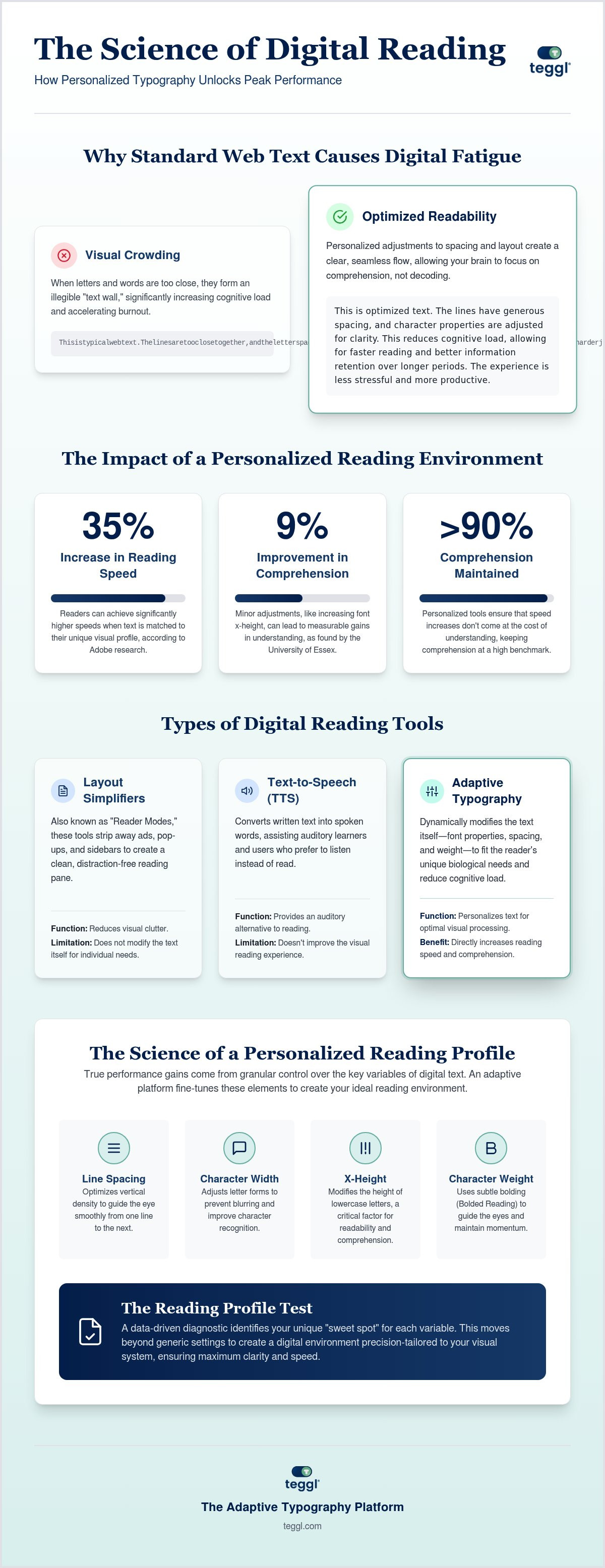
Visual crowding occurs when letters and words sit too close together, causing them to blur into an illegible "text wall." This phenomenon significantly increases cognitive load for modern professionals, leading to faster burnout. While designers often choose elegant fonts like Montserrat or Garamond, Adobe research suggests these standard choices affect age groups differently. There is no "perfect" font for everyone. Your colleague might find a serif font clear, while for you, it acts as a distraction that slows your progress. Understanding the readability of text requires moving past static design toward a personalized Reading Profile.
The Science of Visual Ergonomics and Cognitive Load
Research from the University of Leeds demonstrates that typographic layouts, specifically line length and spacing, dictate how efficiently we "search-read" through complex data. Small shifts in geometry have massive impacts. For instance, a study by the University of Essex found that increasing x-height from 4.2mm to 5.0mm improved comprehension by approximately 9%. When you integrate a browser tool for improved reading, you aren't just changing a font style. You are actively adjusting variables like character width and using digital reading rulers to reduce visual stress. These precise modifications create a seamless flow, allowing your brain to focus on high-level information processing rather than fighting a rigid interface. Establishing your unique profile is the first step toward reclaiming your digital focus.
Comparing Browser Tools for Improved Reading Performance
Selecting a browser tool for improved reading requires understanding how different technologies interact with your visual system. Tools generally fall into three categories. Text-to-Speech software like Read&Write assists auditory learners by converting text to sound. Layout simplifiers, often called Reader Modes, strip away ads and distractions to create a clean interface. Finally, adaptive typography platforms like Teggl modify the text itself to fit your biological needs. Many users try free extensions like OpenDyslexic, but a 2017 study in the Annals of Dyslexia found no measurable performance benefit for OpenDyslexic over standard Arial. True gains come from visual guidance. The debate between Bionic Reading and Bolded Reading also highlights the need for evidence. While both aim to guide the eye, Bolded Reading focuses on weight-based anchors that help maintain your place during rapid scrolling. You can explore the evidence behind these techniques in our guide to Reading Comprehension Tools in 2026: A Guide to Bionic and Bolded Reading.
Key Variables to Look for in a Reading Extension
Optimal performance stems from personalization rather than generic overlays. Adobe research reveals that readers can increase speed by up to 35% when text is matched to their unique visual profile, all while keeping comprehension above the 90% benchmark. It's essential to look for extensions that provide granular control over character weight, spacing, and contrast. These settings align with digital readability guidelines that focus on reducing ocular strain. A superior browser tool for improved reading uses a Reading Profile Test to pinpoint your specific needs. This data-driven approach replaces the "one-size-fits-all" model with a tailored environment. You can discover your optimal reading settings and begin experiencing a more fluid digital workflow today.
Teggl: Personalizing the Digital Reading Experience
Teggl operates as a sophisticated adaptive typography platform rather than a simple font overlay. By treating digital text as a dynamic interface, this browser tool for improved reading allows you to bypass the limitations of static web design. Central to this experience is the Reading Profile Test. This diagnostic identifies your unique "sweet spot" for character weight and spacing, ensuring your visual system isn't overtaxed by dense paragraphs or poor contrast.
The Bolded Reading mode serves as a primary driver for momentum during high-volume research. It uses subtle weight-based anchors to guide your gaze, preventing you from skipping lines or losing context as you move through complex data. For a deeper look at selecting the right configuration for your needs, see our Bolded Reading Modus: The 2026 Buyer’s Guide to Personalised Reading Tools.
How to Optimize Your Reading Workflow with Teggl
Integrating Teggl into your daily routine is a straightforward process designed for immediate impact. Follow these steps to transform your digital environment:
Step 1: Take the Reading Profile Test to establish your performance baseline and discover which typographical variables minimize your cognitive load.
Step 2: Activate Bolded Reading on text-heavy domains to maintain focus and bypass visual crowding during long research sessions.
Step 3: Adjust inter-line spacing and margins to align with the Leeds University legibility framework, ensuring your layout supports efficient search-reading.
By moving from generic settings to a data-driven profile, you turn your browser tool for improved reading into a powerful ally for productivity and visual comfort. You can begin tailoring your experience today by creating your first profile.
Reclaim Your Focus and Transform Your Digital Workflow
Digital reading doesn't have to be a constant source of cognitive fatigue. By understanding the mechanics of visual crowding and implementing personalized typography, you can transform your screen into a high-performance workspace. We've explored how a dedicated browser tool for improved reading moves beyond static web design, using evidence-based settings to reduce mental load. This technology is optimized for both neurotypical and neurodiverse readers, focusing on visual ergonomics to support your unique biological needs. Based on peer-reviewed research from Adobe and The Readability Consortium, these adjustments don't just change how text looks; they change how you process information. It's time to stop fighting your interface and start reading with momentum. Discover your optimal reading profile with the Teggl Browser Extension and experience the clarity of a tailored digital environment today.
Frequently Asked Questions
Can a personalized font really improve my reading speed by 35%?
Yes, peer-reviewed research from Adobe and The Readability Consortium shows that individuals read up to 35% faster when using a font format optimized for their specific visual system. This performance gain occurs without a loss in comprehension. Because no single font is universally best, finding your personal match through a browser tool for improved reading is essential for maximizing these speed benefits.
Does Dyslexie font or OpenDyslexic actually help with reading accuracy?
Independent studies, including a 2017 study in the Annals of Dyslexia, show no statistically significant improvement in reading accuracy or speed when using OpenDyslexic or Dyslexie font compared to standard fonts like Arial. While some users prefer the aesthetic of these weighted designs, empirical evidence suggests that performance is driven more by variables like x-height and spacing than by specialized letter shapes.
What is the difference between Bionic Reading and Teggl's Bolded Reading?
Bionic Reading typically applies a static bolding pattern to the beginning of words to guide the eye. In contrast, Teggl's Bolded Reading mode is part of a broader adaptive typography platform. It uses a Reading Profile Test to identify your specific "sweet spot" for character weight and spacing. This ensures the visual guidance is tailored to your unique cognitive load requirements rather than applying a one-size-fits-all overlay.
How do I find my optimal reading settings for different screen types?
You can identify your ideal configuration by taking a Reading Profile Test, which evaluates how different typographical variables affect your speed and focus. Your optimal settings may change based on screen quality or environmental light. A high-quality browser tool for improved reading allows you to save these profiles, making it easy to switch between settings that prioritize x-height for small displays or increased line spacing for large monitors.



Comments